EasyManua.ls Logo

Sony TRINITRON PVM-1443MD - Page 6

Sony TRINITRON PVM-1443MD
10 pages
Print Icon
To Next Page IconTo Next Page
To Previous Page IconTo Previous Page
Loading...
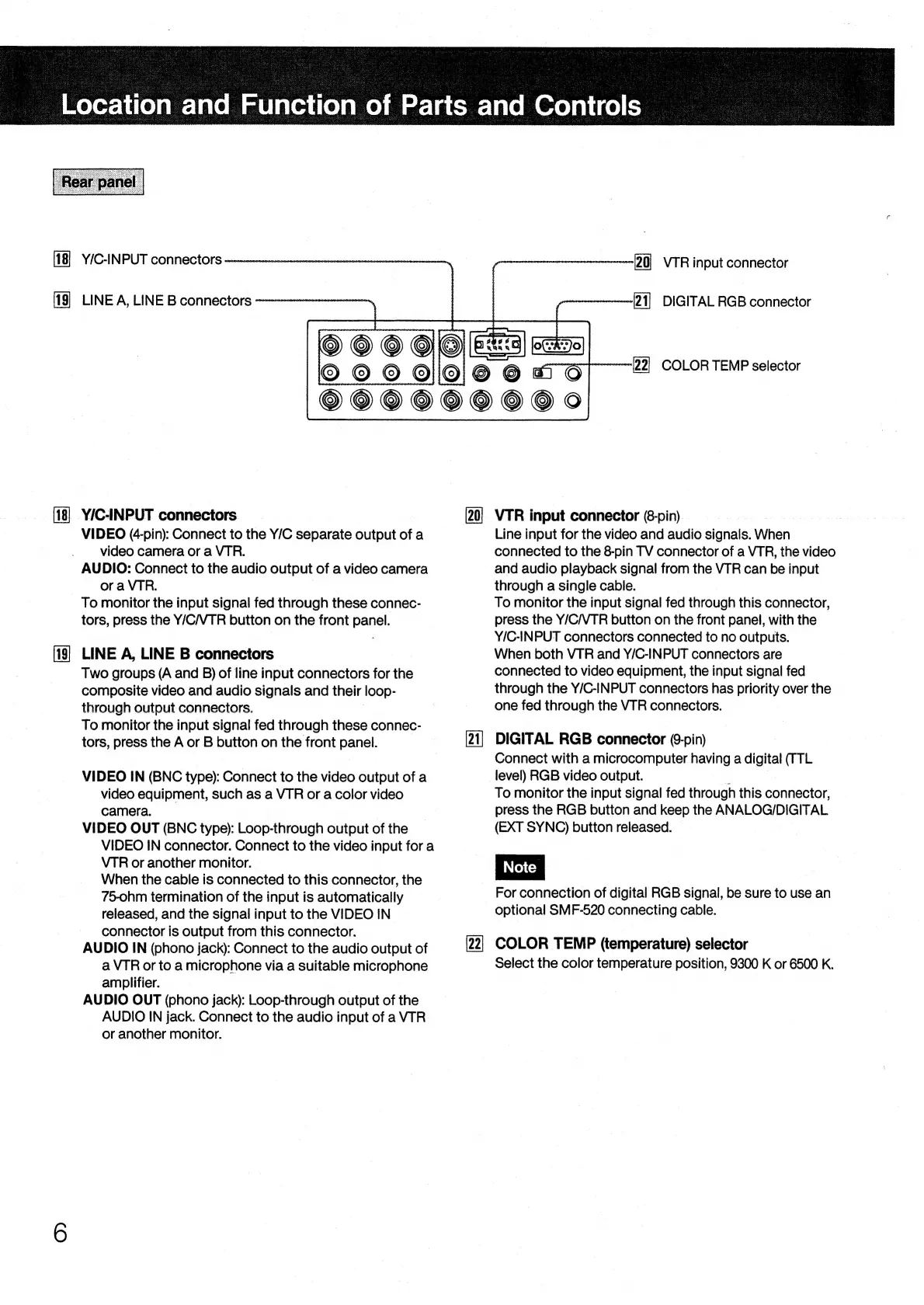
LINE
A,
LINE
B
connectors
rn
YIC-INPUT
connectors
VIDEO
(4-pin):
Connect
to
the
Y/C
separate
output
of
a
video
camera
or
a
VTR.
AUDIO:
Connect
to
the
audio
output
of
a
video
camera
ora
VTR.
To
monitor
the
input
signal
fed
through
these
connec-
tors,
press
the
Y/C/VTR
button
on
the
front
panel.
LINE
A,
LINE
B
connectors
Two
groups
(A
and
B)
of
line
input
connectors
for
the
composite
video
and
audio
signals
and
their
loop-
through
output
connectors.
|
To
monitor
the
input
signal
fed
through
these
connec-
tors,
press
the
A
or
B
button
on
the
front
panel.
VIDEO
IN
(BNC
type):
Connect
to
the
video
output
of
a
video
equipment,
such
as
a
VTR
or
a
color
video
camera.
VIDEO
OUT
(BNC
type):
Loop-through
output
of
the
VIDEO
IN
connector.
Connect
to
the
video
input
for
a
VTR
or
another
monitor.
When
the
cable
is
connected
to
this
connector,
the
75-ohm
termination
of
the
input
is
automatically
released,
and
the
signal
input
to
the
VIDEO
IN
connector
is
output
from
this
connector.
AUDIO
IN
(phono
jack):
Connect
to
the
audio
output
of
a
VTR
or
to
a
microphone
via
a
suitable
microphone
amplifier.
AUDIO
OUT
(phono
jack):
Loop-through
output
of
the
AUDIO
IN
jack.
Connect
to
the
audio
input
of
a
VTR
or
another
monitor.
~n—-eeeenl9
0)
VTR
input
connector
weeweerernenenees|)
{]
DIGITAL
RGB
connector
wtaoeonenenee|91
COLOR
TEMP
selector
VTR
input
connector
(8-pin)
Line
input
for
the
video
and
audio
signals.
When
connected
to
the
8-pin
TV
connector
of
a
VTR,
the
video
and
audio
playback
signal
from
the
VTR
can
be
input
through
a
single
cable.
To
monitor
the
input
signal
fed
through
this
connector,
press
the
Y/C/VTR
button
on
the
front
panel,
with
the
Y/IC-INPUT
connectors
connected
to
no
outputs.
When
both
VTR
and
Y/C-INPUT
connectors
are
connected
to
video
equipment,
the
input
signal
fed
through
the
Y/C-INPUT
connectors
has
priority
over
the
one
fed
through
the
VTR
connectors.
DIGITAL
RGB
connector
(9-pin)
Connect
with
a
microcomputer
having
a
digital
(TTL
level)
RGB
video
output.
7
To
monitor
the
input
signal
fed
through
this
connector,
press
the
RGB
button
and
keep
the
ANALOG/DIGITAL
(EXT
SYNC)
button
released.
For
connection
of
digital
RGB
signal,
be
sure
to
use
an
optional
SMF-520
connecting
cable.
COLOR
TEMP
(temperature)
selector
Select
the
color
temperature
position,
9300
K
or
6500
K.

Related product manuals