EasyManua.ls Logo

Sony Trinitron PVM-1954Q - Location and Function of Controls; Front Panel Overview

Sony Trinitron PVM-1954Q
23 pages
Print Icon
To Next Page IconTo Next Page
To Previous Page IconTo Previous Page
Loading...
Location
and
function
of
parts
and
controls
Front
panel
[l
j
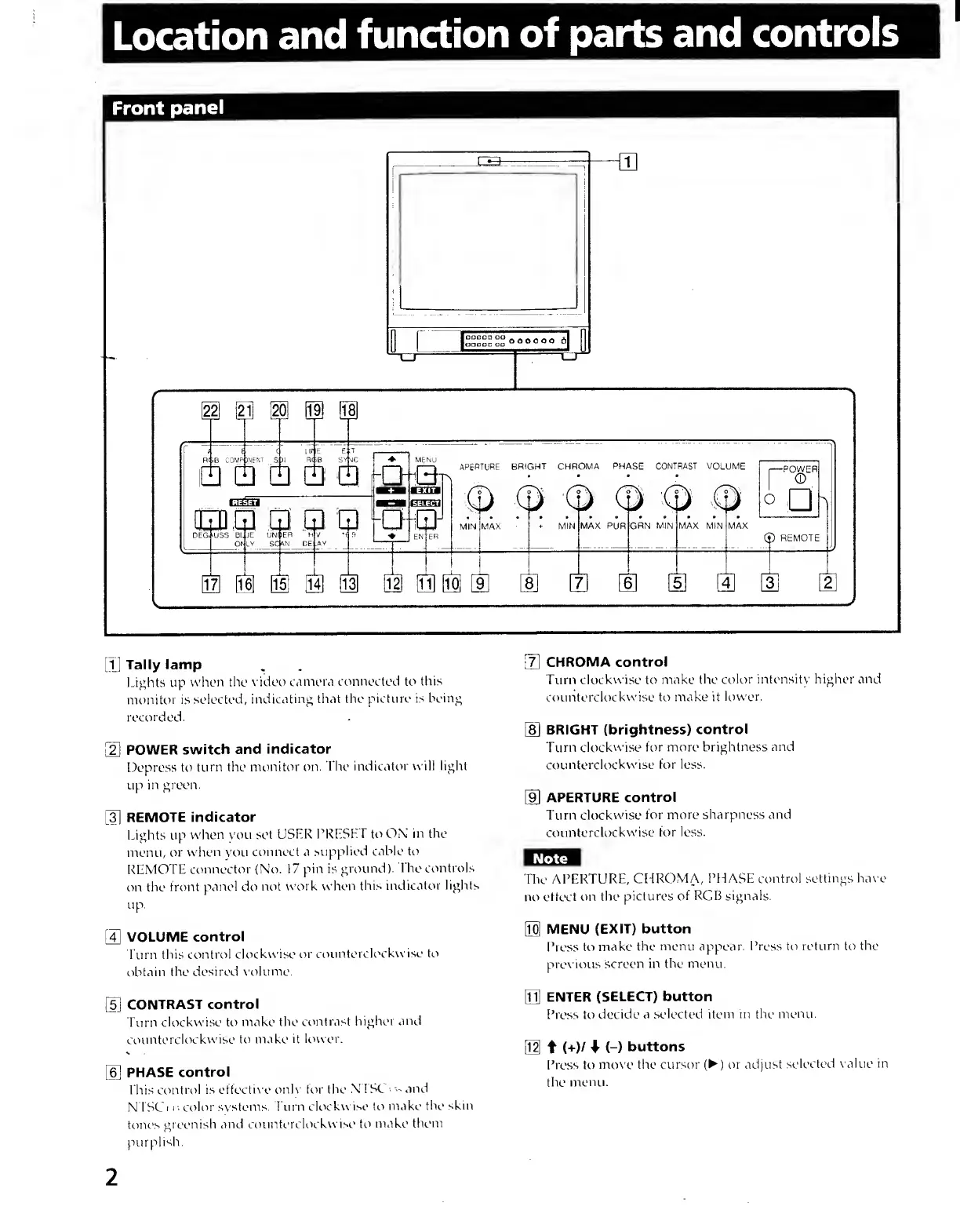
Tally
lamp
Lights up
when
the \'idee
camera
crmnected to this
monitor is
selected,
indicating tliat
the picture is
being
recorded.
POWER
switch and
indicator
Depress to
turn the
monitor on.
The
indicator will light
up
in green.
[3]
REMOTE
indicator
Lights up
when you set
LiSLR
PRLSHL to ON
in the
menu,
or
when
you
connect a
supplied cable to
REMOTE
connector (No.
17
pin is
ground).
I he controls
on the
front
panel
do
not
work when
this
indicator lights
up.
[4]
VOLUME
control
Eurn this
control
clockwise or
counterck'ckwise to
obtain
the desireci
x'olume.
[5]
CONTRAST
control
Turn
clockwise to
make the
contrast
higher
and
counterclockwise
to make
it lower.
PHASE
control
t his
control is
effectix
e
only for the
N 1 Sk
;
and
N
ISCi r. color
systems, burn
clockwise to
make
the skin
tones
greenish
and countercUx
kw ise to
make
them
purplish.
[
7
]
CHROMA control
Turn
clockwise
to
make the
color intensity higher
and
counterclockwise to make it
lower.
[
8
]
BRIGHT (brightness)
control
Turn clockwise
for more brightness
and
counterclockwise
for less.
[9]
APERTURE
control
Turn clockwise
for
more sharpness and
counterclockwise
for
less.
The
APERTURE,
CHROMA, PHASE control
settings haye
no
effect on
the pictures
of RGB signals.
m
MENU
(EXIT) button
Press to
make the
menu
appear.
Press to
return
to
the
prev ious
screen in
the
menu.
M
ENTER
(SELECT) button
Press to
decide a
selected item in the
menu.
Bl
f
(+)/
(-)
buttons
Press to
move the cursor
()
or
adjust
selected
value in
the
menu.
2

Related product manuals