EasyManua.ls Logo

Sony Trinitron PVM-9041QM - Location and Function of Parts and Controls; Front Panel Controls (PVM-9044 QM;9041 QM)

Sony Trinitron PVM-9041QM
10 pages
Print Icon
To Next Page IconTo Next Page
To Previous Page IconTo Previous Page
Loading...
Location
and
Function
of
Parts
and
Controls
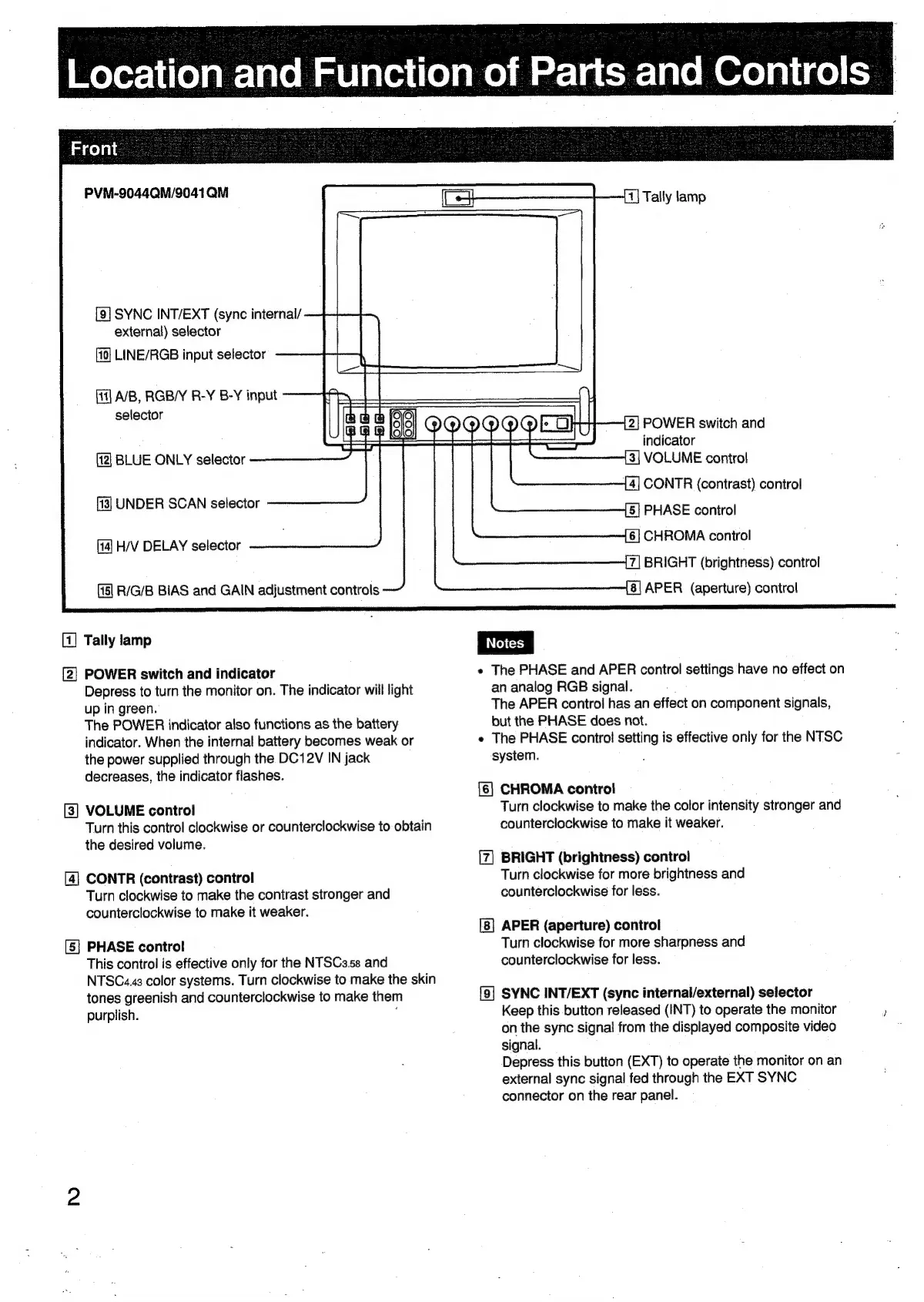
PVM-9044QM/9041QM
[9]
SYNC
INT/EXT
(sync
internal/
external)
selector
LINE/RGB
input
selector
A/B,
RGB/Y
R-Y
B-Y
input
selector
BLUE
ONLY
selector
UNDER
SCAN
selector
H/V
DELAY
selector
R/G/B
BIAS
and
GAIN
adjustment
controls
[1]
Tally
lamp
[2]
POWER
switch
and
indicator
Depress
to
turn
the
monitor
on.
The
indicator
will
light
up
in
green.
The
POWER
indicator
also
functions
as
the
battery
indicator.
When
the
internal
battery
becomes
weak
or
the
power
supplied
through
the
DC12V
IN
jack
decreases,
the
indicator
flashes.
[3]
VOLUME
control
Turn
this
control
clockwise
or
counterclockwise
to
obtain
the
desired
volume.
[4]
CONTR
(contrast)
control
Turn
clockwise
to
make
the
conirast
stronger
and
counterclockwise
to
make
it
weaker.
[5]
PHASE
control
This
control
is
effective
only
for
the
NTSCa.ss
and
NTSC«.43
color
systems.
Turn
clockwise
to
make
the
skin
tones
greenish
and
counterclockwise
to
make
them
purplish.
Tally
lamp
2|
POWER
switch
and
indicator
[3|
VOLUME
control
4|
CONTR
(contrast)
control
5]
PHASE
control
[6]
CHROMA
conirol
7|
BRIGHT
(brightness)
contro!
8]
APER
(aperture)
control
e
The
PHASE
and
APER
control
settings
have
no
effect
on
an
analog
RGB
signal.
The
APER
control
has
an
effect
on
component
signals,
but
the
PHASE
does
not.
e
The
PHASE
control
setting
is
effective
only
for
the
NTSC
system.
[6]
CHROMA
control
Turn
clockwise
to
make
the
color
intensity
stronger
and
counterclockwise
to
make
it
weaker.
BRIGHT
(brightness)
control
Turn
clockwise
for
more
brightness
and
counterclockwise
for
less.
APER
(aperture)
control
Turn
clockwise
for
more
sharpness
and
counterclockwise
for
less.
[9]
SYNC
INT/EXT
(sync
internal/external)
selector
Keep
this
button
released
(INT)
to
operate
the
monitor
)
on
the
sync
signal
from
the
displayed
composite
video
signal.
Depress
this
button
(EXT)
to
operate
the
monitor
on an
external
sync
signal
fed
through
the
EXT
SYNC
connector
on
the
rear
panel.

Related product manuals