EasyManua.ls Logo

Sony Trinitron PVM-9041QM - Power Sources; House Current; Rechargeable Battery

Sony Trinitron PVM-9041QM
10 pages
Print Icon
To Next Page IconTo Next Page
To Previous Page IconTo Previous Page
Loading...
Power
Sources
House
Current
(for-all
models)
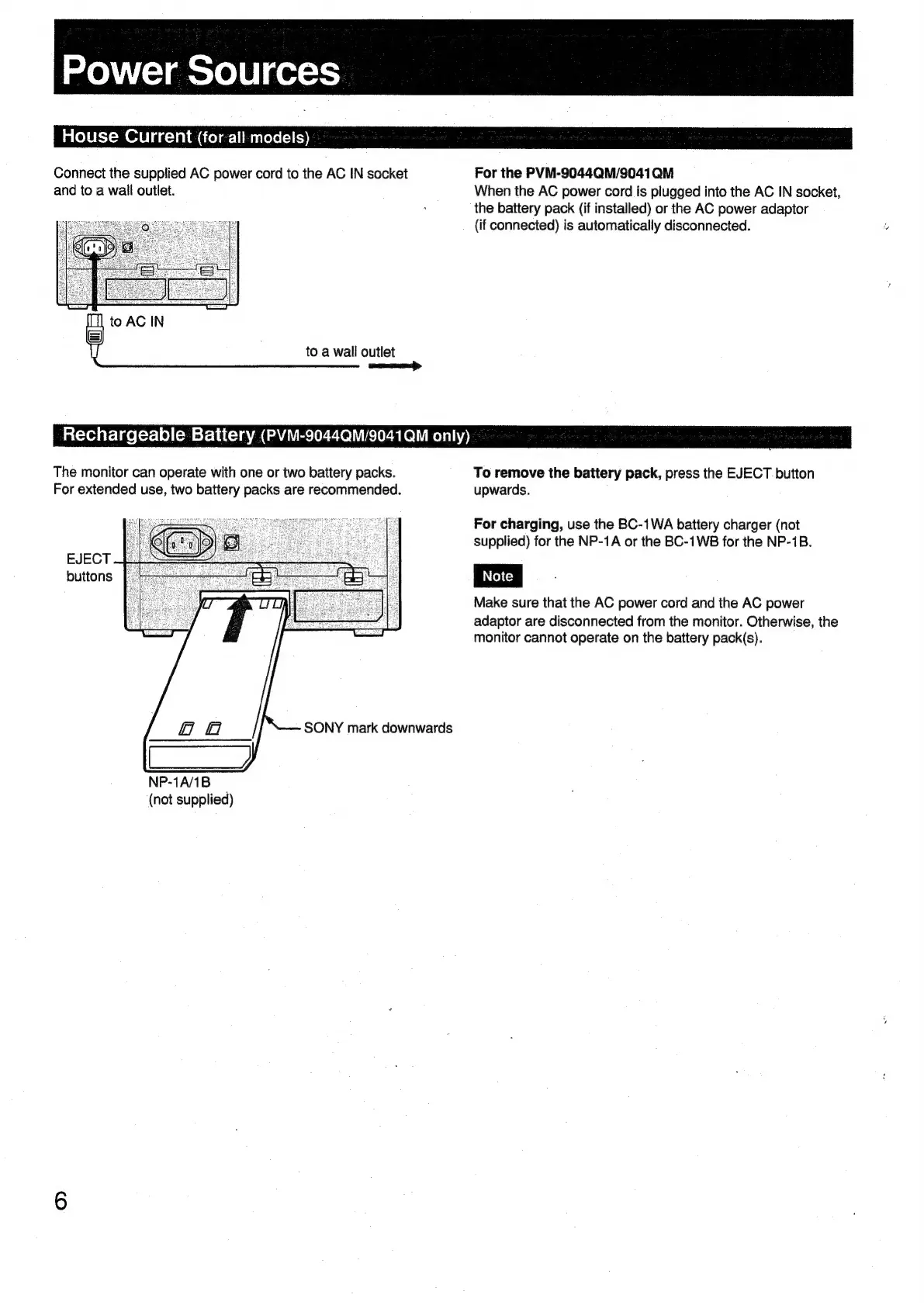
Connect
the
supplied
AC
power
cord
to
the
AC
IN
socket
For
the
PVM-9044QM/9041QM
and
to
a
wail
outlet.
When
the
AC
power
cord
is
plugged
into
the
AC
IN
socket,
.
the
battery
pack
(if
installed)
or
the
AC
power
adaptor
(if
connected)
is
automatically
disconnected.
[|
to
AC
IN
|
to
a
wall
outlet
Rechargeable
Battery
(PVM-9044QM/9041QM
only)
The
monitor
can
operate
with
one
or
two
battery
packs.
To
remove
the
battery
pack,
press
the
EJECT
button
For
extended
use,
two
battery
packs
are
recommended.
upwards.
For
charging,
use
the
BC-1WA
battery
charger
(not
supplied)
for
the
NP-1A
or
the
BC-1WB
for
the
NP-1B.
Make
sure
that
the
AC
power
cord
and
the
AC
power
adaptor
are
disconnected
from
the
monitor.
Otherwise,
the
monitor
cannot
operate
on
the
battery
pack(s).
EJECT
buttons
SONY
mark
downwards
NP-1A/1B
(not
supplied)

Related product manuals