EasyManua.ls Logo

Sony Trinitron PVM-9041QM - Rear Panel Connectors and Controls (PVM-9040 ME)

Sony Trinitron PVM-9041QM
10 pages
Print Icon
To Next Page IconTo Next Page
To Previous Page IconTo Previous Page
Loading...
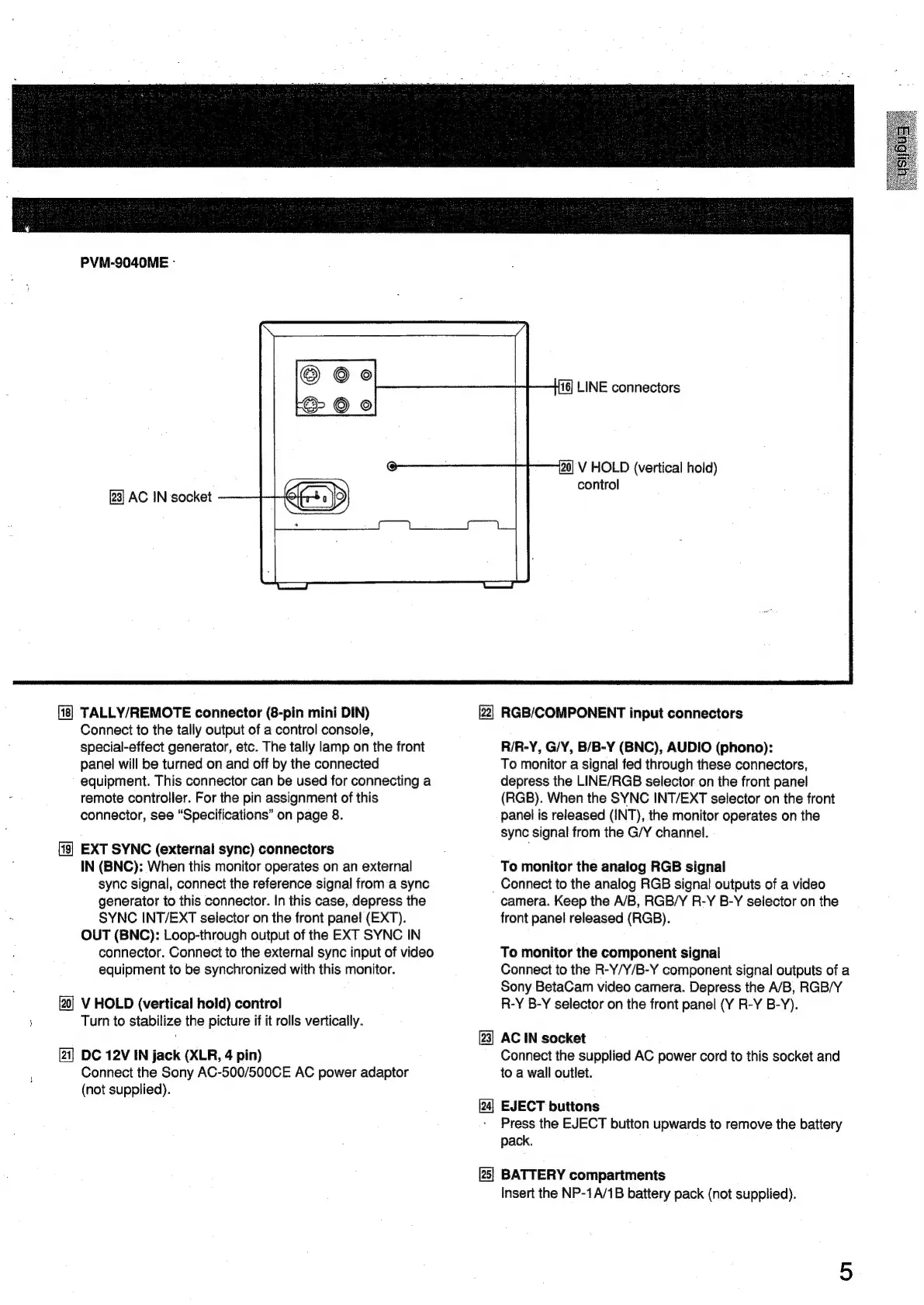
PVM-S040ME
-
[23]
AC
IN
socket
TALLY/REMOTE
connector
(8-pin
mini
DIN)
Connect
to
the
tally
output
of
a
control
console,
special-effect
generator,
etc.
The
tally
lamp
on
the
front
panei
will
be
turned
on
and
off
by
the
connected
equipment.
This
connector
can
be
used
for
connecting
a
remote
controller.
For
the
pin
assignment
of
this
connector,
see
“Specifications”
on
page
8.
EXT
SYNC
(external
sync)
connectors
IN
(BNC):
When
this
monitor
operates
on an
external
sync
signal,
connect
the
reference
signal
from
a
sync
generator
to
this
connector.
In
this
case,
depress
the
SYNC
INT/EXT
selector
on
the
front
panel
(EXT).
OUT
(BNC):
Loop-through
output
of
the
EXT
SYNC
IN
connector.
Connect
to
the
external
sync
input
of
video
equipment
to
be
synchronized
with
this
monitor.
V
HOLD
(vertical
hold)
control
Turn
to
stabilize
the
picture
if it
rolls
vertically.
[21]
DC
12V
IN
jack
(XLR,
4
pin)
Connect
the
Sony
AC-500/500CE
AC
power
adaptor
(not
supplied).
16]
LINE
connectors
20]
V
HOLD
(vertical
hold)
control
22]
RGB/COMPONENT
input
connectors
R/R-Y,
G/Y,
B/B-Y
(BNC),
AUDIO
(phono):
To
monitor
a
signal
fed
through
these
connectors,
depress
the
LINE/RGB
selector
on
the
front
panel
(RGB).
When
the
SYNC
INT/EXT
selector
on
the
front
panel
is
released
(INT),
the
monitor
operates
on
the
sync
signal
from
the
G/Y
channel.
To
monitor
the
analog
RGB
signal
_
Connect
to
the
analog
RGB
signal
outputs
of
a
video
camera.
Keep
the
A/B,
RGB/Y
R-Y
B-Y
selector
on
the
front
panel
released
(RGB).
To
monitor
the
component
signal
Connect
to
the
R-Y/Y/B-Y
component
signal
outputs
of
a
Sony
BetaCam
video
camera.
Depress
the
A/B,
RGB/Y
R-Y
B-Y
selector
on
the
front
panel
(Y
R-Y
B-Y).
[23]
AC
IN
socket
Connect
the
supplied
AC
power
cord
to
this
socket
and
to
a
wall
outlet.
EJECT
buttons
Press
the
EJECT
button
upwards
to
remove
the
battery
pack.
[25]
BATTERY
compartments
Insert
the
NP-1A/1B
battery
pack
(not
supplied).

Related product manuals