USB DAC AMPLIFIER
UDA-1
Connecting speakers
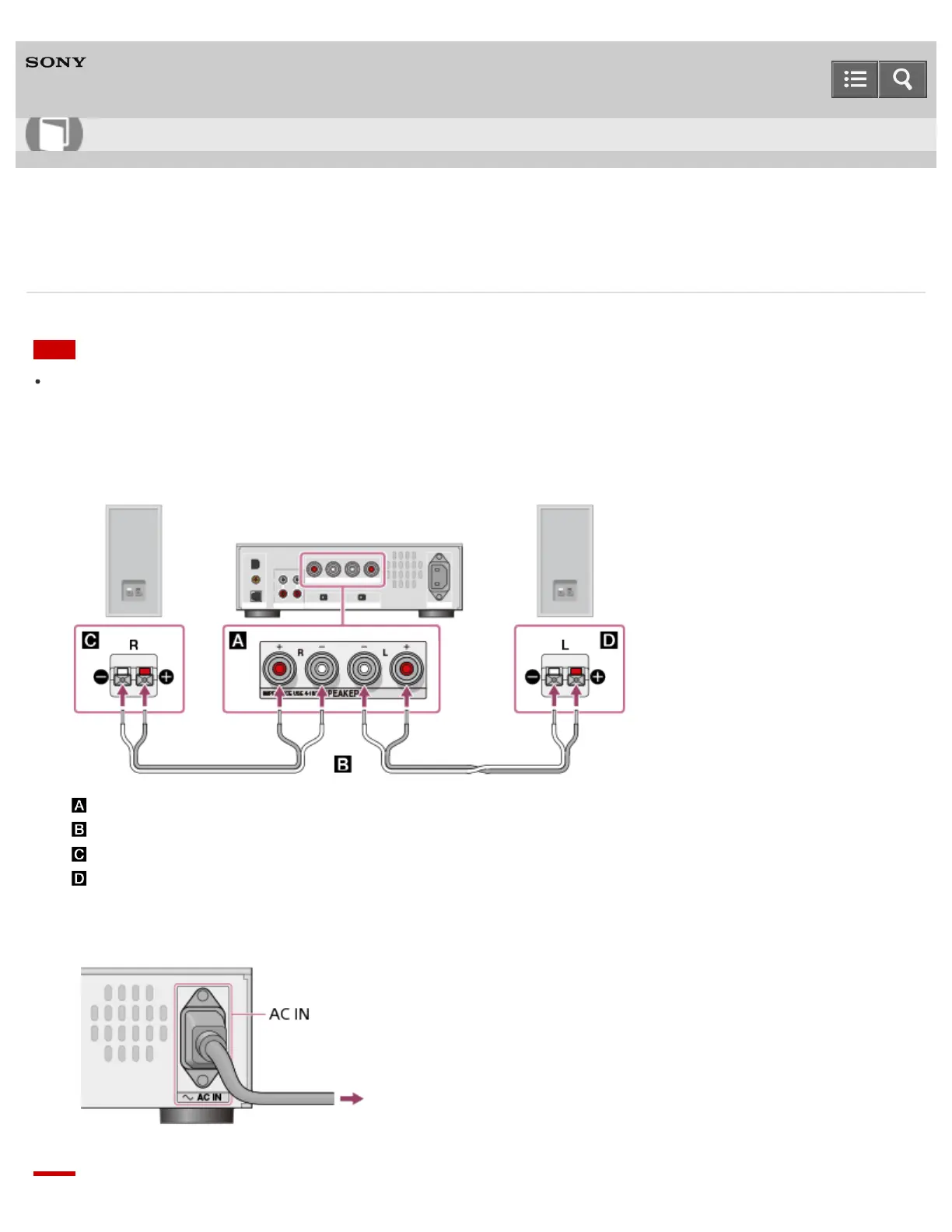
Connect speakers to the USB DAC AMPLIFIER, then connect the supplied AC power cord (mains lead).
Note
Make sure that the AC power cord (mains lead) of the USB DAC AMPLIFIER is unplugged when
connecting any other cord.
1. Connect speakers to the SPEAKERS terminals on the rear panel of the USB DAC AMPLIFIER as shown
in the illustration below.
: SPEAKERS terminals
: Speaker cords (not supplied)
: Speaker (R)
: Speaker (L)
2. Firmly connect the supplied AC power cord (mains lead) to the AC IN jack on the rear panel of the
USB DAC AMPLIFIER, then connect the plug to a wall outlet (mains).
Help Guide
How to Use



 To Next Page