11
Features / Location and Function of Parts and Controls
Introduction
Introduction
Features
The UP-DR80MD Digital Color Printer is a dye
sublimation thermal transfer printer providing high quality
and high resolution printing of computer image data on A4
or letter size paper in full color (256 gradations process
and 16.7 million colors). It prints images by pressing a
thermal head, heated according to the input image data,
against a dedicated ink ribbon coated with sublimation ink,
transferring the ink onto special thermal printing paper.
System Configuration
Location and Function of
Parts and Controls
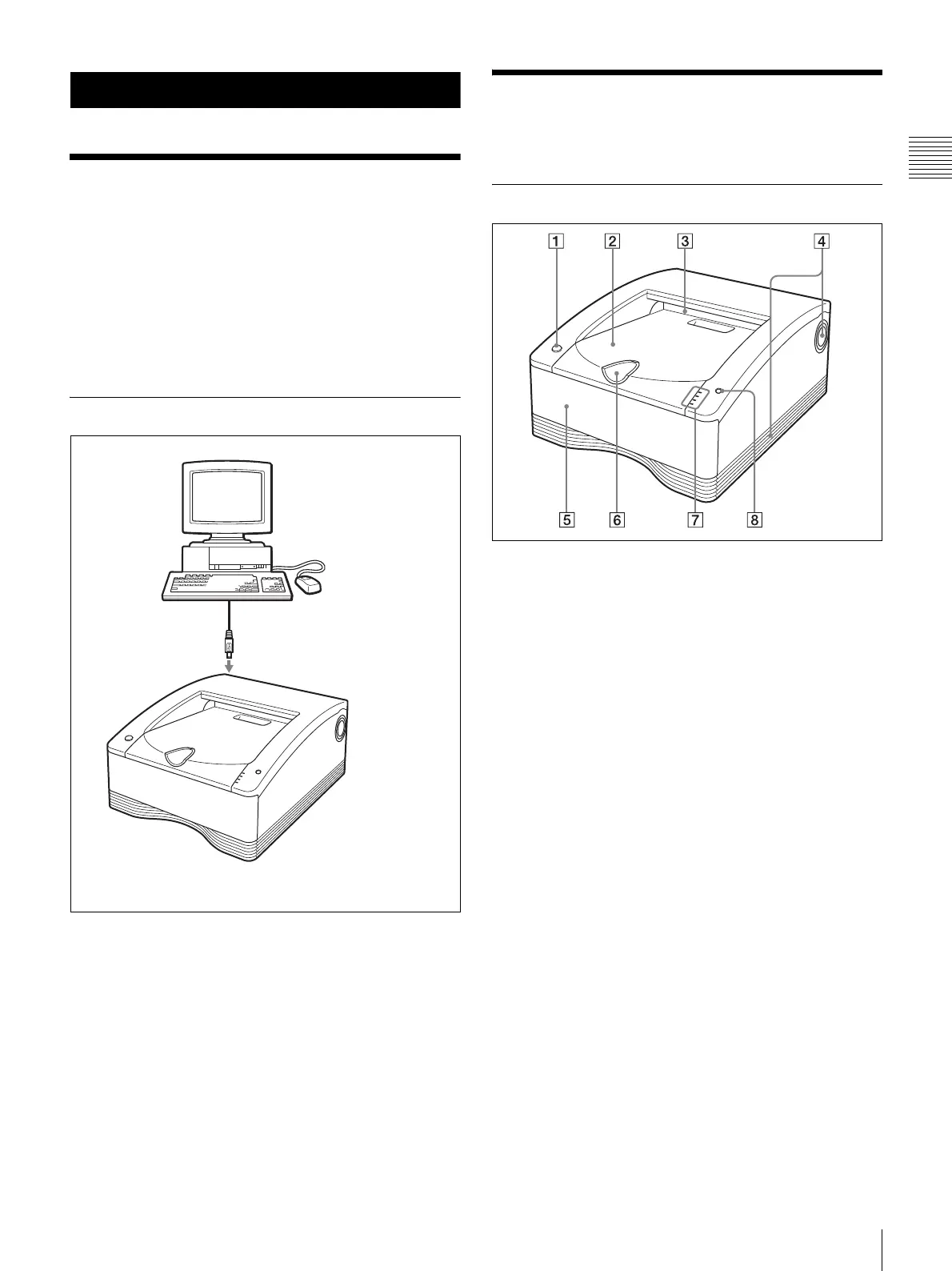
Front
A 1 On/standby switch/indicator
When this switch is pressed, the indicator lights, and
the printer enters the ready state. When it is pressed
again, the indicator flashes and then goes out, and the
printer enters the standby state.
B Paper cover
Printouts stack here.
C Paper outlet
Printouts are ejected here.
D Vent openings
E Media tray (page 16)
The ink ribbon and paper are loaded here.
F Stopper (page 20)
Flip this stopper up in order to prevent the ejected
printouts from falling.
UP-DR80MD Digital Color Printer
Computer
Controls the printer
operations.
USB cable



 To Next Page