EasyManua.ls Logo

Sony URXP2/3032 - Page 2

Sony URXP2/3032
2 pages
Print Icon
To Previous Page IconTo Previous Page

Loading...
2/17/2011
2
AF RF BATT
AF RF BATT
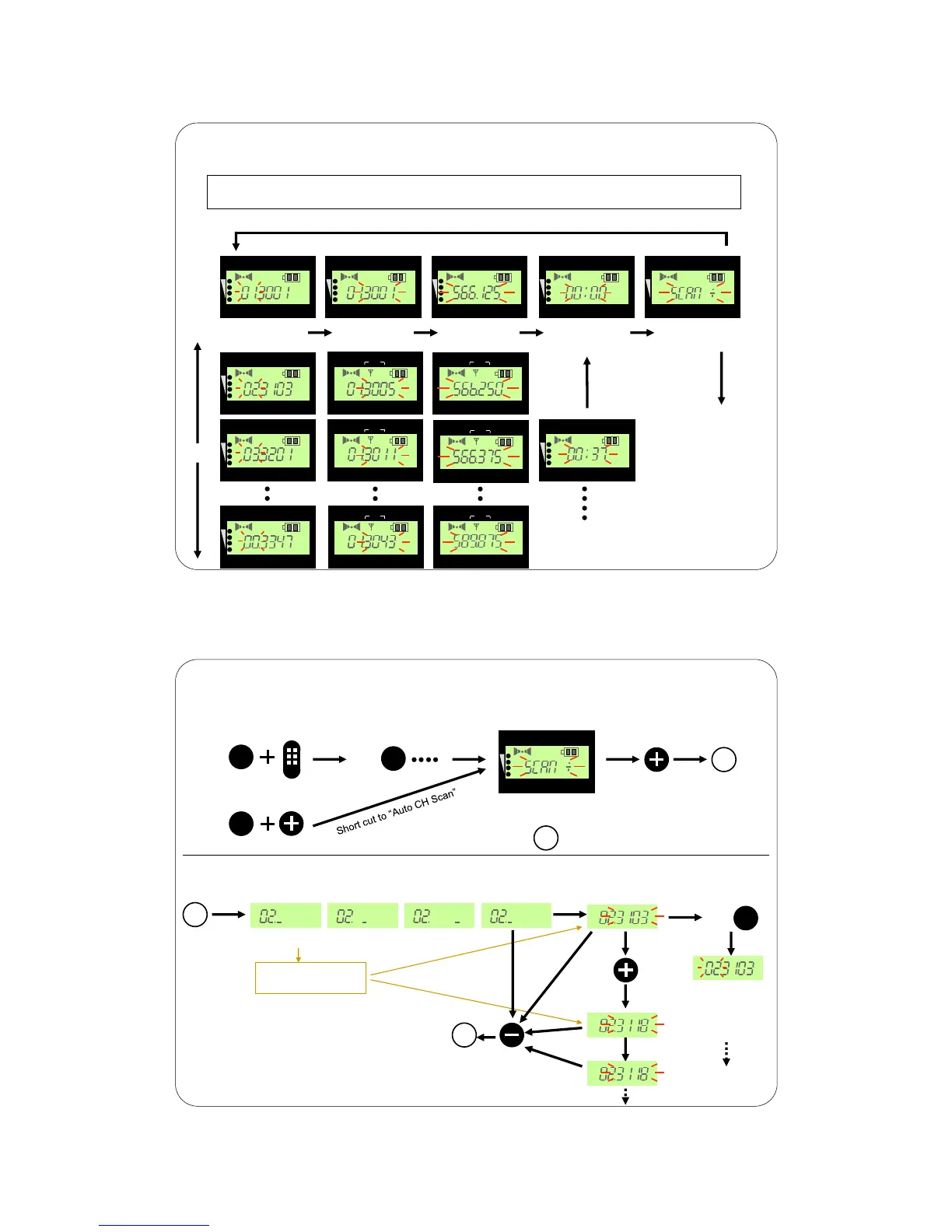
Press the SET” button to change the next menu
Press the “SET” button until the menu is blinking or turn the “POWER” switch on
while pressing the “SET” button to enter set up mode.
Press the + ” button
Press the - ” button
AF RF BATT
Reception
“Group”
Accumulated
“Battery use time”
AF RF BATT
Reception
“Frequency”
AF RF BATT
AF RF BATT
Reception
“Channel
AF RF BATT
“Auto channel
scan” menu
Press the -
button to reset to
“00:00”
AF RF BATT
L
AF RF BATT
L
AF RF BATT
L
AF RF BATT
L
AF RF BATT
L
AF RF BATT
L
Press +” button
AF RF BATT
AF RF BATT
URX-P2 Portable Receiver / Set-up Menu
Continued on
Next Page
URX-P2 Portable Receiver Auto Channel Scan
“Auto channel
scan” menu
AF RF BATT
SET
POWER
ON
OFF
SET
SET
1
1
Search clear channels within selected GP
All clear channels are stored
as result of search.
3103 3118 3137
3140 3146
The lowest
clear channel
blinks
Press “SET” button
several times
SET
Press “SET”
button to fix
the channel
The “GP” blinks
as a part of set-
up menu. (The
channel has already
been fixed.)
Press “+” button to
activate scan.
Ex)
(Set up menu)
Cancel
a
a
Press “-” button to
cancel the process
and return to Ch
scan menu (a) .

Related product manuals