6
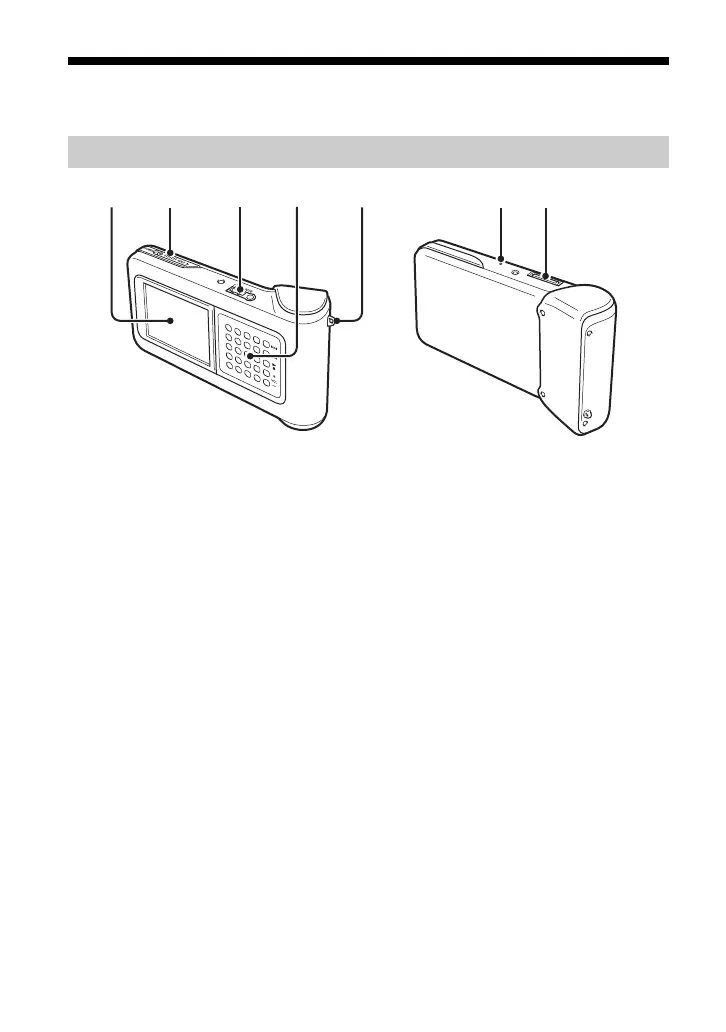
Names of parts
Portable music player
1 Display (page 9)
2 POWER/HOLD switch
When you slide this control in the arrow direction, operation of the player is disabled.
3 Headphone connector (page 15)
4 G-sense pad (page 10)
5 Carrying strap ring
6 Reset button
If the player has ceased to operate normally, try pressing this button with a pointed object (such
as a bent paper clip). The player's display turns white, and the settings such as G-sense
sensitivity, language, and clock are returned to the factory default values. It takes several tens of
seconds for the player to finish resetting.
7 Cradle connector




 To Next Page