Introduction
7
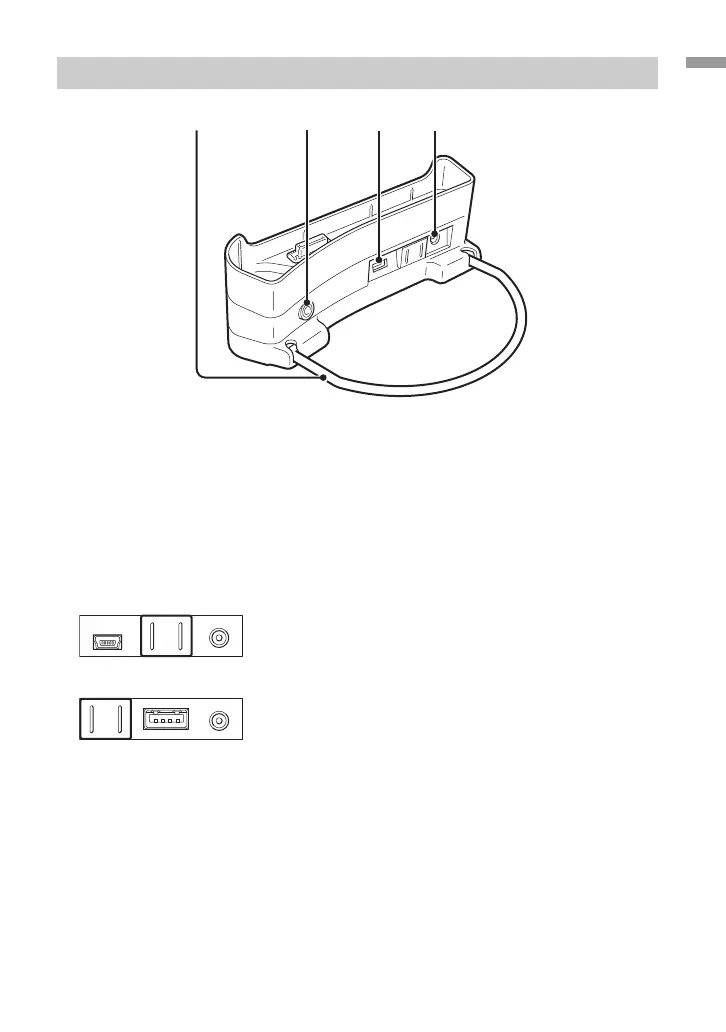
Cradle
1 Support bracket
Supports the cradle when in use. When the cradle is not in use, the bracket can be folded.
2 LINE OUT connector
Lets you connect external speakers to the player. When a cable is plugged in here, the
headphone output is cut off.
To use the LINE OUT connector, disconnect the USB cable from the cradle. While a USB cable
is plugged in, the player automatically is in Data Transfer Mode and no sound will be heard
from the external speakers.
3 USB ports
Left side: Mini-B connector (for connecting the player to a computer)
Right side: Type A connector (for connecting the player to a digital camera)
4 DC IN connector




 To Next Page