8
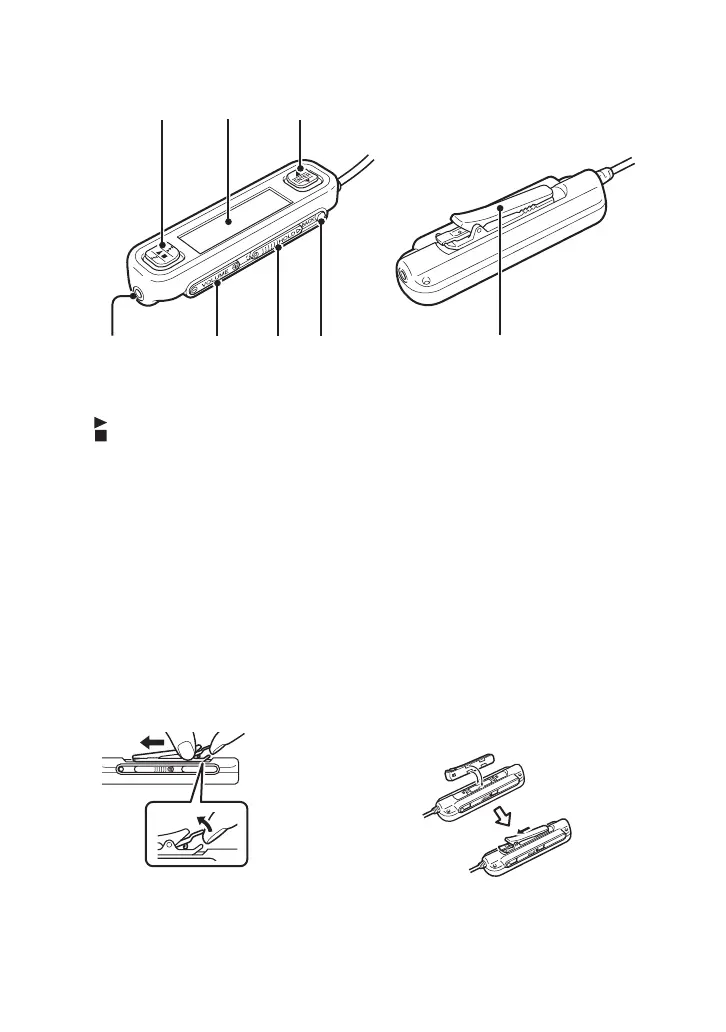
Remote control
1 Basic operation button
: Play/Stop
. : Rewind/Skip back
> : Fast forward/Skip ahead
2 Display
3 Selector button
v : Scroll cursor up
ENTER: Select item on menu
V : Scroll cursor down
4 Headphone connector
5 Volume button
6 Hold switch
Sliding this switch in the direction of the
arrow until the yellow marker is visible
disables the remote control.
7 BACK button
Moves up one menu level.
8 Clip
Using the remote control clip
To make it easy to fasten the remote control anywhere and still keep the display oriented for easy
viewing, the clip can be reversed.
1 Remove the clip.
2 Reattach it in the opposite
direction.
4567 8





 To Next Page