EasyManua.ls Logo

Sony VO-5800PS - Troubleshooting Guide; Moisture and Function Issues; Cassette and Tape Running Problems; Recording;Playback and Picture Issues

Sony VO-5800PS
28 pages
Print Icon
To Previous Page IconTo Previous Page
Loading...
>
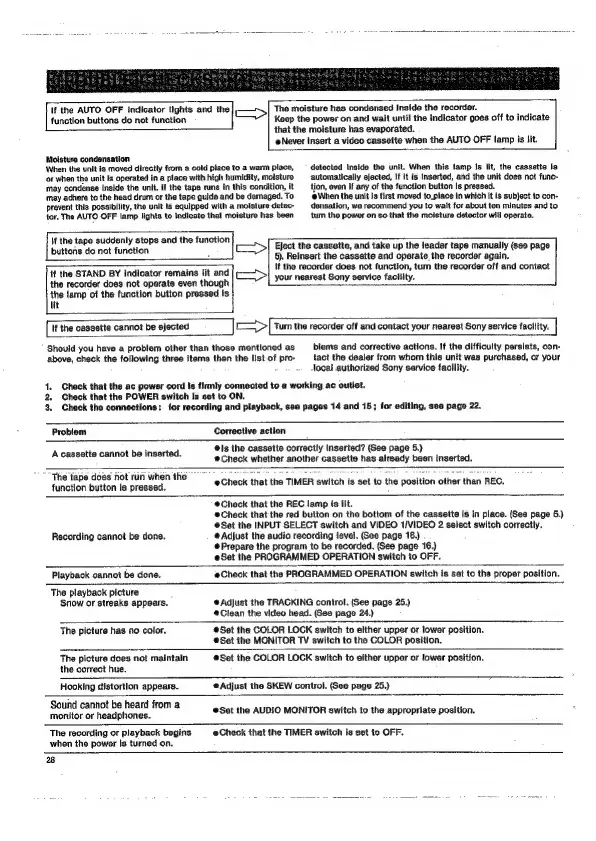
The
moisture
has
condensed
Inside
the
recorder.
Keep
the
power
on
and
wait
until
the
indicator
goes
off
to
indicate
that
the
moisture
has
evaporated.
If
the
AUTO
OFF
Indicator
lights
and
the
function
buttons
do
not
function
eNever
insert
a
video
casseite
when
the
AUTO
OFF
lamp
is
lit.
Moisture
condensation
When
the
unlt
is
moved
directly
from
a
cold
place
to
a
warm
place,
or
when
the
unit
is
operated
in
a
place
with
high
humidity,
moisture
may
condense
Inside
the
unit.
If
the
tape
runs
in
this
condition,
it
may
adhere
to
the
head
drum
or
the
tape
guide
and
bs
damaged.
To
prevent
this
possibility,
the
unit
Is
equipped
with
a
moisture
detec-
tor.
The
AUTO
OFF
lamp
lights
to
Indicate
that
moisture
has
been
detected
Inside
the
unit.
When
this
lamp
Is
lit,
the
cassette
is
automatically
ejected,
if it
is
Inserted,
and
the
unit
does
not
func-
tion,
even
if
any
of
the
function
button
Is
pressed.
When
the
unit
is
first
moved
to_place
in
which
It
is
subject
to
con-
densation,
wa
recommend
you
to
walt
for
about
ten
minutes
and
to
tum
the
power
on so
that
the
moisture
detector
will
operate.
buttons
do
not
function
If
the
tape
suddgnly
stops
and
the
function
>
Eject
the
cassette,
and
take
up
the
leader
tape
manually
(see
page
6).
Reinsert
the
cassette
and
operate
the
recorder
again.
if
the
recorder
does
not
function,
turn
the
recorder
off
and
contact
Ut
If
the
STAND
BY
indicator
remains
lit
and
=>
the
recorder
does
not
operate
even
though
your
nearest
Sony
service
facility.
the
{amp
of
the
function
button
pressed
Is
If
the
cassette
cannot
be
ejected
=>
[Tum
the
recorder
off
and
contact
your
nearest
Sony
service
facitty.
|
Should
you
have
a
problem
other
than
those
mentloned
as
above,
check
the
following
three
Items
then
the
Ilst
of
pro-
blems
and
corrective
actions.
If
the
difficulty
persists,
con-
tact
the
dealer
from
whom
this
unit
was
purchased,
or
your
-locat
authorized
Sony
service
facility.
1.
Check
that
the
ac
power
cord
is
firmly
connected
to
a
working
ac
outlet.
2.
Check
that
the
POWER
switch
is
set
to
ON.
3.
Check
the
connections:
for
recording
and
playback,
see
pages
14
and
15;
for
editing,
see
page
22.
Problem
A
cassette
cannot
be
inserted.
Corrective
action
Is
the
cassette
correctly
Inserted?
(See
page
5.)
(Check
whether
another
cassette
has
already
been
inserted.
“'
"The
tape
does
fot
run
when
the
function
button
is
pressed.
Check
that
the
TIMER
switch
is
set
to
the
position
other
than
REC.
Recording
cannot
be
done.
@Chack
that
the
REC
lamp
is
lit.
Check
that
the
red
button
on
the
bottom
of
the
cassette
is in
place.
(See
page
5.)
@Set
the
INPUT
SELECT
switch
and
VIDEO
1/VIDEO
2
select
switch
correctly.
@
Adjust
the
audio
recording
level.
(See
page
16.)
®Prepare
the
program
to
be
recorded.
(See
page
16.)
Set
the
PROGRAMMED
OPERATION
switch
to
OFF.
Playback
cannot
be
done.
@Check
that
the
PROGRAMMED
OPERATION
switch
is
set
to
the
proper
position.
The
playback
picture
Snow
or
streaks
appears.
@
Adjust
the
TRACKING
control.
(See
page
25.)
®Clean
the
video
head.
(See
page
24.)
7
The
picture
has
no
color,
Set
the
COLOR
LOCK
switch
to
either
upper
or
lower
position.
@Set
the
MONITOR
TV
switch
to
the
COLOR
position.
The
picture
does
not
maintain
the
correct
hue.
®@Set
the
COLOR
LOCK
switch
to
either
upper
or
lower
position.
Hooking
distortion
appears.
@Adjust
the
SKEW
control.
(See
page
25.)
Sound
cannot
be
heard
from
a
monitor
or
headphones.
@Set
the
AUDIO
MONITOR
switch
to
the
appropriate
position.
The
recording
or
playback
begins
when
the
power
Is
turned
on.
eCheck
that
the
TIMER
switch
Is
set
to
OFF.
28

Related product manuals