EasyManua.ls Logo

Sony VO-5800PS - Front Panel Controls: Power and Tape Tension; Power and Timer Switches; Tape Tension Adjustment

Sony VO-5800PS
28 pages
Print Icon
To Next Page IconTo Next Page
To Previous Page IconTo Previous Page
Loading...
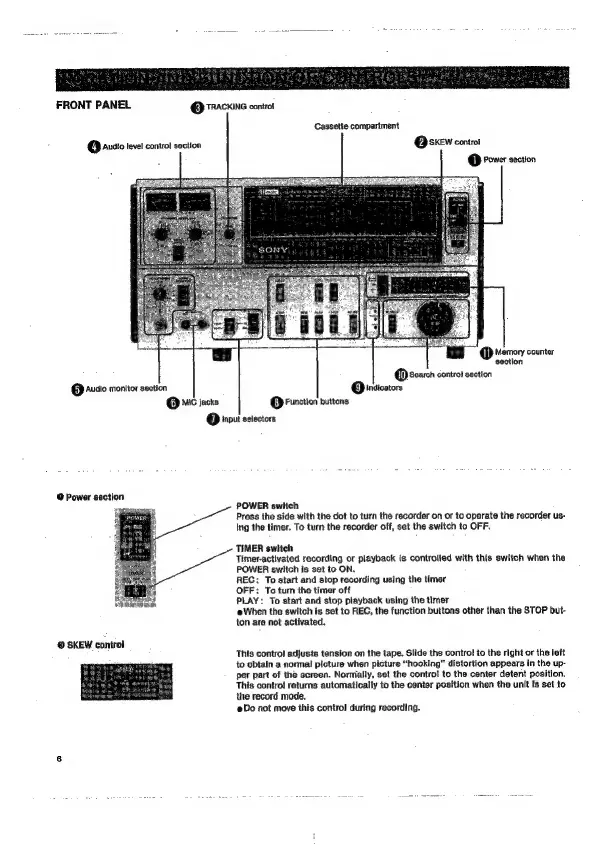
FRONT
PANEL
@
TRACKING
control
Cassette
compartment
Q@sKEW
controt
@
Power
section
Q)
ausio
level
control
section
@
Memory
counter
section
@
Search
contro}
section
Q
indicators
(5)
Audio
monitor
section
Q
Mc
jacks
(3)
Function
buttons.
(7)
input
selectors:
@
Power
section
POWER
switch
Press
the
side
with
the
dot
to
turn
the
recorder
on
or
to
operate
the
recorder
us-
Ing
the
timer.
To
turn
the
recorder
off,
set
the
switch
to
OFF.
TIMER
switch
Timer-actlvated
recording
or
playback
is
controlled
with
this
switch
when
the
POWER
switch
is
set
to
ON.
REC:
To
start
and
stop
recording
using
the
timer
OFF:
To
turn
the
timer
off
PLAY:
To
start
and
stop
playback
using
the
timer
When
the
switch
is
set
to
REC,
the
function
buttons
other
than
the
STOP
but-
ton
are
not
activated.
@
SKEW
control
‘This
control
adjusts
tension
on
the
tape.
Slide
the
contro!
to
the
right
or
the
left
to
obtain
a
normal
picture
when
picture
“hooking”
distortion
appears
in
the
up-
per
part
of
the
screen.
Normally,
set
the
controt
to
the
center
detent
position,
This
contro!
returns
automatically
to
the
center
position
when
the
unit
Is
set
to
the
record
mode,
Do
not
move
this
control
during
recording.

Related product manuals