EasyManua.ls Logo

Sony VO-5800PS - Cassette Handling and Recording Basics; Inserting and Removing Cassettes; Recording Format and Protection; Tape Handling and Storage

Sony VO-5800PS
28 pages
Print Icon
To Next Page IconTo Next Page
To Previous Page IconTo Previous Page
Loading...
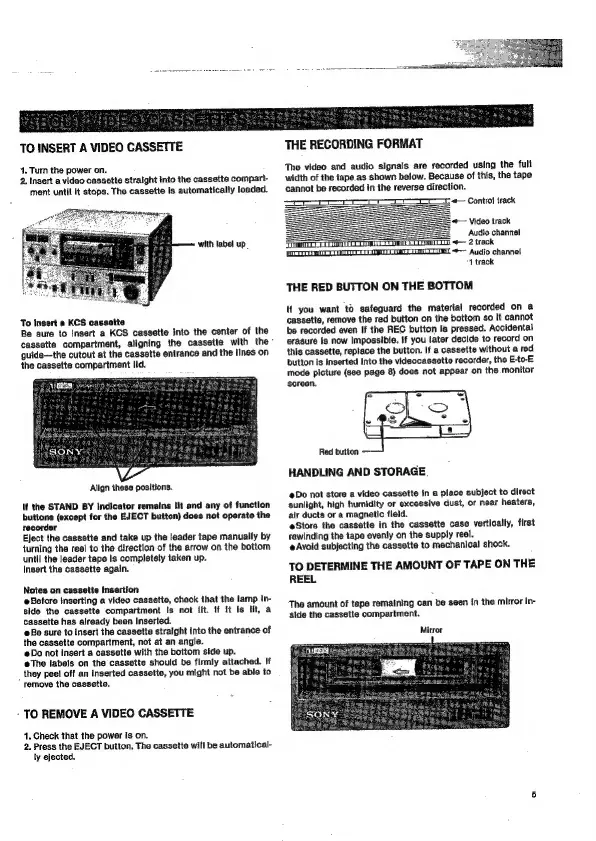
TO
INSERT
A
VIDEO
CASSETTE
1.
Turn
the
power
on.
2.
Insert
a
video
cassette
straight
into
the
cassette
compart-
ment
until
it
stops.
The
cassette
Is
automatically
loaded.
with
label
up.
To
Insert
a
KCS
cassette
Be
sure
to
insert
a
KCS
cassette
into
the
center
of
the
cassette
compartment,
aligning
the
cassette
with
the
guide—the
cutout
at
the
cassette
entrance
and
the
lines
on
the
cassette
compartment
lid.
Align
these
positions.
It
the
STAND
BY
Indicator
remains
lit
and
any
of
function
buttons
(except
for
the
EJECT
button)
does
not
operate
the
recorder
Eject
the
cassette
and
take
up
the
leader
tape
manually
by
turning
tha
reel
to
the
direction
of
the
arrow
on
the
bottom
until
the
leader
tape
Is
completely
taken
up.
Insert
the
cassette
again.
Notes
on
cassette
Insertion
@Before
inserting
a
video
cassette,
chack
that
the
lamp
in-
side
the
cassette
compartment
Is
not
lit.
If
it
Is
lit,
a
cassette
has
already
been
inserted.
Be
sure
to
insert
the
cassette
straight
Into
the
entrance
of
the
cassette
compartment,
not
at
an
angle.
Do
not
insert
a
cassette
with
the
bottom
side
up.
eThe
labels
on
the
cassette
should
be
firmly
attached.
If
_
they
peel
off
an
inserted
cassette,
you
might
not
be
able
to
remove
the
cassette.
-
TO
REMOVE
A
VIDEO
CASSETTE
4.
Check
that
the
power
is
on.
2.
Press
the
EJECT
button,
The
cassette
will
be
automatical-
ly
ejected.
THE
RECORDING
FORMAT
The
video
and
audio
signals
are
recorded
using
the
fult
width
of
the
tape.as
shown
below.
Because
of
this,
tha
tape
cannot
be
recorded
in
the
reverse
direction.
ooo
«—
Control
track
*—
Video
track
Audio
channel
<<
2
track
“+
Audio
channel
1
track
THE
RED
BUTTON
ON
THE
BOTTOM
lf
you
want
to
safeguard
the
material
recorded
on
a
cassette,
remove
the
red
button
on
the
bottom
so
it
cannot
be
recorded
even
If
the
REG
button
Is
pressed.
Accidental
erasure
Is
now
impossible.
!f
you
later
decide
to
record
on
this
cassette,
replace
the
button.
If
a
cassette
without
a
red
button
is
inserted
Into
the
videocassette
recorder,
the
E-to-E
mode
picture
(see
page
8)
does
not
appear
on
the
monitor
HANDLING
AND
STORAGE
@Do
not
store
a
video
cassette
in
a
place
subject
to
direct
sunlight,
high
humidity
or
excessive
dust,
or
near
heaters,
air
ducts
or
a
magnetic
fleld.
eStore
the
cassette
in
the
cassette
case
vertically,
first
rewinding
the
tape
evenly
on
the
supply
reel.
@
Avoid
subjecting
the
cassette
to
mechanical
shock.
TO
DETERMINE
THE
AMOUNT
OF
TAPE
ON
THE
REEL
The
amount
of
tape
remaining
can
be
seen
In
the
mirror
in-
side
the
cassette
compartment.
Mirror

Related product manuals