EasyManua.ls Logo

Sony VO-5800PS - Safety, Installation, and Handling; General Safety Guidelines; Installation and Placement; Operation and Cleaning Procedures

Sony VO-5800PS
28 pages
Print Icon
To Next Page IconTo Next Page
To Previous Page IconTo Previous Page
Loading...
On
safety
Operate
the
unit
only
with
a
power
source
specified
in
the
“SPECIFICATIONS”
on
page
27.
e@Should
any
solid
object
or
liquid
fall
into
the
cabinet,
unplug
the
unit
and
have
It
checked
by
qualified
personnel
before
operating
it
any
further.
Unplug
the
unit
from
the
wall
outlet
If it
is
not
to
be
used
for
an
extended
period
of
time.
To
disconnect
the
cord,
pull
it
out
by
the
plug.
Never
pull
the
cord
Itself.
On
installation
@Allow
adequate
air
circulation
to
prevent
internal
heat
buildup.
Do
not
place
the
unit
on
surfaces
(rugs,
blankets,
etc.)
or
near
materials
(curtains,
draperies)
that
may
block
the
ventilation
slots.
e@Do
not
install
the
unit
near
a
heat
source
such
as
a
radiator
or
an
air
duct,
or
in
a
place
subject
to
direct
sunlight,
excessive
dust,
mechanical
vibration
or
shock.
@The
unit
Is
designed
for
operation
in
a
horizontal
position.
Never
operate
the
unit
In
a
vertical
position.
The
projections
‘on
the
connector
panel
are
to
protect
the
connectors
and
switches
on
the
panel
when
the
unit
Is
stored
vertically.
aKeep
the
unit
away
from
equipment
with
strong
magnets
as
for
example
a
targe
loudspeaker.
On
operation
eWhen
the
unit
is
not
in
use,
turn
the
power
off.
eRemove
and
store
video
cassettes
after
recording
or
playback,
Never
operate
the
unit
right
after
having
transported
It
trom
a
cold
location
directly
to
a
warm
location.
On
cleaning
Clean
the
cabinet,
panel
and
controls
with
a
dry
soft
cloth,
or
a
soft
cloth
lightly
moistened
with
a
mild
detergent
solu-
tion.
Do
not
use
any
type
of
solvent,
such
as
alcohol
or
ben-
zine,
which
might
damage
the
finish.
On
transportation
Remove
the
video
cassette
when
transporting
the
unit.
Save
the
original
carton
and
associated
packing
material,
They
will
be
useful
should
you
have
to
transport
or
ship
the
unit.
if
you
have
any
questions
about
this
unit,
contact
your
Sony
dealer.
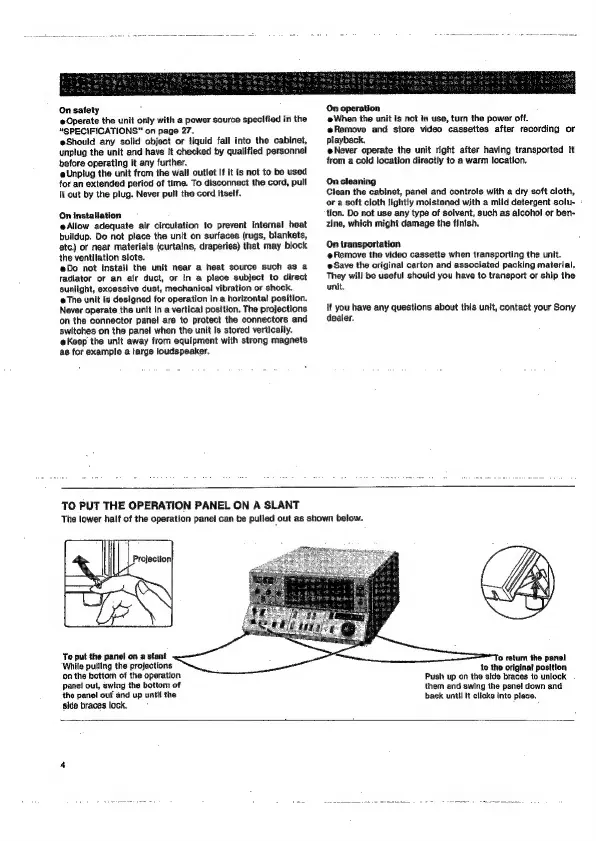
TO
PUT
THE
OPERATION
PANEL
ON
A
SLANT
The
lower
half
of
the
operation
panel
can
be
pulled
out
as
shown
below.
LU
Projection|
hac
Te
put
the
panel
on
a
stant
‘While
pulling
the
projections
on
the
bottom
of
the
operation
panel
out,
swing
the
bottom
of
the
panel
ouf
and
up
until
the
side
braces
lock.
fo
return
the
panel
to
the
original
position
Push
up
on
the
side
braces
to
unlock
them
and
swing
the
panel
down
and
back
until
it
clicks
into
place.

Related product manuals