EasyManua.ls Logo

Sony VO-5800PS - Front Panel Controls: Audio and Input Selection; Tracking and Audio Level Controls; Audio Monitoring and Input Settings

Sony VO-5800PS
28 pages
Print Icon
To Next Page IconTo Next Page
To Previous Page IconTo Previous Page
Loading...
©
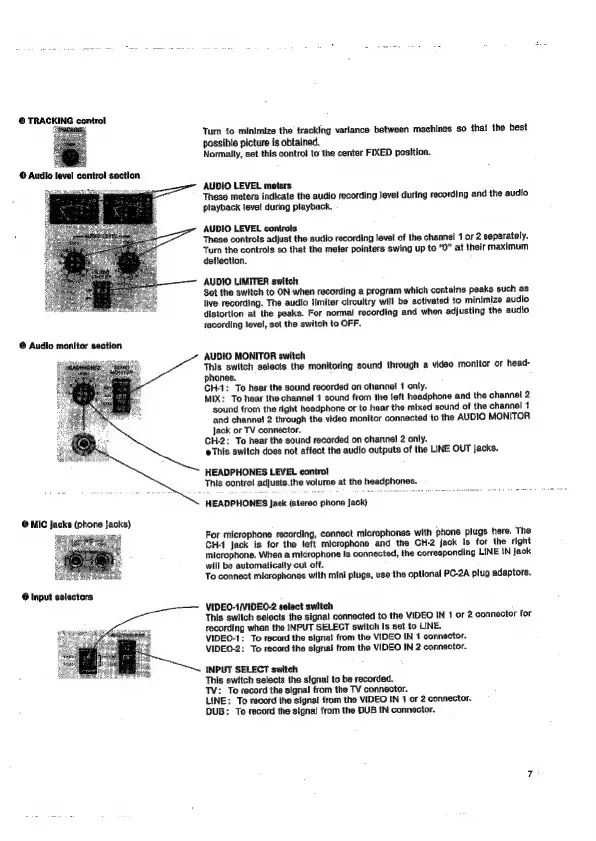
TRACKING
control
©
Audio
level
control
section
©
Audio
monitor
section
@
MIC
jacks
(phone
Jacks)
@
Input
selectors
Turn
to
minimize
the
tracking
variance
between
machines
so
that
the
best
possible
picture
Is
obtained.
Normally,
set
this
control
to
the
center
FIXED
position.
AUDIO
LEVEL
meters
These
meters
indicate
the
audio
recording
Jevel
during
recording
and
the
audio
playback
level
during
playback.
AUDIO LEVEL
controts
These
controls
adjust
the
audio
recording
fevel
of
the
channel
1
or
2
separately.
Turn
the
controls
so
that
the
meter
pointers
swing
up
to
“O”
at
thelr
maximum
deflection.
AUDIO
LIMITER
switch
Set the
switch
to
ON
when
recording
a
program
which
contains
peaks
such
as
live
recording.
The
audio
{limiter
clrcuitry
will
be
activated
to
minimize
audio
distortion
at
the
peaks.
For
normal
recording
and
when
adjusting
the
audio
recording
tevel,
set
the
switch
to
OFF.
AUDIO
MONITOR
switch
‘This
switch
selects
the
monitoring
sound
through
a
video
monitor
or
head-
phones.
CH-1:
To
hear
the
sound
recorded
on
channel
1
only.
MIX:
To
hear
the
channel
1
sound
from
the
left
headphone
and
the
channel
2
sound
from
the
right
headphone
or
to
hear
the
mixed
sound
of
the
channel
1
and
channel
2
through
the
video
monitor
connected
to
the
AUDIO
MONITOR
jack
or
TV
connector.
CH-2:
To
hear
the
sound
recorded
on
channel
2
only.
eThis
switch
does
not
affect
the
audio
outputs
of
the
LINE
OUT
jacks.
HEADPHONES
LEVEL
contro!
This
control
adjusts.the
volume
at
the
headphones.
HEADPHONES
Jack
(stereo
phone
jack)
For
microphone
recording,
connect
microphones
with
phone
plugs
here.
The
CH-1
Jack
is
for
the
left
microphone
and
the
CH-2
Jack
is
for
the
right
microphone.
When
a
microphone
is
connected,
the
corresponding
LINE
IN
jack
will
be
automatically
cut
off.
To
connect
microphones
with
mini
plugs,
use
the
optional
PC-2A
plug
adaptors.
VIDEO-1/VIDEO-2
select
swiich
This
switch
selects
the
signal
connected
to
the
VIDEO
IN
1
or
2
connector
for
recording
when
the
INPUT
SELECT
switch
Is
set
to
LINE.
VIDEO-1:
To
record
the
signal
from
the
VIDEO
IN
1
connector.
VIDEQ-2:
To
record
the
signal
from
the
VIDEO
IN
2
connector.
INPUT
SELECT
switch
This
switch
selects
the
signal
to
be
recorded.
TV:
To
record
the
signal
from
the
TV
connector.
LINE:
To
record
the
signat
from
the
VIDEO
{N
1
or
2
connector.
DUB:
To
record
the
signal
from
the
DUB
IN
connector.

Related product manuals