EasyManua.ls Logo

Sony VO-5800PS - Front Panel Controls: Buttons and Indicators; Core Function Buttons; Indicator Lights Explained

Sony VO-5800PS
28 pages
Print Icon
To Next Page IconTo Next Page
To Previous Page IconTo Previous Page
Loading...
©
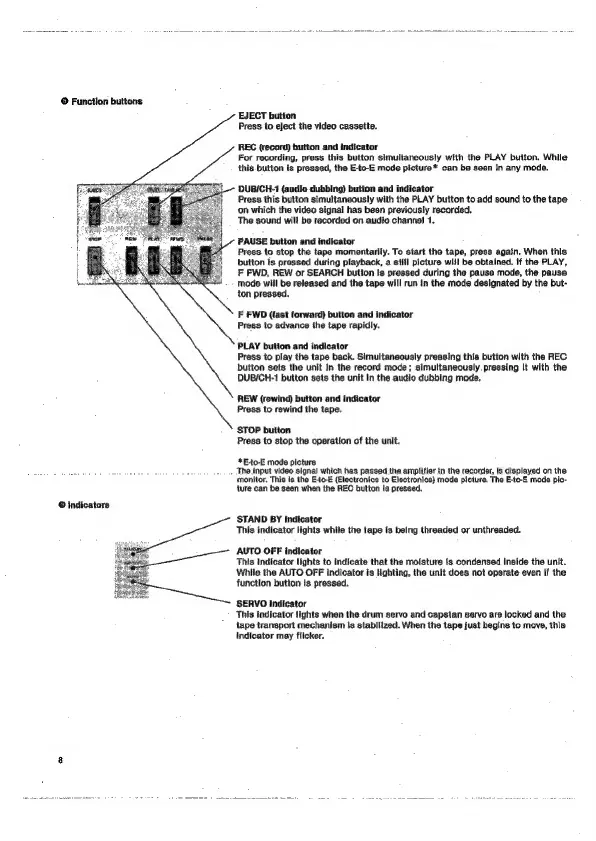
Functlon
buttons
EJECT
button
Press
to
eject
the
video
cassette.
REC
(record)
button
and
indicator
For
recording,
press
this
button
simultaneously
with
the
PLAY
button,
While
this
button
is
pressed,
the
E-to-E
mode
picture*
can
be
seen
In
any
mode.
DUB/CH-1
(audio
dubbing)
bution
and
indicator
Press
this
button
simultaneously
with
the
PLAY
button
to
add
sound
to
the
tape.
on
which
the
video
signal
has
been
previously
recorded.
The
sound
will
be
recorded
on
audio
channel
1.
PAUSE
button
and
indicator
Press
to
stop
the
tape
momentarily.
To
start
the
tape,
press
again.
When
this
button
is
pressed
during
playback,
a
still
picture
will
be
obtained.
If
the
PLAY,
F
FWD,
REW
or
SEARCH
button
Is
pressed
during
the
pause
mode,
the
pause.
mode
will
be
released
and
the
tape
will
run
in
the
mode
designated
by
the
but-
ton
pressed.
F
FWD
(fast
forward)
button
and
indicator
Press
to
advance
the
tape
rapidly.
PLAY
button
and
indicator
Press
to
play
the
tape
back.
Simultaneously
pressing
this
button
with
the
REC.
button
sets
the
unit
In
the
record
mode;
simultaneously.
pressing
It
with
the
DUB/CH-1
button
sets
the
unit
In
the
audio
dubbing
mode.
REW
(rewind)
button
and
indicator
Press
to
rewind
the
tape.
STOP
button
Press
to
stop
the
operation
of
the
unit.
*E-+to-E
mode
picture
.
The
input
video
signa)
which
has
passed
the
amplifier
In
the
recorder,
is
displayed
on
the
monitor.
This
is
the
E-to-E
(Electronics
to
Electronics}
mode
picture.
The
E-to-E
mode
pic-
ture
can
be
seen
when
the
REC
button
is
pressed.
@
Indicators
STAND
BY
Indicator
This
indicator
tights
while
the
tape
is
belng
threaded
or
unthreaded.
AUTO
OFF
indicator
This
indicator
lights
to
indicate
that
the
moisture
Is
condensed
inside
the
unit.
While
the
AUTO
OFF
indicator
is
lighting,
the
unit
does
not
operate
even
If
the
function
button
is
pressed.
SERVO
indicator
This
indicator
fights
when
the
drum
servo
and
capstan
servo
are
locked
and
the
tape
transport
mechanism
Is
stabillzed.
When
the
tape
just
begins
to
move,
this
indicator
may
flicker.

Related product manuals