EasyManua.ls Logo

Sony VO-5800PS - Search and Memory Functions; Search Dial Operation; Time Counter and Memory Buttons

Sony VO-5800PS
28 pages
Print Icon
To Next Page IconTo Next Page
To Previous Page IconTo Previous Page
Loading...
@
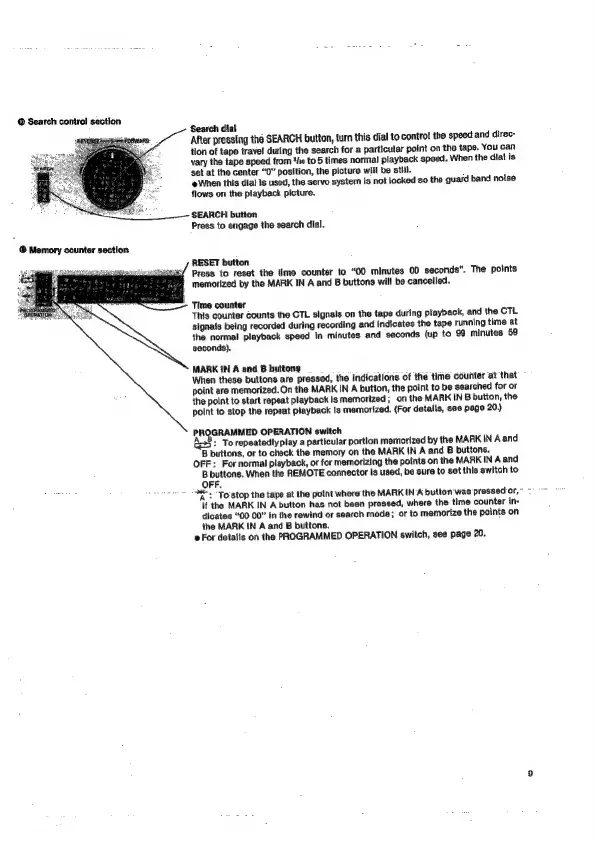
Search
contro!
section
Search
dial
After
pressing
the
SEARCH
button,
turn
this
dial
to
control
the
speed
and
direc-
tion
of
tape
travel
during
the
search
for
a
particular
point
on
the
tape.
You
can
vary
the
tape
speed
from
*ho
to
5
times
normal
playback
speed.
When
the
diat
is
set
at
the
center
“0”
position,
the
picture
will
be
still.
:
When
this dial
is
used,
the
servo
system
is
not
tocked
so
the
guard
band
noise
flows
on
the
playback
picture.
SEARCH
button
Press
to
engage
the
search
dial.
RESET
button
Press
to
reset
the
time
counter
to
“00
minutes
00
seconds”.
The
points
memorized
by
the
MARK
IN
A
and
B
buttons
will
be
cancelled.
Time
counter
This
counter
counts
the
CTL
signals
on
the
tape
during
playback,
and
the
CTL
signals
being
recorded
during
recording
and
Indicates
the
tape
running
time
at
the
normal
playback
speed
in
minutes
and
seconds
(up
to
99
minutes
59
seconds).
MARK
IN
A
and
B
buttons
When
these
buttons
are
pressed,
the
indications
of
the
tine
counter
‘at
that
point
are
memorized.
On
the
MARK
IN
A
button,
the
point
to
be
searched
for
or
the
point
to
start
repeat
playback
Is
memorized;
on
the
MARK
IN
B
button,
the
polnt
to
stop
the
repeat
playback
Is
memorized.
(For
details,
see
page
20.)
PROGRAMMED
OPERATION
switch
A»:
To
repeatedly
play
a
particular
portion
memorized
by
the
MARK
IN
A
and
'B
buttons,
or
to
check
the
memory
on
the
MARK
IN
A
and
B
buttons.
OFF:
For
normal
playback,
or
for
memorizing
the
points
on
the
MARKIN
A
and
B
buttons.
When
the
REMOTE
connector
is
used,
be
sure
to
set
this
switch
to
OFF.
+
To'stop
the
tape
at
the
point
where
the
MARK
INA
button
was
pressed
or,
if
the
MARK
IN
A
button
has
not
been
pressed,
where
the
time
counter
ins
dicates
“00
00”
in
the
rewind
or
search
mode;
or
to
memorize
the
points
on
the
MARK
IN
A
and
B
buttons.
For
details
on
the
PROGRAMMED
OPERATION
switch,
see
page
20.

Related product manuals