13
Connecting the Projector
Preparation
INPUT C
• Audio output from the HDMI connector is available only on VPL-EW276/EW246/EW226/
EX276/EX246/EX226.
• Use HDMI-compatible equipment which has the HDMI Logo.
• Use a high speed HDMI cable(s) on which the cable type logo is specified. (Sony products are
recommended.)
• The HDMI connector of this projector is not compatible with DSD (Direct Stream Digital) Signal
or CEC (Consumer Electronics Control) Signal.
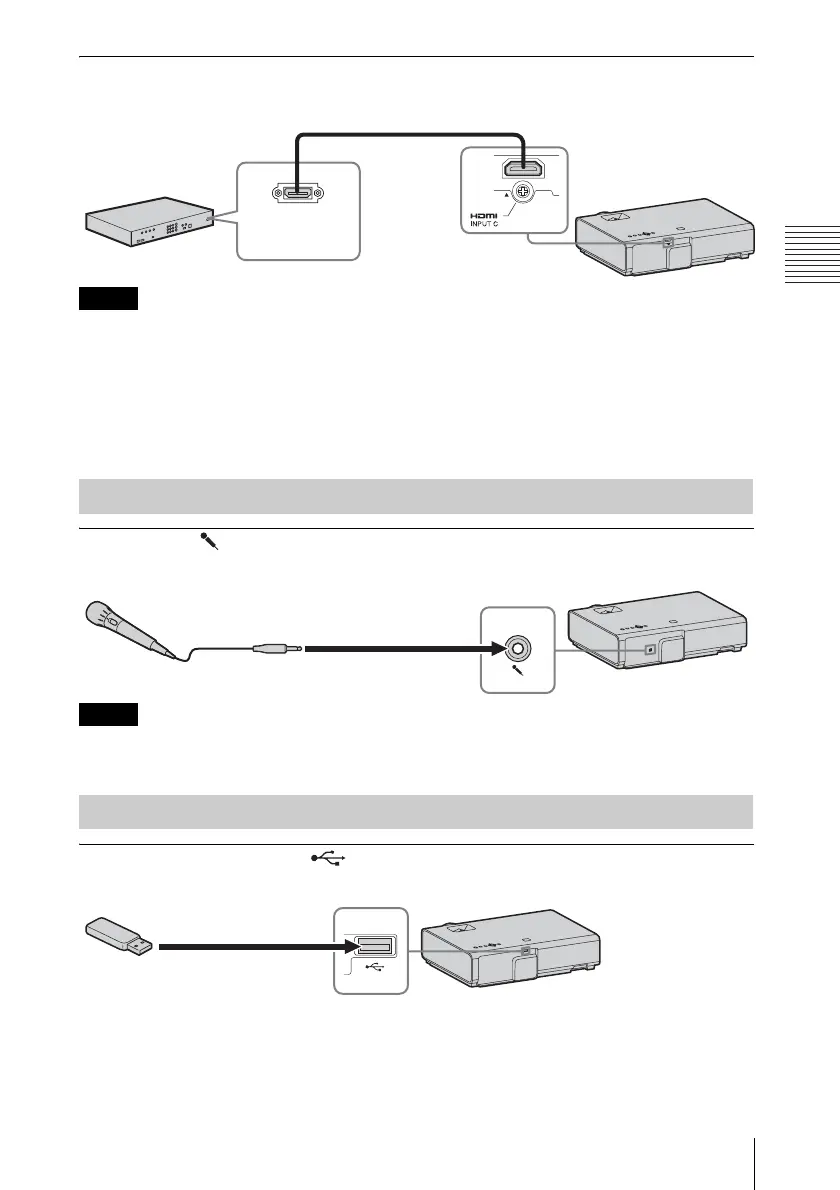
Microphone ( )
For connecting a microphone.
• The microphone input is available only on VPL-EW276/EW246/EW226/EX276/EX246/EX226.
• Only dynamic microphones are supported.
USB connector (Type A) ( )
For connecting a USB memory device (“Using USB Media Viewer” (page 40)).
Notes
Connecting a microphone
Notes
Connecting a USB memory device
Video equipment
HDMI cable
(not supplied)
HDMI output
connector
For connecting video equipment with an HDMI output connector.
Microphone
(not supplied)
USB memory device
(not supplied)



 To Next Page