6
Location and Function of Controls
• This connector outputs the projected image
or audio only when INPUT A or INPUT B is
used.
• The audio output connector is available only
on VPL-EW276/EW246/EW226/EX276/
EX246/EX226.
Others
g RS-232C connector (RS-232C)
RS-232C compatible control connector.
Connects the computer’s RS-232C
connector and the RS-232C cross cables.
h LAN connector (page 32)
i AC IN (∼) socket
Connects the supplied AC power cord.
j USB connector (Type A) ( )
(pages 13, 40)
k USB connector (Type B) ( )
(page 39)
l Microphone input ( )
Microphone input is available only on VPL-
EW276/EW246/EW226/EX276/EX246/
EX226.
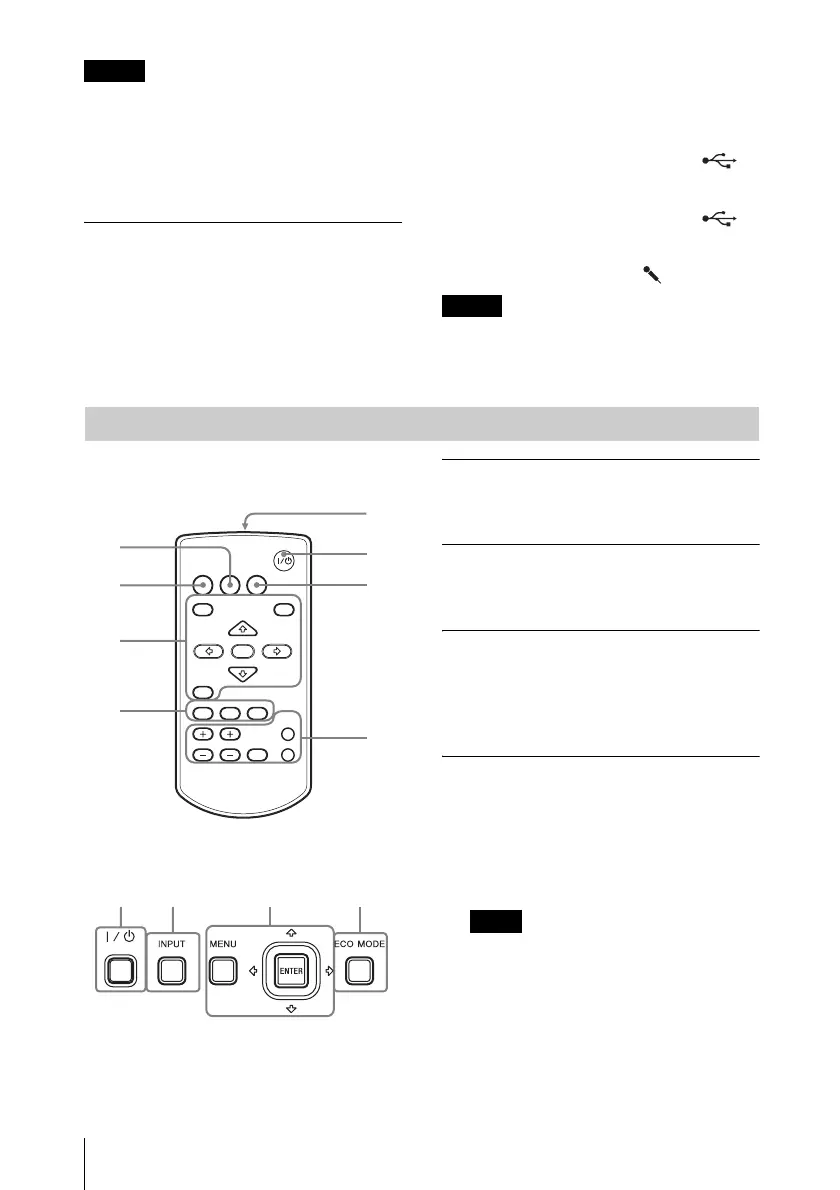
Remote Commander
Control Panel Keys
a Turning on the power/Going to
standby mode
?/1 (On/Standby) key
b Selecting an input signal
(page 15)
INPUT key
c Operating a menu (page 20)
MENU key
RESET key
ENTER /V/v/B/b (arrow) keys
RETURN key
d Adjusting the image (page 16)
ASPECT key (page 22)
KEYSTONE key (page 18)
PATTERN key (page 18)
APA (Auto Pixel Alignment) key
*
(page 18)
*
Use this key when inputting a computer
signal via the RGB input connector
(INPUT A or INPUT B).
Notes
Note
Remote Commander and Control Panel Keys
2
3
4
5
6
1
4
7
INPUT
MENU
APA ECO MODE
RETURN
ASPECT
D ZOOM
KEYSTONE
ENTER
VOLUME
PATTERN
FREEZE
BLANK
MUTING
RESET
3
6
12
Note



 To Next Page