56
When connecting a cable such as an HDMI cable, etc., check the type of the signal in the Information
menu (page 37) and “Digital signal” (page 54), and check items that are adjustable/can be set.
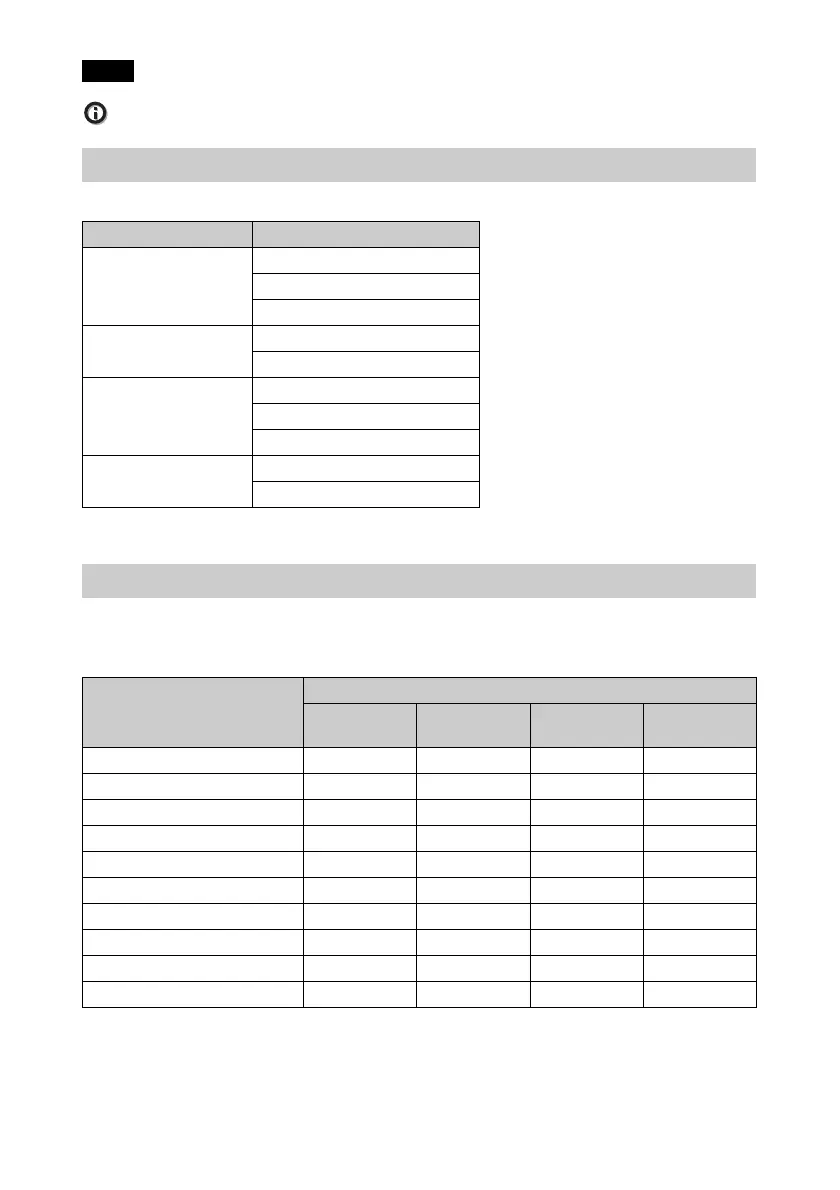
This unit accepts the following types of 3D signals.
*: Mandatory 3D format of the HDMI standards.
Some items on the menus may not be available to adjust/set, depending on the 3D signals.
The items that cannot be adjusted are not displayed on the menu. The following tables indicate
those items.
z: Adjustable/can be set
–: Not adjustable/cannot be set
*1: The item is not available for Frame Packing/Over-Under on 720/60p, or Over-Under on 1080/
60p.
*2: For further details, refer to the tables in “Aspect Mode” (page 57).
Note
Compatible 3D Signals
Resolution 3D signal format
720/60p, 720/50p Side-by-Side format
Over-Under format*
Frame packing*
1080/60i, 1080/50i Side-by-Side format
Frame packing
1080/24p Side-by-Side format
Over-Under format*
Frame packing*
1080/60p, 1080/50p Side-by-Side format
Over-Under format
3D Signals and Adjustable/Setting Items
Item
3D signals
720/60p,
720/50p
1080/60i,
1080/50i
1080/24p 1080/60p,
1080/50p
Reality Creation
zzzz
Advanced Iris – – – –
Lamp Control
zzzz
Motionflow*
1
zzzz
NR ––––
MPEG NR ––––
Smooth Gradation – – – –
Film Mode –
z ––
x.v.Color
zzzz
Aspect*
2
zzzz


 To Next Page