11
Connecting to Video Equipment or a
Computer
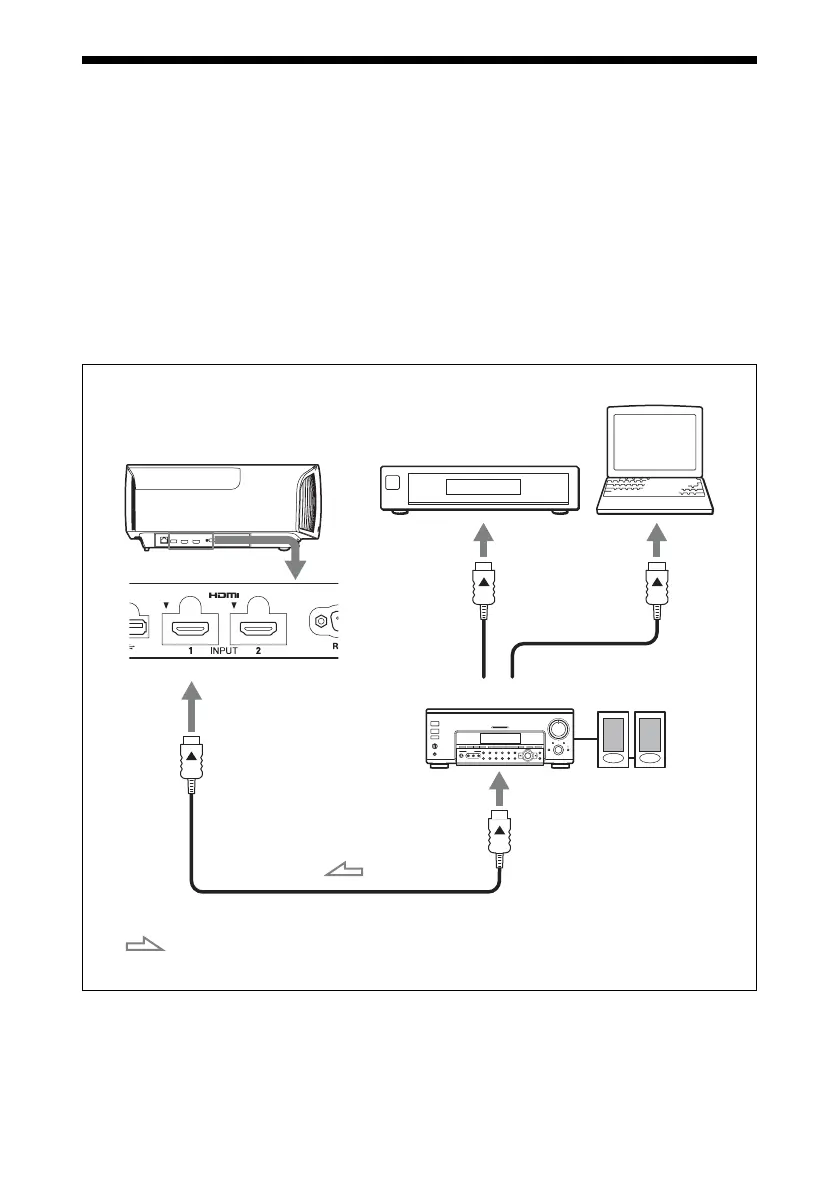
You can enjoy high picture quality by connecting a DVD player/recorder, Blu-ray Disc player/
recorder, or PlayStation
®
equipped with HDMI output to the HDMI input of the unit.
When making connections, be sure to do the following:
• Turn off all equipment before making any connections.
• Use the proper cables for each connection.
• Insert the cable plugs properly; poor connection at the plugs may cause a malfunction or poor
picture quality. When pulling out a cable, be sure to pull it out from the plug, not the cable
itself.
• Refer to the operating instructions of the connected equipment.
Right side of the unit
AV amplifier
Speakers
Equipment with HDMI
output connectors
Computer
to HDMI output
HDMI cable (not supplied)
: Video signal flow Use a High Speed HDMI cable or a Premium High Speed
HDMI cable on which the cable type logo is specified.


 To Next Page