EasyManua.ls Logo

Sony WM-BF49 - Page 3

Sony WM-BF49
10 pages
Print Icon
To Next Page IconTo Next Page
To Previous Page IconTo Previous Page
Loading...
asinine
enh
BB
RCRA
sstuainnvincracesuitiees
faactaasincescatcnsasyeasieaiasasinacarane
eecerarees
©
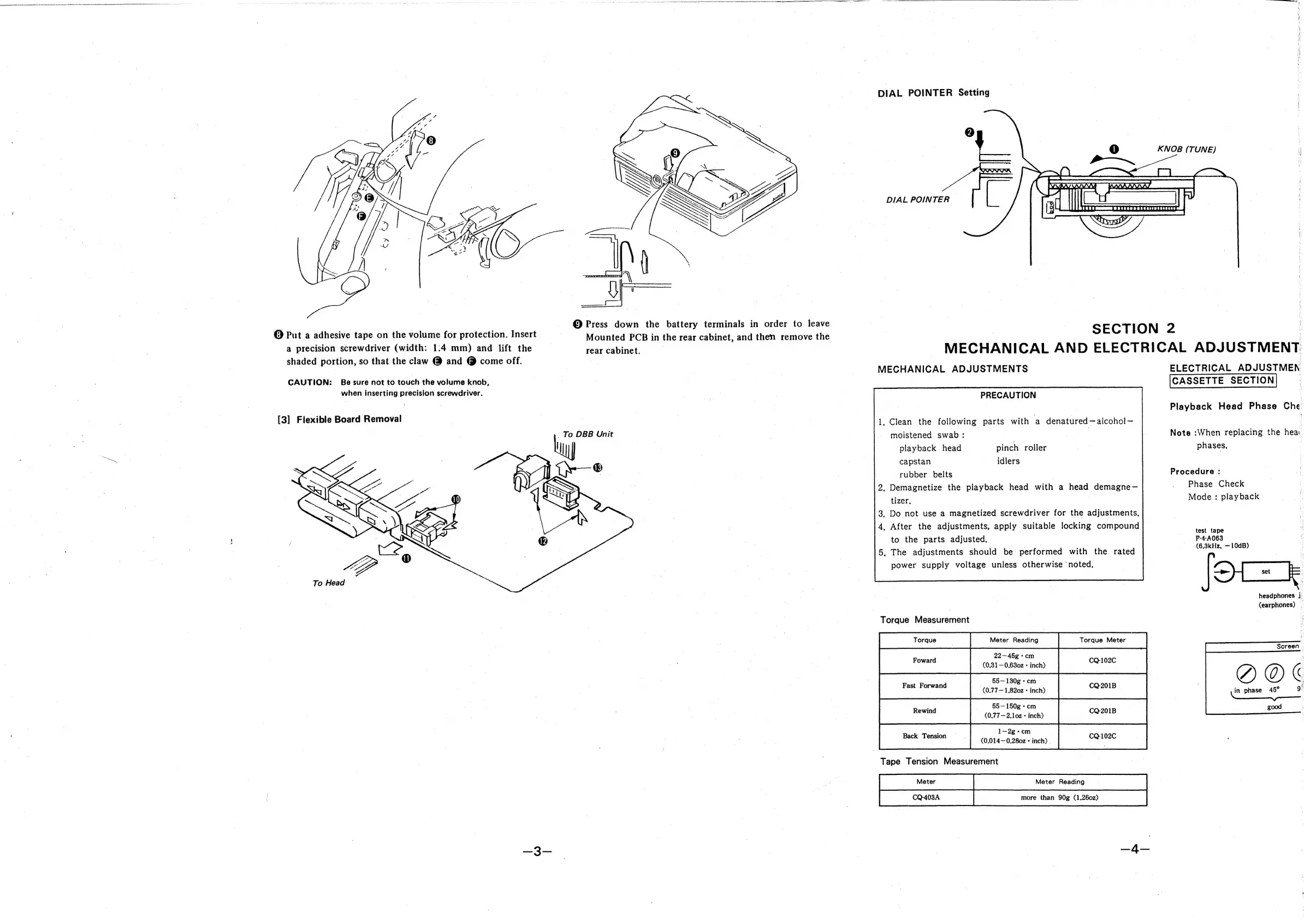
Put
a
adhesive
tape
on
the
volume
for
protection.
Insert
a
precision
screwdriver
(width:
1:4
mm)
and
lift
the
shaded
portion,
so
that
the
claw
@
and
@
come
off.
CAUTION:
Be
sure
not
to
touch
the
volume
knob,
when
inserting
precision
screwdriver.
[3]
Flexible
Board
Removal
aa
©
Press
down
the
battery
terminals
in
order
to
leave
Mounted
PCB
in
the
rear
cabinet,
and
then
remove
the
DIAL
POINTER
Setting
KNOB
(TUNE)
aan
a
Raa
an
a
RE
EE
TS
ODETTE
CAS
EE
EE
RAL
SALW
Sa
A
a
DIAL
POINTER
|
-
SECTION
2
,
MECHANICAL
AND
ELECTRICAL
ADJUSTMENT.
MECHANICAL
ADJUSTMENTS
PRECAUTION
,
Clean
the
following
parts
with
a
denatured
alcohol
3
ELECTRICAL
ADJUSTMEN
CASSETTE
SECTION
Playback
Head
Phase
Che
moistened
swab
:
.
Note
:When
replacing
the
hear
playback
head
pinch
roller
phases.
capstan
idlers
rubber
belts
Procedure
:
:
;
1—2g
-cm
Back
T
.
Demagnetize
the
playback
head
with
a
head
demagne—
tizer,
|
.
Do
not
use
a
magnetized
screwdriver
for
the
adjustments,
.
After
the
adjustments,
apply
suitable
locking
compound
to
the
parts
adjusted.
.
The
adjustments
should
be
performed
with
the
rated
power
supply
voltage
unless
otherwise
‘noted,
Torque
Nessurenient
ae
eee
Tape
Tension
Measurement
oo
ag?
es
.
CQ-403A
more
than
90g
(1.260z)
|
Phase
Check
Mode
:
playback
test
tape
P-4-A063
(6,3kHz,
10dB)
SH
headphones
jy
(earphones)
_
Screen.
,
in
phase
45°
gi
good

Related product manuals