EasyManua.ls Logo

Sony WRT-810A - Page 10

Sony WRT-810A
24 pages
Print Icon
To Next Page IconTo Next Page
To Previous Page IconTo Previous Page
Loading...
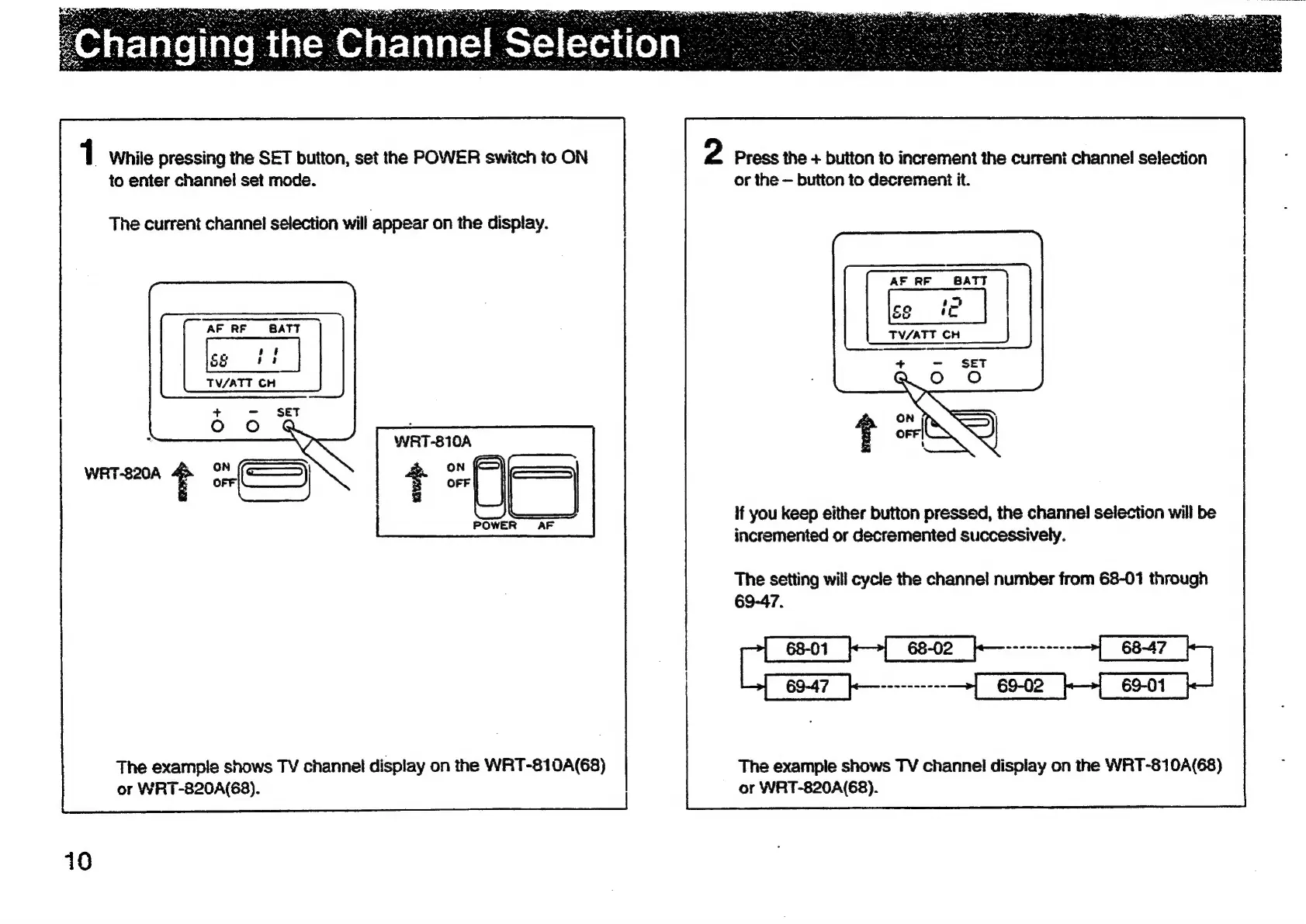
1
While
pressing
the
SET
button,
set
the
POWER
switch
to
ON
to
enter
channel
set
mode.
The
current
channel
selection
will
appear
on
the
display.
AF
RF
B8ATT
af
SS
a
TV/ATT
CH
WRT-810A
ro
WRT-820A
+
POWER
AF
The
example
shows
TV
channel
display
on
the
WRT-810A(68)
or
WRT-820A(68).
10
2
Press
the
+
button
to
increment
the
curreni
channel
selection
or
the
button
to
decrement
it.
if
you
keep
either
button
pressed,
the
channel!
selection
will
be
incremented
or
decremented
successively.
The
setting
will
cycle
the
channel
number
from
68-01
through
The
example
shows
TV
channel
display
on
the
WRT-810A(68)
or
WAT-820A(68).

Other manuals for Sony WRT-810A

Related product manuals