EasyManua.ls Logo

Sony WRT-810A - Page 12

Sony WRT-810A
24 pages
Print Icon
To Next Page IconTo Next Page
To Previous Page IconTo Previous Page
Loading...
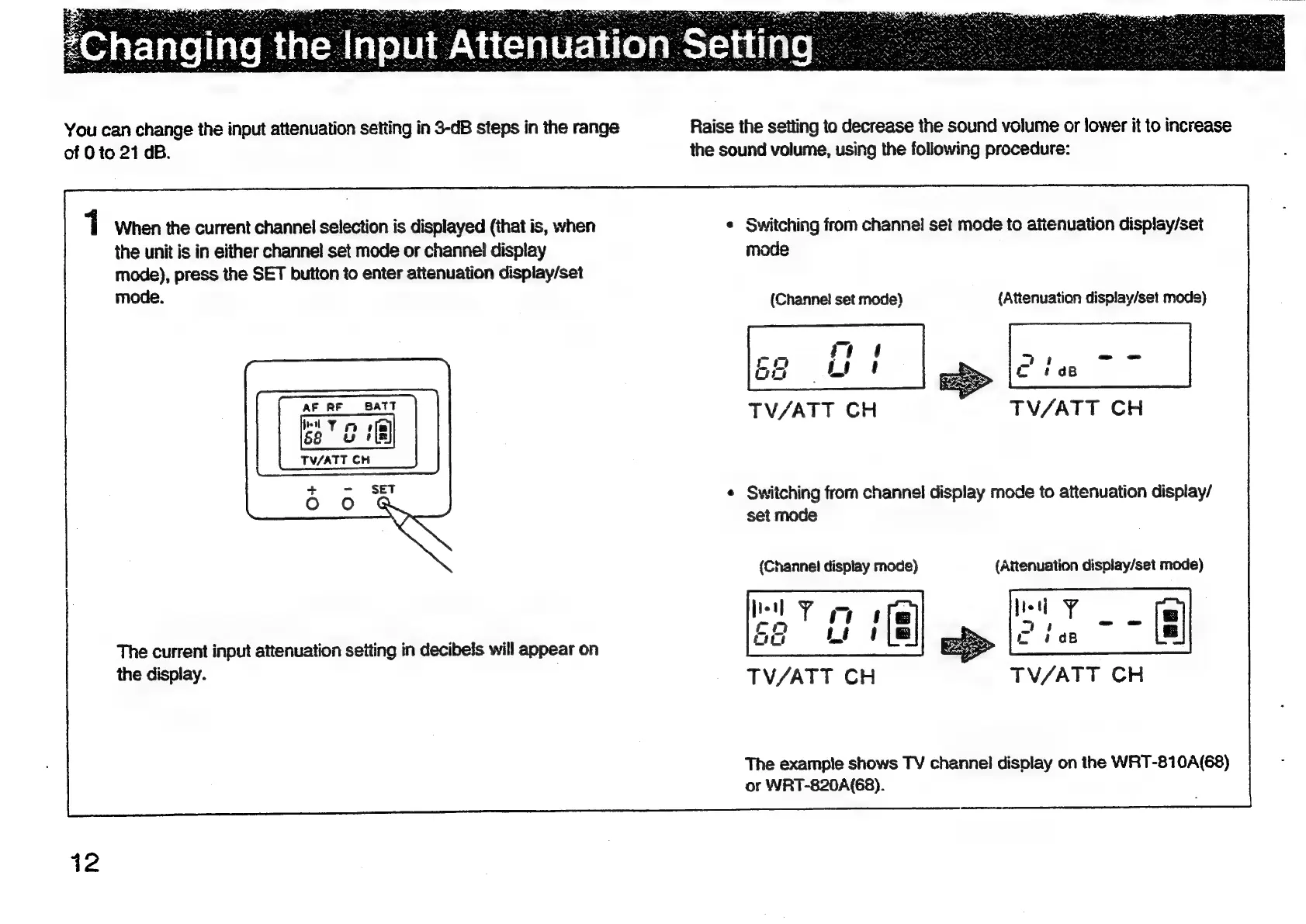
You
can
change
the
input
attenuation
setting
in
3-dB
steps
in
the
range
Raise
the
setting
to
decrease
the
sound
volume
or
lower
it
to
increase
of
0
to
21
GB.
the
sound
volume,
using
the
following
procedure:
1
When
the
current
channel
selection
is
displayed
(that
is,
when
¢
Switching
from
channel!
set
mode
to
attenuation
display/set
the
unit
is
in
either
channel
set
mode
or
channel
display
mode
mode),
press
the
SET
button
to
enter
attenuation
dispiay/set
mode.
(Channe!
set
mode)
{Attenuation
display/set
mode)
‘aie
7
4
—_—-
=
64
Ly
ot
eas
AF
RF
BATT
TV/ATT
CH
:
TV/ATT
CH
TV/ATT
CH
¢
Switching
frorn
channel
display
mode
to
attenuation
display/
set
mode
(Channel
display
mode)
(Attenuation
display/set
mode)
The
current
input
attenuation
seiting
in
decibels
will
appear
on
es
ine
depiey:
TV/ATT
CH
TV/ATT
CH
The
exampie
shows
TV
channel
display
on
the
WRT-810A(68)
or
WRT-820A(68).
12

Other manuals for Sony WRT-810A

Related product manuals