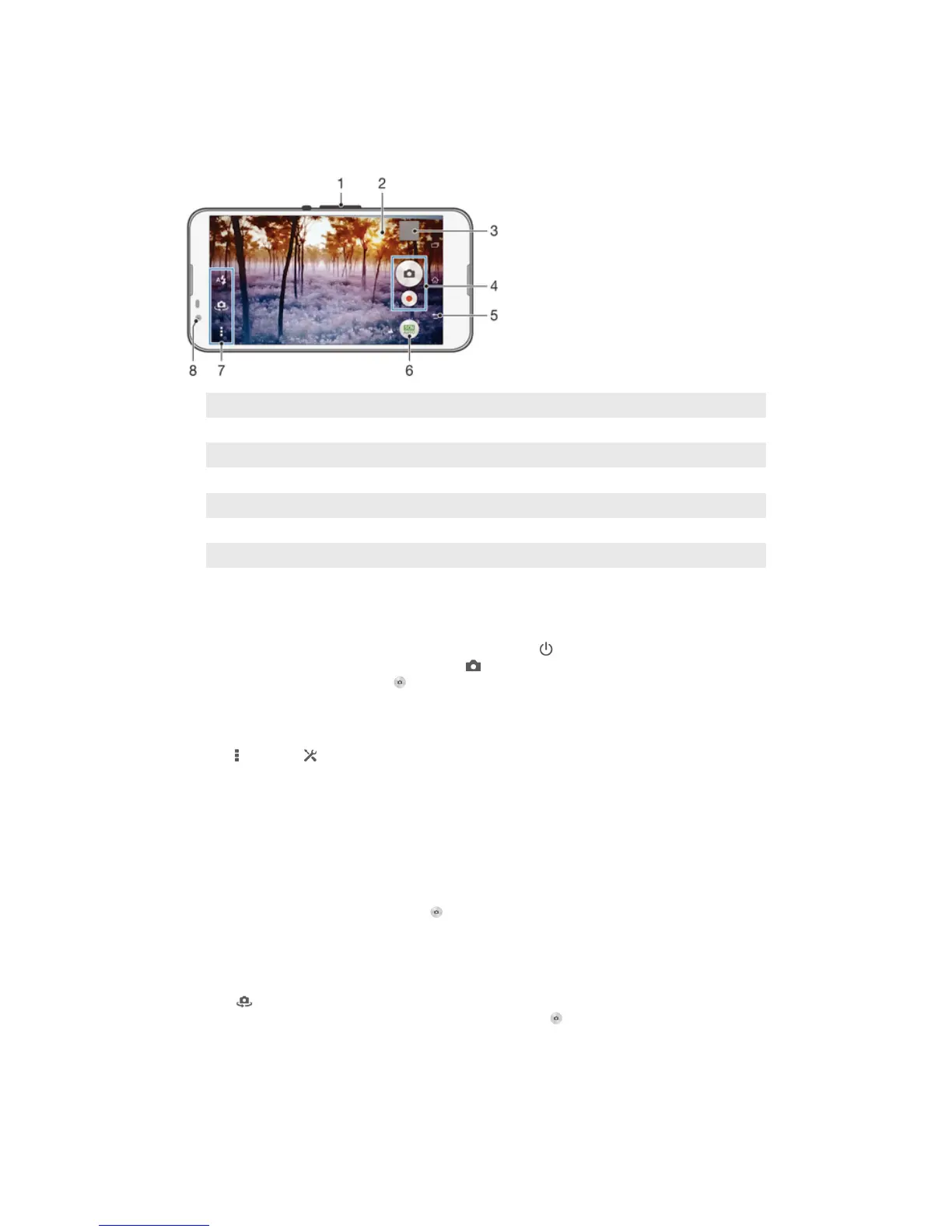
Camera
Taking photos and recording videos
1 Zoom in or out
2 Main camera screen
3 View photos and videos
4 Take photos or record video clips
5 Go back a step or exit the camera
6 Change capturing mode settings
7 Access camera settings and shortcuts
8 Front camera
To take a photo from the lock screen
1
To activate the screen, briefly press the power key .
2
To activate the camera, touch and hold
and drag upwards.
3
After the camera opens, tap
.
To take a photo by touching the screen
1
Activate the camera.
2
Tap , then tap .
3
Drag the slider beside Touch capture to the right.
4
Point the camera towards the subject.
5
To activate auto focus, touch and hold a spot on the screen. When the focus
frame turns blue, lift your finger to take the photo.
To take a photo by tapping the on-screen camera button
1
Activate the camera.
2
Point the camera towards the subject.
3
Tap the on-screen camera button
. The photo is taken as soon as you
release your finger.
To take a self-portrait using the front camera
1
Activate the camera.
2
Tap .
3
To take the photo, tap the on-screen camera button . The photo is taken as
soon as you release your finger.
75
This is an Internet version of this publication. © Print only for private use.










 To Next Page