EasyManua.ls Logo

Sony XV-M30 - Battery Life and Usage; Battery Performance; House Current Usage

Sony XV-M30
7 pages
Print Icon
To Next Page IconTo Next Page
To Previous Page IconTo Previous Page
Loading...
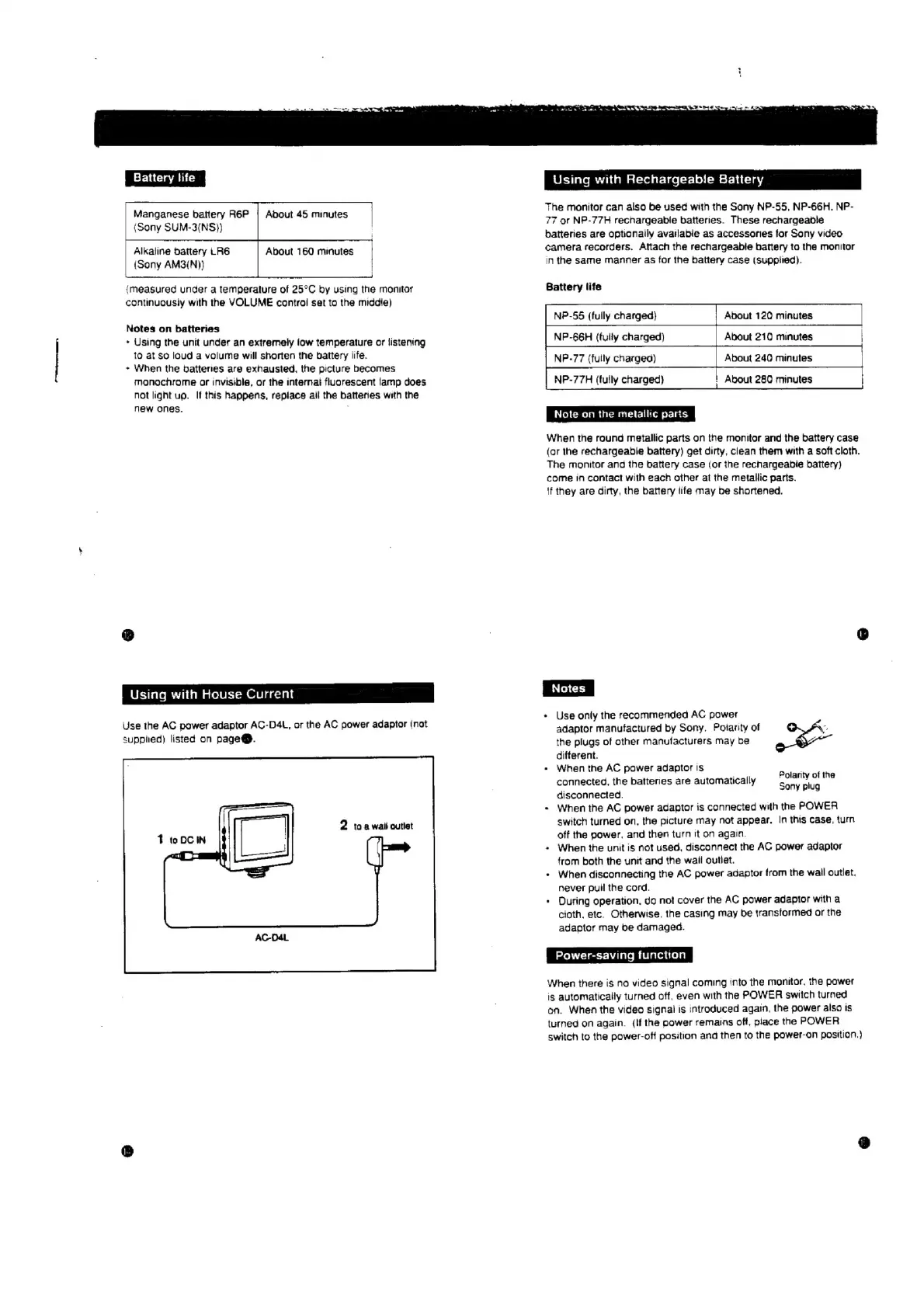
Battery
life
Manganese
battery
R6P
|
Abdout
45
minutes
(Sony
SUM-3(NS}}
Alkaline
Dattery
LR6
(Sony
AM3(N))
About
160
minutes
{measured
under
a
temperature
of
25°C
by
using
the
monitor
continucusiy
with
the
VOLUME
control
set
to
the
middie)
Notes
on
batteries
+
Using
the
unit
under
an
extremely
iow
temperature
or
listening
to
at
So
loud
a
volume
will
shorten
the
battery
life.
+
When
the
dattenes
are
exhausted,
the
picture
becomes
monochrome
or
invisible,
or
the
internat
fluorescent
lamp
does
not
light
up.
If
this
happens,
replace
ail
the
batteries
with
the
new
ones.
Using
with
House
Current
Use
the
AC
power
adaptor
AC-DA4L,
or
the
AC
power
adaptor
(not
supplied)
listed
on
page@.
Using
with
Rechargeable
Battery
The
monitor
can
also
be
used
with
the
Sony
NP-55,
NP-66H.
NP-
77
or
NP-77H
rechargeable
batteries.
These
rechargeable
batteries
are
optionaily
avatlable
as
accessories
for
Sony
video
camera
recorders.
Attach
the
rechargeable
battery
ta
the
monitor
in
the
same
manner
as
for
the
battery
case
(supptied).
Battery
life
NP-55
(fully
charged)
NIP-66H
(fully
charged)
NP-77
(fully
charged)
NP-77H
(tully
charged)
|
About
280
minutes
About
120
minutes
About
210
minutes
About
246
minutes
Note
on
the
metallic
parts
When
the
round
metallic
parts
on
the
monitor
and
the
battery
case
(or
the
rechargeable
battery)
get
dirty,
clean
them
with
a
soft
cloth.
The
monitor
ang
the
batiery
case
(or
ihe
rechargeabie
battery)
come
in
contact
with
each
other
at
the
metallic
parts.
if
they
are
dirty,
the
battery
life
may
be
shortened.
>
Use
only
the
recommended
AC
power
adaptor
manufactured
by
Sony.
Polarity
of
a
the
plugs
of
other
manufacturers
may
be
ae
different.
When
the
AC
power
adaptor
Is
connected,
the
batteries
are
automatically
disconnected.
-
When
the
AC
power
adaptor
is
connected
with
the
POWER
switch
turned
on,
the
picture
may
not
appear.
In
this
case,
turn
off
the
power,
and
then
turn
it
on
again.
»
When
the
unit
is
not
used,
disconnect
the
AC
power
adaptor
from
both
the
unit
and
the
wail
outlet.
*
When
disconnecting
the
AC
power
adaptor
from
the
wall
outlet.
never
pull
the
cord.
-
Ouring
operation,
do
not
cover
the
AC
power
adaptor
with
a
cloth.
etc.
Otherwise.
the
casing
may
be
transformed
or
the
adaptor
may
be
damaged.
Power-saving
function
When
there
is
no
video
signal
coming
into
the
monitor,
the
power
is
automatically
turned
off,
even
with
the
POWER
switch
turned
on.
When
the
video
signal
is
introduced
again,
the
power
also
is
turned
on
again.
(if
the
power
remains
off,
place
the
POWER
switch
to
the
power-off
position
and
then
to
the
power-on
position.)
Polarity
of
the
Sony
plug

Related product manuals