EasyManua.ls Logo

Sony XV-M30 - Mounting and Operation; Mounting on Camera; Picture Viewing Adjustments

Sony XV-M30
7 pages
Print Icon
To Next Page IconTo Next Page
To Previous Page IconTo Previous Page
Loading...
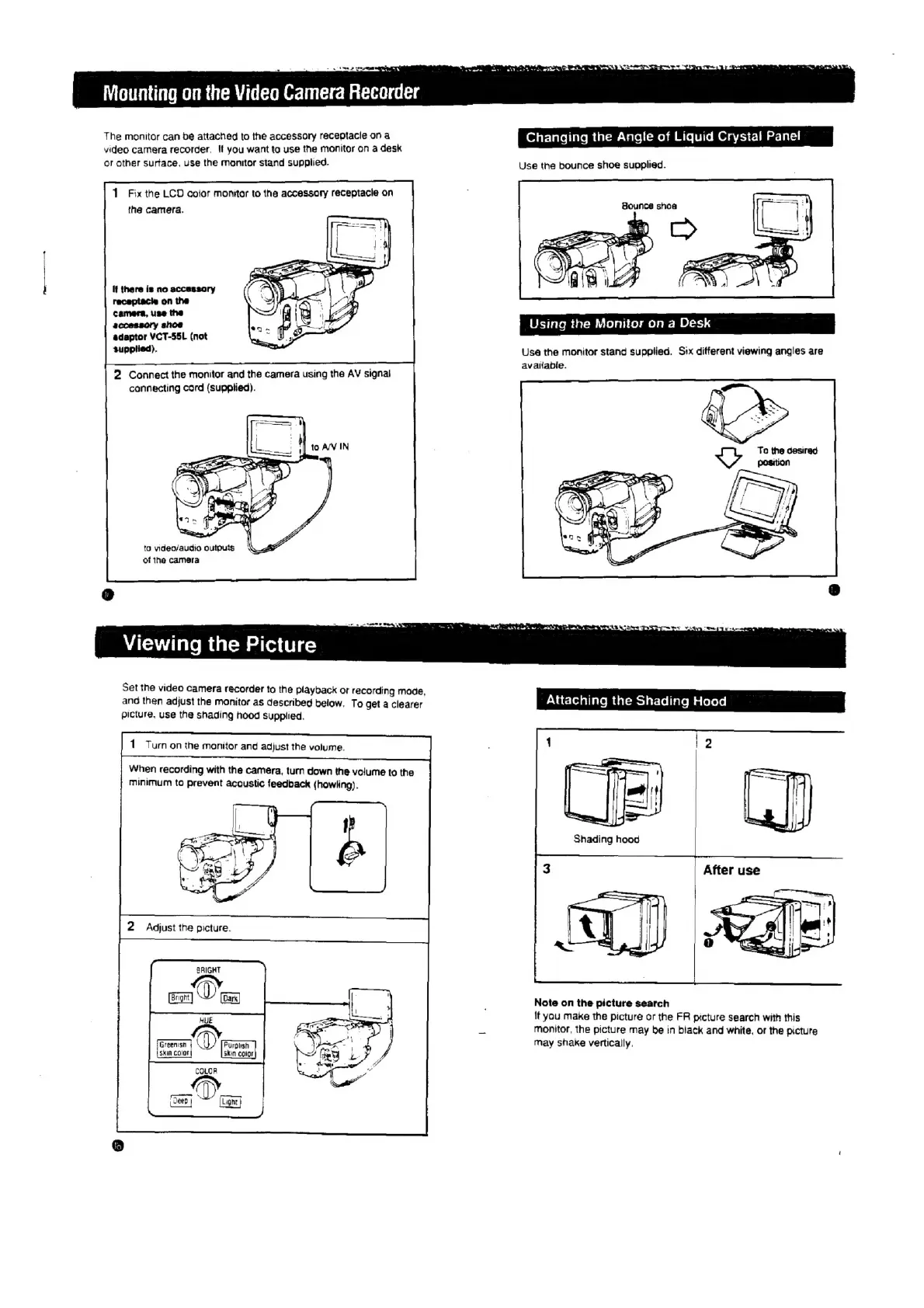
The
monitor
can
be
attached
to
the
accessory
receptacle
on
a
video
camera
recorder,
!f
you
want
ta
use
the
monitor
on
a
desk
or
other
Surtace.
use
the
monitor
stand
supplied.
1
Fix
the
LCD
color
monitor
to
the
accessory
receptacle
on
the
camera.
if
there
is
no
accassory
receptacie
on
the
camera,
use
the
accessory
shoe
adapter
VCT-55L
(not
supplied).
2
Connect
the
monitor
and
the
camera
using
the
AV
signal
connecting
cord
(supplied).
to
video/audio
outputs
of
the
camera
Viewing
the
Picture
Set
the
video
camera
recorder
to
the
playback
or
recording
mode,
anc
then
adjust
the
monitor
as
described
below.
To
get
a
clearer
picture,
use
the
shading
hood
supplied.
1
Turn
on
the
monitor
and
adjust
the
volume.
When
recording
with
the
camera,
turn
down
the
volume
to
the
minimum
to
prevent
acoustic
feedback
(howling).
2
Adjust
the
picture.
em
Dt
HUE
Greenisn
@
Skin
Color
skin
color
Changing
the
Angle
of
Liquid
Crystal
Panel
Use
the
bounce
shoe
supplied.
Bounce
shoa
Using
the
Monitor
on
a
Desk
Use
the
monitor
stand
supplied.
Six
different
viewing
angles
are
avaiable.
To
the
desired
ee
a
a
ee
|
Note
on
the
picture
search
lf
you
make
the
picture
or
the
FR
picture
search
with
this
monitor,
the
picture
may
be
in
black
and
white,
or
the
picture
may
shake
vertically,

Related product manuals