Help Guide
Wireless Noise Canceling Stereo Headset
WF-1000XM4
Turning off the headset
When the headset is left removed
When the headset is not worn on your ears for about 15 minutes after being removed from the charging case, the
headset turns off automatically.
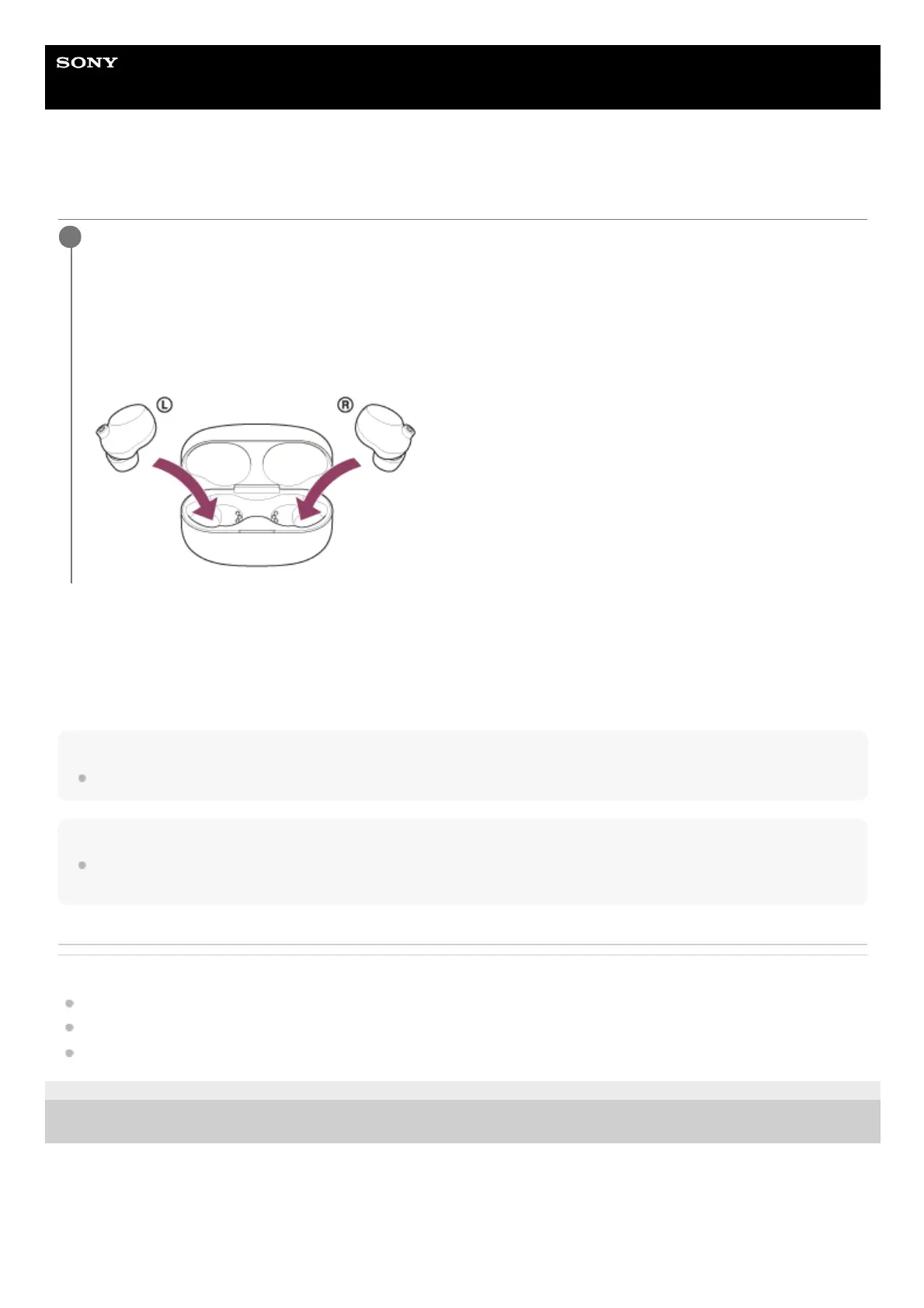
To turn off the power before the headset turns off automatically, place the headset into the charging case.
Hint
You can also turn off the headset with the “Sony | Headphones Connect” app.
Note
When the remaining battery charge of the charging case is not sufficient, the charging of the headset will not start. Charge the
charging case.
Related Topic
Charging
Turning on the headset
What you can do with the “Sony | Headphones Connect” app
5-027-983-11(1)
Copyright 2021 Sony Corporation
Set the headset into the charging case.
Put the left unit of the headset (the unit with the tactile dot) back into the left hole of the charging case, and put the
right unit of the headset back into the right hole of the charging case. Each unit of the headset will be set to the
correct position in the charging case by the built-in magnet.
When the headset is set into the charging case, the headset will turn off automatically. When the remaining battery
charge of the charging case is sufficient, the indicator (orange) on the charging case will light up and the charging
of the headset will start.
1



 To Next Page