Help Guide
Digital Camera
ZV-1M2
Identifying parts
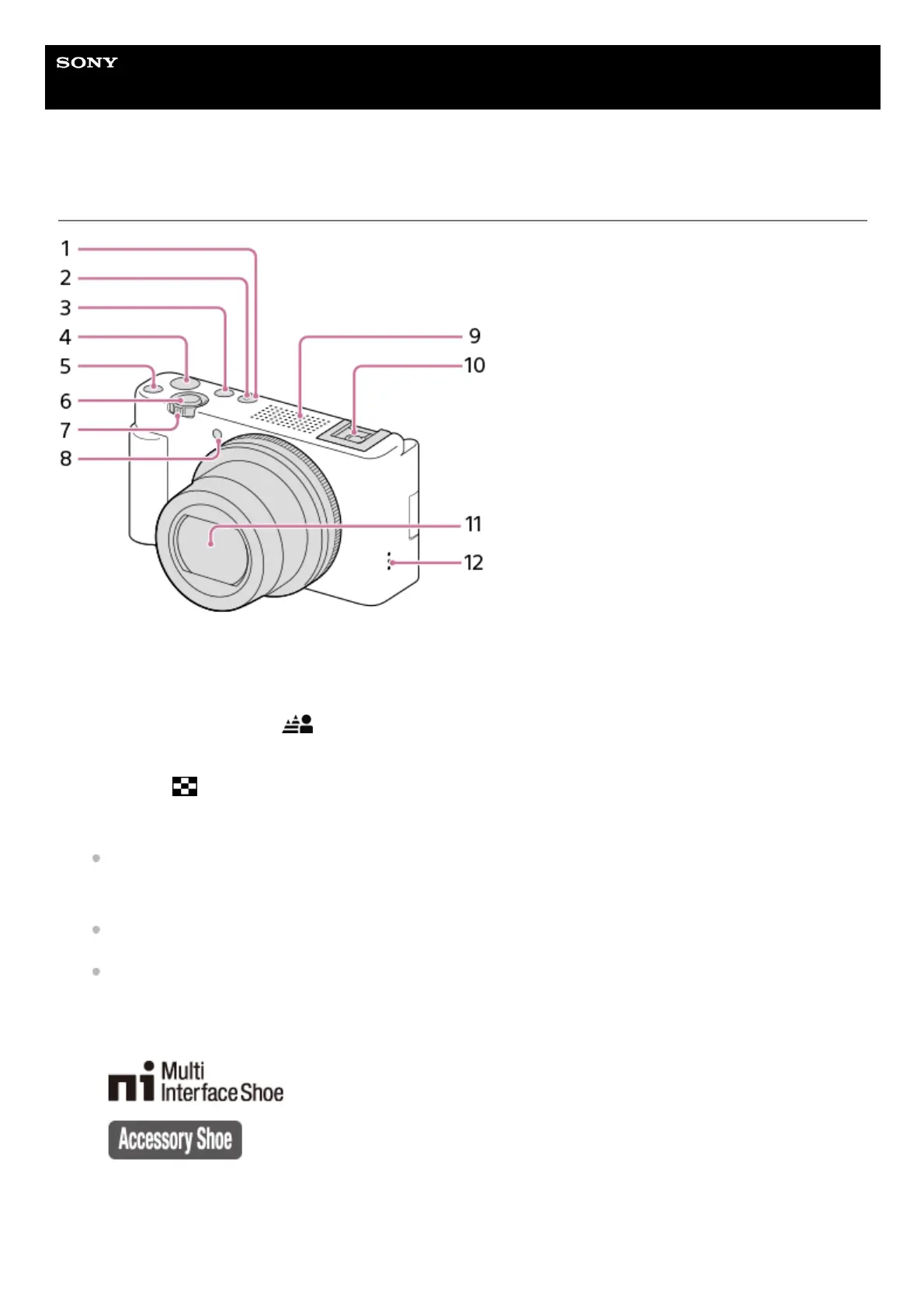
ON/OFF (Power) button1.
Power/Charge lamp2.
Still/Movie/S&Q button3.
MOVIE (Movie) button4.
C1 button (Custom button 1)/
(Background Defocus) button5.
Shutter button6.
For shooting: W/T (zoom) lever
For viewing:
(Index) lever/Playback zoom lever
7.
Self-timer lamp/Recording lamp8.
Internal microphone
Do not cover this part during movie recording. Doing so may cause noise or lower the volume.
9.
Multi Interface Shoe
Some accessories may not go in all the way and protrude backward from the Multi interface shoe. However,
when the accessory reaches the front end of the shoe, the connection is completed.
For details on compatible accessories for the Multi Interface Shoe, visit the Sony website, or consult your Sony
dealer or local authorized Sony service facility.
Accessories for the Accessory Shoe can also be used. Operations with other manufacturers’ accessories are not
guaranteed.
10.
Lens11.
Speaker12.



 To Next Page