Related Topic
List of icons on the screen for shooting movies
List of icons on the screen for shooting still images
List of icons on the playback screen
5-049-603-11(1) Copyright 2023 Sony Corporation
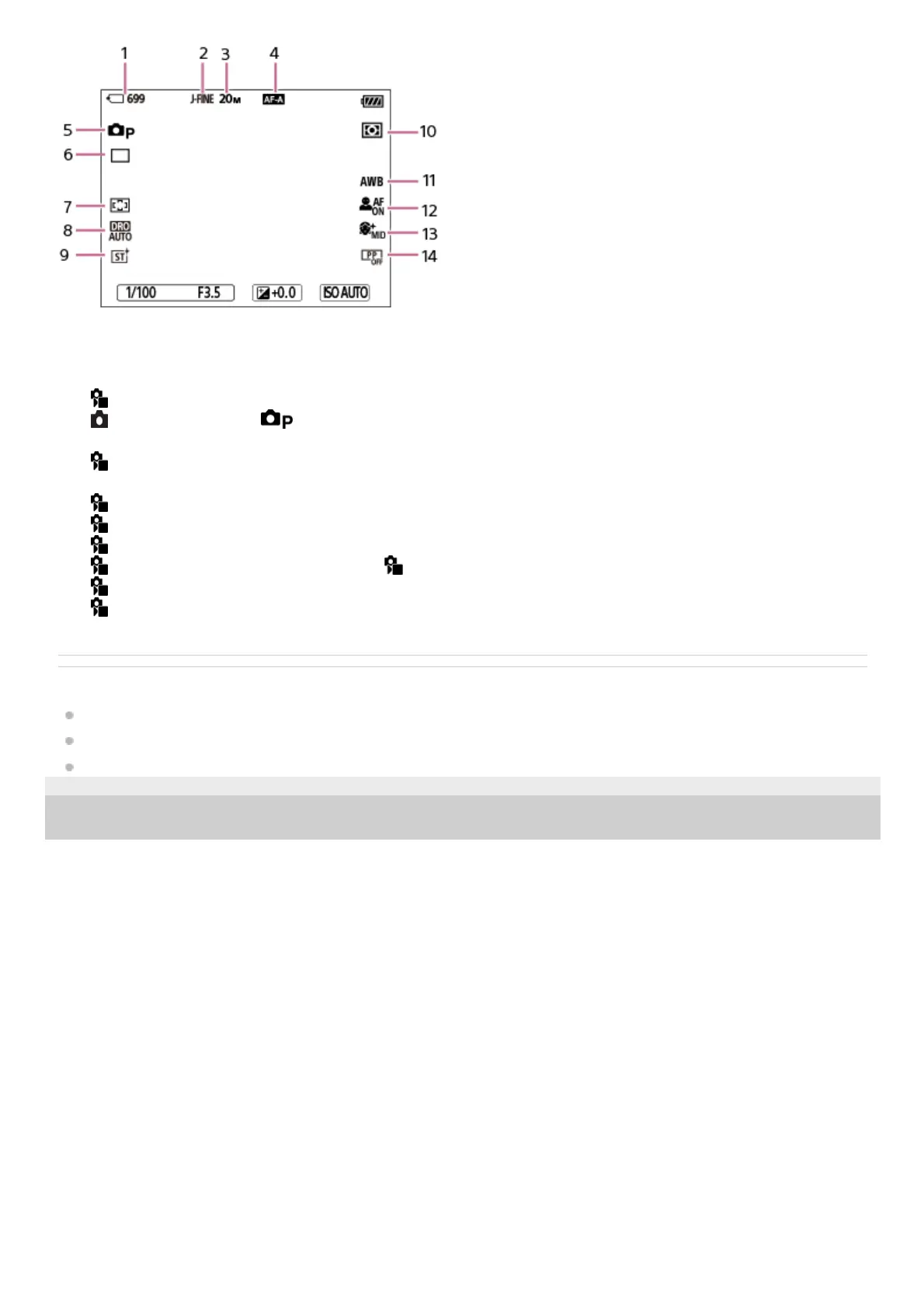
Number of still images that can be recorded on the memory card1.
[JPEG Quality] is set to [Fine].2.
[JPEG Image Size] is set to [L: 20M].3.
[
Focus Mode] is set to [Automatic AF].4.
[
Shoot Mode] is set to [Program Auto].5.
[Drive Mode] is set to [Single Shooting].6.
[
Focus Area] is set to [Wide].7.
[D-Range Optimizer: Auto] is selected.8.
[
Creative Look] is set to [ST].9.
[
Metering Mode] is set to [Multi].10.
[
White Balance] is set to [Auto].11.
[
Subject Recog in AF] is set to [On] and [ Recognition Target] is set to [Human].12.
[
Soft Skin Effect] is set to [On: Mid].13.
[
Picture Profile] is set to [Off].14.



 To Next Page