Need help?
Do you have a question about the Sophos CS101-8FP and is the answer not in the manual?
Connect a serial console to the RJ45 COM port for CLI access.
Press and hold for 7 seconds to reset to factory defaults. All configuration is lost.
Switch the meaning of the left LED on RJ45 ports between LAN and PoE status.
 General
| Switching Capacity | 20 Gbps |
|---|---|
| Forwarding Rate | 14.88 Mpps |
| PoE Budget | 130W |
| MAC Address Table Size | 8K |
| Jumbo Frame Support | 9 KB |
| Operating Temperature | 0°C to 40°C |
| Humidity | 10% to 90% non-condensing |
| Certifications | CE, FCC, RoHS |
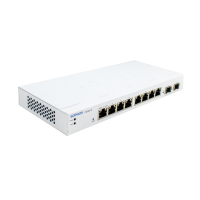
| Ports | 8 x GE (RJ45) + 2 x GE SFP |
| Power Supply | 54 V DC |
| Storage Temperature | -20°C to 70°C |


 To Next Page