EasyManua.ls Logo

SOR 651 Series - User Manual

SOR 651 Series
12 pages
Print Icon
To Next Page IconTo Next Page
Loading...
Form 830 (03.13) ©SOR Inc.
1/12
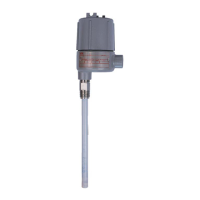
The 651 RF Admittance Single Point Level Switch is a level control which
uses dielectric constant and conductivity to detect the level of liquids,
slurries, granulars, and solids. When used with any of the RF Probes,
it will provide accurate switching for level processes.
The control features a fail-safe switch which reverses the operation of
the relay. An LED inside the housing lights when the process is touching
the probe. A sensitivity adjustment inside the control allows the user to
increase or decrease sensitivity as needed. Optional time delay feature
will delay switching on or off from 0 to 60 seconds.
651 RF Admittance
Single Point Level Switch
General Instructions
Registered Quality System to ISO 9001
Design and
specifications are
subject to change
without notice.
For latest revision, go to
www.sorinc.com
NOTE: If you suspect that a product is defective, contact the factory or the
SOR
®
Representative in your area for a return authorization number (RMA).
This product should only be installed by trained and competent personnel.
Table of Contents
Pre-Installation I/O Test and Calibration ....1
Installation ....................................... 3
Electrical Connections .........................4
RF Probe Grounding Scheme .................5
Fail-Safe Mode ..................................6
Circuit Board Replacement ....................7
Sensor Replacement ...........................7
Control Drawings ............................ 8-9
Troubleshooting ............................... 10
Dimensions ................................ 11-12
Pre-Installation I/O Test and Calibration
Remove instrument from shipping box and visually inspect for obvious
physical damage. Report any shipping damage to the carrier. Report
any internal discrepancies to the factory representative in your area.
Record the serial number from the nameplate should conversation
with the factory be necessary.
Remove housing cover.
Place instrument on an insulated surface or support so sensor does not touch a
conductive surface.
Ensure area is safe and observe normal precautions for exposed and powered PC board.
Apply proper line power per page 4, and observe LED. (See
)
h
g
)
.
o
us

Questions and Answers

  • S
    Sydney KimAug 9, 2025
    What to do if the SOR Switch device will not detect process material?
    • L
      Lauren TownsendAug 9, 2025
      If your SOR Switch is not detecting process material, it could be due to several reasons. First, the sensitivity might be improperly set, so recalibrate according to the Pre-Installation I/O Test and Calibration instructions. If you are using a highly conductive product, consider using a sheathed sensor. Also, heavy conductive product build-up on the sensor can cause this issue, so use a sheathed sensor and periodically remove any build-up.
  • H
    Hannah MillerAug 14, 2025
    Why does my SOR 651 calibration drifts?
    • C
      Charles ReeseAug 15, 2025
      Calibration drifts in your SOR Switch can occur due to a few reasons. One potential cause is a widely varying dielectric due to changing process material; recalibrate according to the Pre-Installation I/O Test and Calibration instructions. Another cause may be a highly conductive product, so consider using a sheathed sensor. Finally, heavy conductive product build-up on the sensor can also lead to calibration drift, so use a sheathed sensor and periodically remove any build-up.
  • T
    Tiffany RichardsonAug 19, 2025
    What to do if the LED will not illuminate on my SOR Switch?
    • J
      John WattsAug 19, 2025
      If the LED on your SOR Switch doesn't illuminate, even at the maximum sensitivity setting, consider these potential causes: The antenna banana plug might be loose or disconnected, so plug the antenna banana plug securely into the sensor jack. There might be no power to the circuit; check the voltage at the terminal block as appropriate. A blown fuse could be the issue; replace line fuses F1 and F2. If none of those solutions work, the sensing circuit may be faulty, consider replacing the PC board.
  • C
    Charles WagnerAug 25, 2025
    What to do if LED remains illuminated on SOR 651 Switch?
    • A
      Angel HuffmanAug 25, 2025
      If the LED on your SOR Switch remains illuminated, even at the minimum sensitivity setting, it could be due to a couple of reasons. First, the antenna lead might be unplugged and touching the housing or other ground; clean the banana plug and insert it into the sensor jack. Alternatively, the antenna could be shorted to the case or ground; ensure that the bare end of the antenna is not touching any metal part. Remove P1; if the LED goes dark, clean, repair, or replace the sensor assembly.
  • C
    Cindy Vasquez DVMAug 29, 2025
    Why is the sensor on my SOR 651 corroded?
    • A
      Alexandria JonesAug 29, 2025
      A corroded sensor on your SOR Switch may be due to the process material chemically attacking the sensor. To resolve this, use a coated or sheathed sensor to provide corrosion resistance.
  • C
    Christopher WilkersonSep 3, 2025
    Why is the sensor on my SOR 651 eroded or abraded?
    • C
      charles43Sep 3, 2025
      An eroded or abraded sensor on your SOR Switch is likely due to the fast flowing or agitated process physically attacking the sensor. Consider using another sensor material or design, relocating the sensor, or using a stilling well in a liquid process.

SOR 651 Series Specifications

General IconGeneral
BrandSOR
Model651 Series
CategorySwitch
LanguageEnglish

Related product manuals