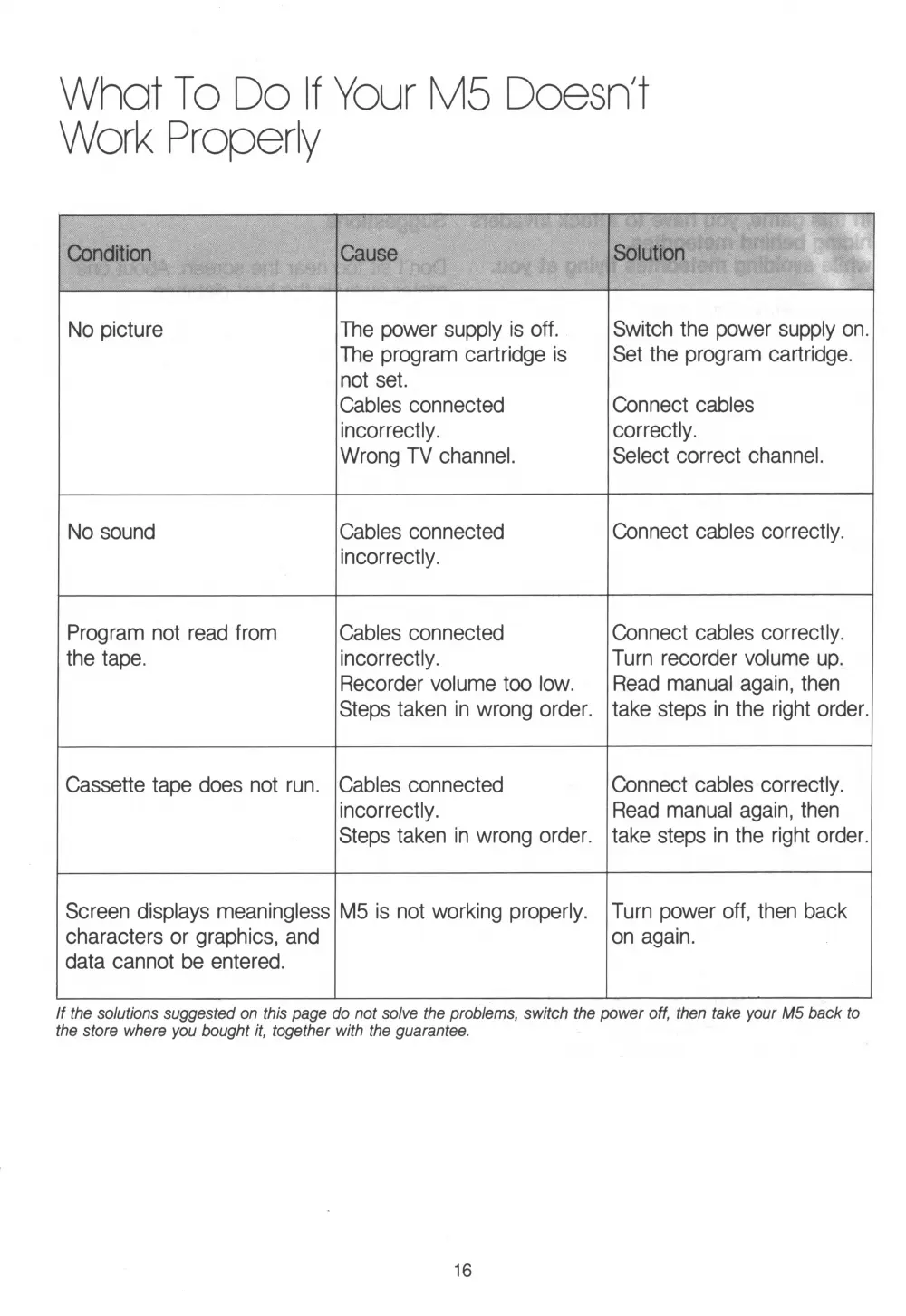
W hat To Do If Your M5 Doesn't
Work Properly
Condition Cause
Solution
No picture
The power supply is off.
The program cartridge is
not set.
Cables connected
incorrectly.
Wrong TV channel.
Switch the power supply on.
Set the program cartridge.
Connect cables
correctly.
Select correct channel.
No sound
Cables connected
incorrectly.
Connect cables correctly.
Program not read from
the tape.
Cables connected
incorrectly.
Recorder volume too low.
Steps taken in wrong order.
Connect cables correctly.
Turn recorder volume up.
Read manual again, then
take steps in the right order.
Cassette tape does not run.
Cables connected
incorrectly.
Steps taken in wrong order.
Connect cables correctly.
Read manual again, then
take steps in the right order.
Screen displays meaningless
characters or graphics, and
data cannot be entered.
M5 is not working properly.
Turn power off, then back
on again.
If the solutions suggested on this page do not solve the problems, switch the power off, then take your M5 back to
the store where you bought it, together with the guarantee.
16


 To Next Page