EasyManua.ls Logo

Sorvall RT/T6000D - Page 273

Sorvall RT/T6000D
302 pages
Print Icon
To Next Page IconTo Next Page
To Previous Page IconTo Previous Page
Loading...
SORVALL9
Centrifuges
RT6000D, T6000D, RT6000B,
and
T6000B
Centrifuges
Serial
Number
9101800
and Above
5.
Prepare
an ice
and
water
bath
(2/3
Ice.
1/3
water).
Immerse
the
temperature
sensor
in
the
ice and water
bath
and
agitate
it
to cool
completely.
Check the
ice
and
water
bath with
a
thermometer
to ensure
that the
temperature
has stabilized
at
O'C.
6.
Remove
the
temperature
control knob
from the front
panel.
Turn
the
temperature
post
fully counterclockwise.
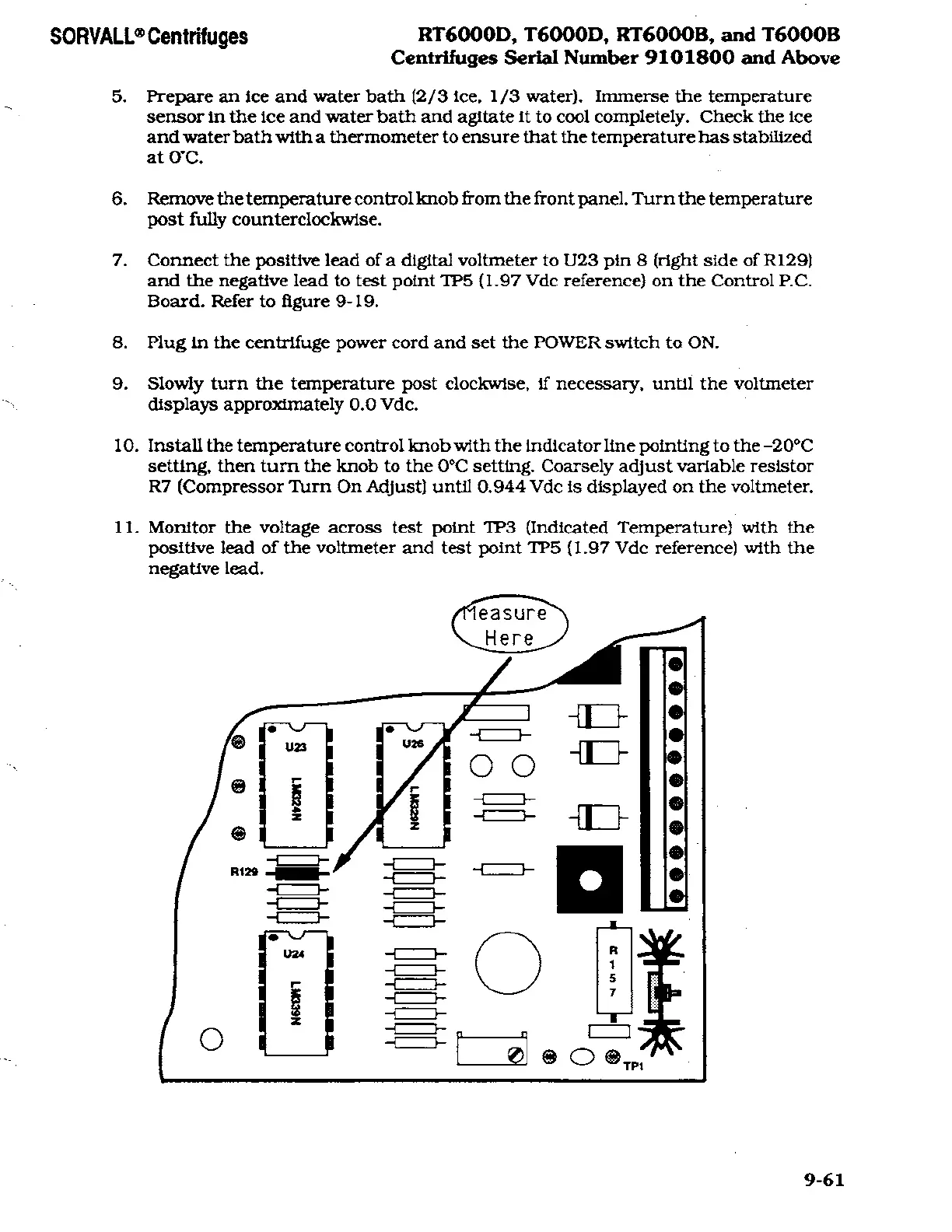
7.
Connect
the
positive
lead
of
a
digital voltmeter to
U23
pin
8
(right
side of
R129)
and the
negative
lead
to test
point
TP5
(1.97
Vdc
reference)
on
the Control
P.C.
Board.
Refer
to figure
9-19.
8.
Plug
in
the
centrifuge
power
cord and set
the
POWER
switch
to ON.
9.
Slowly turn
the
temperature
post
clockwise,
if
necessary,
until the voltmeter
displays approximately 0.0
Vdc.
10.
Install the
temperature
control knob
with
the indicator line
pointing
to
the
-20°C
setting,
then
turn
the knob
to
the
0°C
setting.
Coarsely adjust
variable
resistor
R7
(Compressor
Turn
On
Adjust)
until 0.944 Vdc
is displayed
on
the
voltmeter.
11.
Monitor
the
voltage across
test
point
TP3
(Indicated
Temperature)
with the
positive
lead of
the
voltmeter and
test
point
TP5
(1.97
Vdc
reference)
with the
negative lead.
9-61

Related product manuals