EasyManua.ls Logo

Sorvall RT/T6000D - Page 76

Sorvall RT/T6000D
302 pages
Print Icon
To Next Page IconTo Next Page
To Previous Page IconTo Previous Page
Loading...
SORVALL®
Centrifuges
Repair
&
Replacement
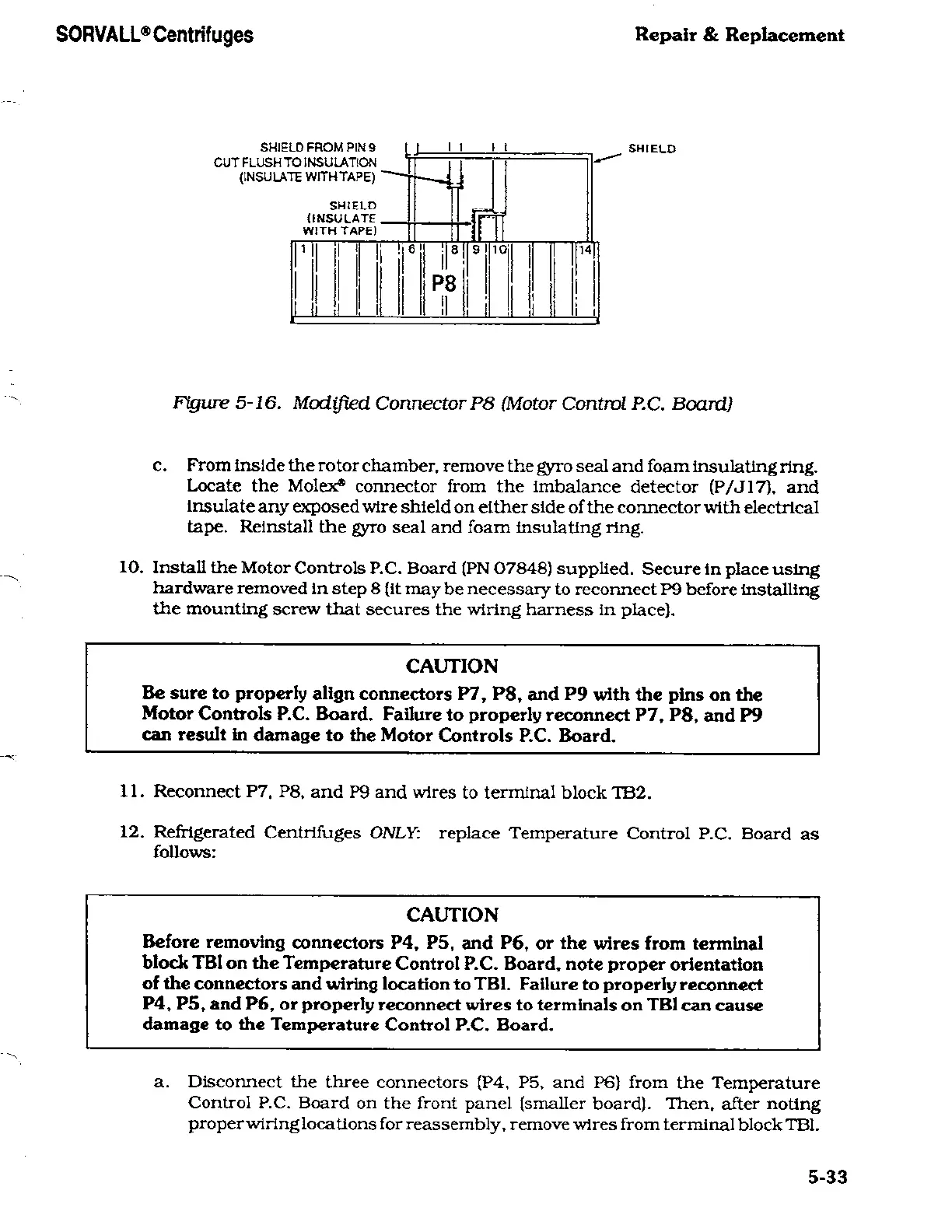
SHIELD
FROM PIN
9
CUT
FLUSH TO
INSULATION
(INSULATE
WITH
TAPE)
'
SHIELD
(INSULATE.
WITH TAPE)
P8
ii
<i
SHIELD
Figure
5-16.
Modified
Connector
P8
(Motor
Control
P.C.
Board)
c.
From
Inside the
rotor
chamber, remove
the
gyro
seal and foam insulating
ring.
Locate the
Molex*
connector
from
the
imbalance
detector
(P/J17).
and
insulate
any
exposed wire
shield
on
either side
of the
connector
with
electrical
tape.
Reinstall
the
gyro
seal
and foam insulating
ring.
10.
Install
the
Motor Controls
P.C.
Board (PN
07848)
supplied.
Secure
in
place using
hardware removed
in
step
8
(it
may
be
necessary
to
reconnect
P9
before
installing
the
mounting
screw
that
secures
the
wiring
harness
in
place).
CAUTION
Be
sure
to
properly
align
connectors
P7, P8,
and
P9
with the
pins
on
the
Motor Controls
P.C.
Board.
Failure to
properly
reconnect
P7, P8,
and
P9
can
result in
damage
to
the
Motor Controls
P.C.
Board.
11. Reconnect
P7.
P8.
and
P9
and
wires
to
terminal
block
TB2.
12.
Refrigerated
Centrifuges
ONLY:
replace
Temperature
Control
P.C.
Board
as
follows:
CAUTION
Before
removing
connectors
P4,
P5,
and
P6, or
the
wires from
terminal
block
TB1
on
the
Temperature
Control
P.C. Board,
note
proper
orientation
of the
connectors and
wiring
location to
TB1. Failure
to
properly
reconnect
P4,
P5,
and
P6,
or
properly
reconnect
wires to terminals
on
TB1
can cause
damage
to the
Temperature
Control
P.C.
Board.
a.
Disconnect
the three
connectors (P4,
P5,
and
P6)
from
the
Temperature
Control
P.C.
Board
on
the front
panel
(smaller
board).
Then,
after
noting
proper
wiring
locations for
reassembly,
remove
wires from terminal
block
TB1.
5-33

Related product manuals