EasyManua.ls Logo

Sorvall RT/T6000D - Page 79

Sorvall RT/T6000D
302 pages
Print Icon
To Next Page IconTo Next Page
To Previous Page IconTo Previous Page
Loading...
Repair
and Replacement
SORVALL®
Centrifuges
CAUTION
When
removing
the
optical
pick-up
P.C.
assembly,
be
sure
to retain
the
screw
and
the
clear
Teflon*
washer
for
reassembly.
If
the
Teflon*
washer
is not
replaced,
the
screw
may
come
in
contact
with the
interconnection on
the
optical
pick-up
P.C.
assembly
and short
it
out.
4.
Install
optical pick-up
(PN 07940)
to
the
top
of
motor.
Be
sure
that the
optical pick¬
up
disc (located
on
top
of
the
motor)
does
not touch
or
bind the
optical
pick-up.
5.
Reconnect
P12
to
the
optical
pick-up.
6.
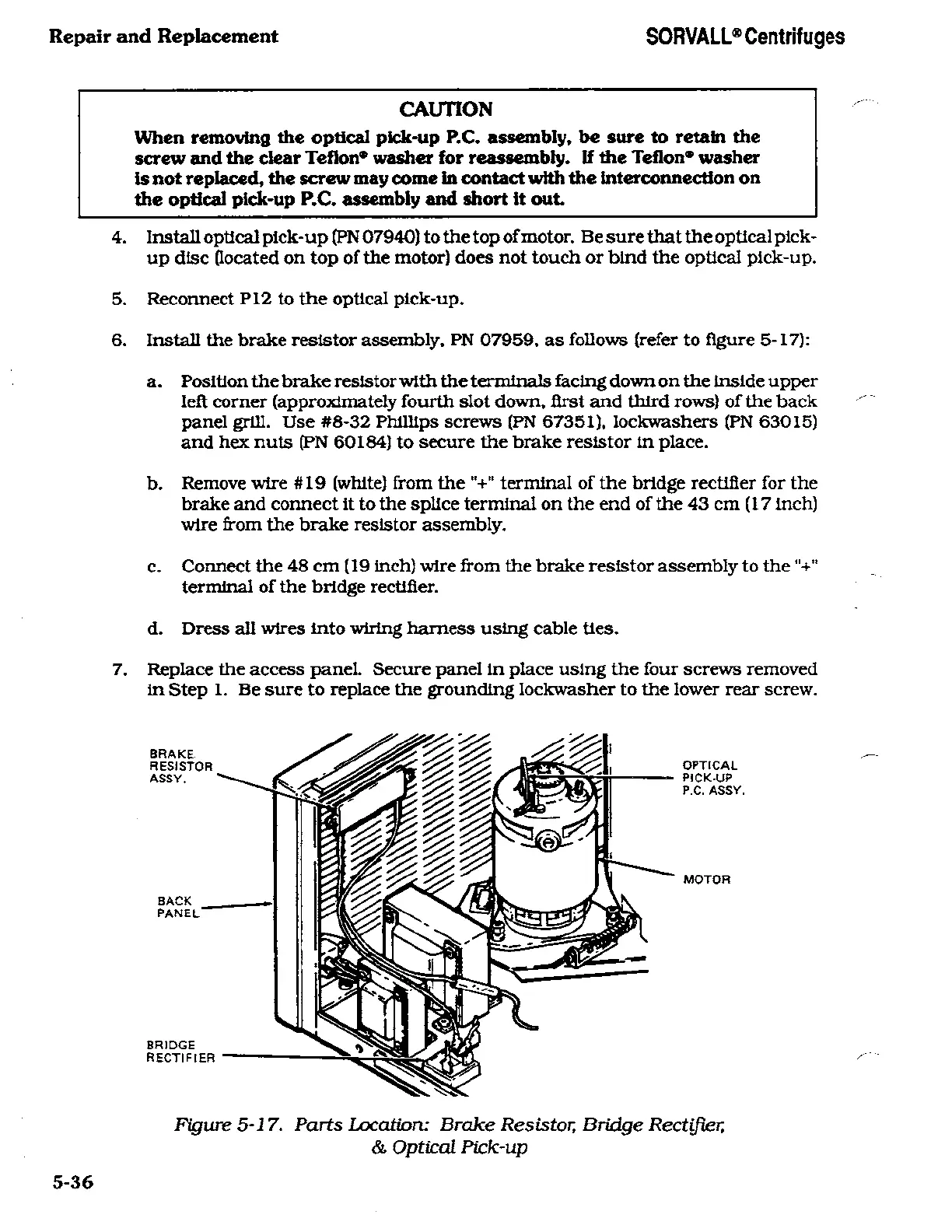
Install the
brake resistor
assembly.
PN
07959.
as
follows
(refer
to
figure
5-17):
a.
Position
the
brake
resistor
with the terminals
facing
down
on
the
inside
upper
left
corner
(approximately
fourth slot
down,
first
and
third
rows)
of the back
panel
grill.
Use
#8-32
Phillips
screws
(PN 67351). lockwashers (PN
63015)
and hex
nuts
(PN 60184)
to secure
the
brake
resistor
in
place.
b.
Remove
wire
#19
(white)
from the
"+"
terminal
of the
bridge rectifier for
the
brake and
connect
it
to
the
splice
terminal
on
the
end
of the
43
cm
(17 inch)
wire
from the
brake
resistor
assembly.
c.
Connect
the
48
cm
(19
inch)
wire
from
the brake
resistor
assembly
to
the"+"
terminal
of the
bridge rectifier.
d.
Dress
all
wires
into
wiring harness
using
cable
ties.
7.
Replace
the
access
panel.
Secure
panel
in
place using
the
four
screws removed
in
Step
1.
Be
sure
to
replace
the
grounding
lockwasher
to
the
lower rear
screw.
BRAKE
RESISTOR
ASSY.
BACK
PANEL
BRIDGE
RECTIFIER
OPTICAL
PICK-UP
P.C.
ASSY.
MOTOR
Figure
5-17. Parts
Location: Brake
Resistor, Bridge
Rectifier,
&
Optical Pick-up
5-36

Related product manuals