
 Need help?
Do you have a question about the Soundcore AeroFit and is the answer not in the manual?
Details LED indicators for earbud and charging case battery levels.
Steps for pairing the earbuds with a new Bluetooth device.
Detailed touch commands for controlling music and calls in TWS mode.
Detailed touch commands for controlling music and calls in Mono mode.
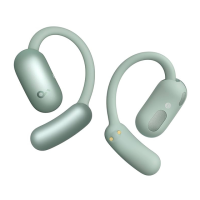
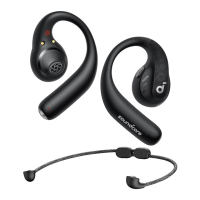
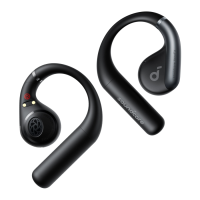
The soundcore AeroFit (A3872) are wireless earbuds designed for an immersive audio experience, featuring 3D surround sound and customizable EQ settings. These earbuds are accompanied by a charging case that not only protects them but also facilitates charging and pairing.
The primary function of the soundcore AeroFit earbuds is to provide high-quality audio playback and hands-free communication. Users can download the soundcore app to unlock a range of advanced features, including 3D surround sound, personalized equalizer adjustments, and firmware updates. The app also serves as a central hub for managing the earbuds' settings and exploring additional functionalities.
Before the first use, it's crucial to remove the insulation stickers from the earbuds. The earbuds are designed for comfortable and secure placement; users should pick them up from the charging case and rotate the earhooks along the auricles of their ears to achieve proper positioning.
To power on and pair the earbuds for the first time, users should place them in the charging case and close the lid. After removing the insulation stickers, returning the earbuds to the charging case, and pressing the reset button, Bluetooth pairing is activated. Alternatively, closing and reopening the case lid with the earbuds inside will also initiate pairing. The earbuds will automatically power on and enter Bluetooth pairing mode. Users then select "soundcore AeroFit" from their device's Bluetooth list to connect. During pairing, the LED indicators on the charging case will scroll, and upon successful connection, they will light up for 2 seconds before turning off. Once successfully connected, the earbuds will automatically reconnect to the paired device every time the charging case is opened, provided the pairing history has not been deleted from the device.
To connect the earbuds to a new device in subsequent uses, users should place the earbuds back into the charging case, press and hold the reset button for 3 seconds until the LED indicators on the charging case start scrolling, and then select "soundcore AeroFit" on the new device's Bluetooth list.
The soundcore AeroFit supports dual connections, allowing the earbuds to be connected to two Bluetooth devices simultaneously. This feature is turned off by default and can be enabled through the soundcore app. To activate it, users open the soundcore app, navigate to settings, and select "Dual Connections" > "Enable Dual Connections" > "Connect New Device."
The earbuds feature intuitive touch controls for various functions, available in both TWS (True Wireless Stereo) and Mono modes.
To power off the earbuds, users simply return them to the charging case and close the lid. The earbuds will automatically power off after 30 minutes if they are not connected to any device. This duration can be customized within the soundcore app.
The earbuds are charged by placing them in the charging case and closing the lid. It is important to ensure that both the earbuds and the USB-C charging port are completely dry before charging. The charging case itself can be charged via a USB-C cable. A quick 10-minute charge can provide approximately 3 hours of playtime.
When the earbuds' battery is low, users will hear a voice prompt. For the charging case, the LED 1 indicator will light up for 3 seconds and then turn off to indicate a low battery.
The LED indicators on the charging case provide visual cues for battery level and charging status.
If the earbuds encounter issues with pairing with each other or other devices, a reset can resolve the problem. To reset, first delete the pairing history from your Bluetooth device. Then, place the earbuds in the charging case and leave the case open. Press and hold the reset button on the charging case for 10 seconds until the LED indicators on the charging case start to scroll and then stay on for 5 seconds. This indicates a successful reset.
The soundcore app will notify users when a new firmware version is detected. To update the firmware, ensure the earbuds are placed in the charging case and the case remains open throughout the process. It is crucial that the earbuds are being charged during the update and that no usage occurs until the update is complete.
 General
| Water Resistance | IPX7 |
|---|---|
| Frequency Response | 20 Hz - 20 kHz |
| Voice Assistant Support | Yes |
| Multi-Point Connection | Yes |
| Codecs | SBC, AAC |
| Touch Controls | Yes |
| Playtime | 11 hours (earbuds) |
| Charging Time | 2 hours |
| Bluetooth Version | Bluetooth 5.3 |


 To Next Page