APP
Download the soundcore app to adjust EQ settings, experience Gaming Mode, customize touch controls, update firmware, and explore more features.
If your earbuds cannot connect with the soundcore app, try re-installing the app or updating it to the latest version available in your mobile app store.
Download the app via http://dl-soundcore.soundcore.com/qcdl?flow=soundcore
OVERVIEW
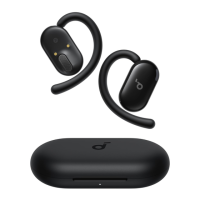
1. Adjustable Ear Hook
2. Touch Area
3. Charging Contactors
4. Sound Outlet
5. LED Light Strip
6. USB-C Charging Port
7. Charging Case Button
POWERING ON & PAIRING
1. Open the charging case. The earbuds will automatically power on and enter Bluetooth pairing mode.
2. Select "soundcore AeroFit 2" on your device's Bluetooth list to connect. During pairing, the LED light strip on the
charging case will start flashing. Once the pairing is successful, the LED light strip will stay on for 1 second before
turning off.
Once connected, the earbuds will automatically reconnect to your device every time you open the charging case, as long as you haven't deleted the
pairing history from your device.
DUAL CONNECTIONS
To connect your earbuds with two Bluetooth devices at the same time, there are two methods:

 Need help?
 General

 To Next Page