EN 2
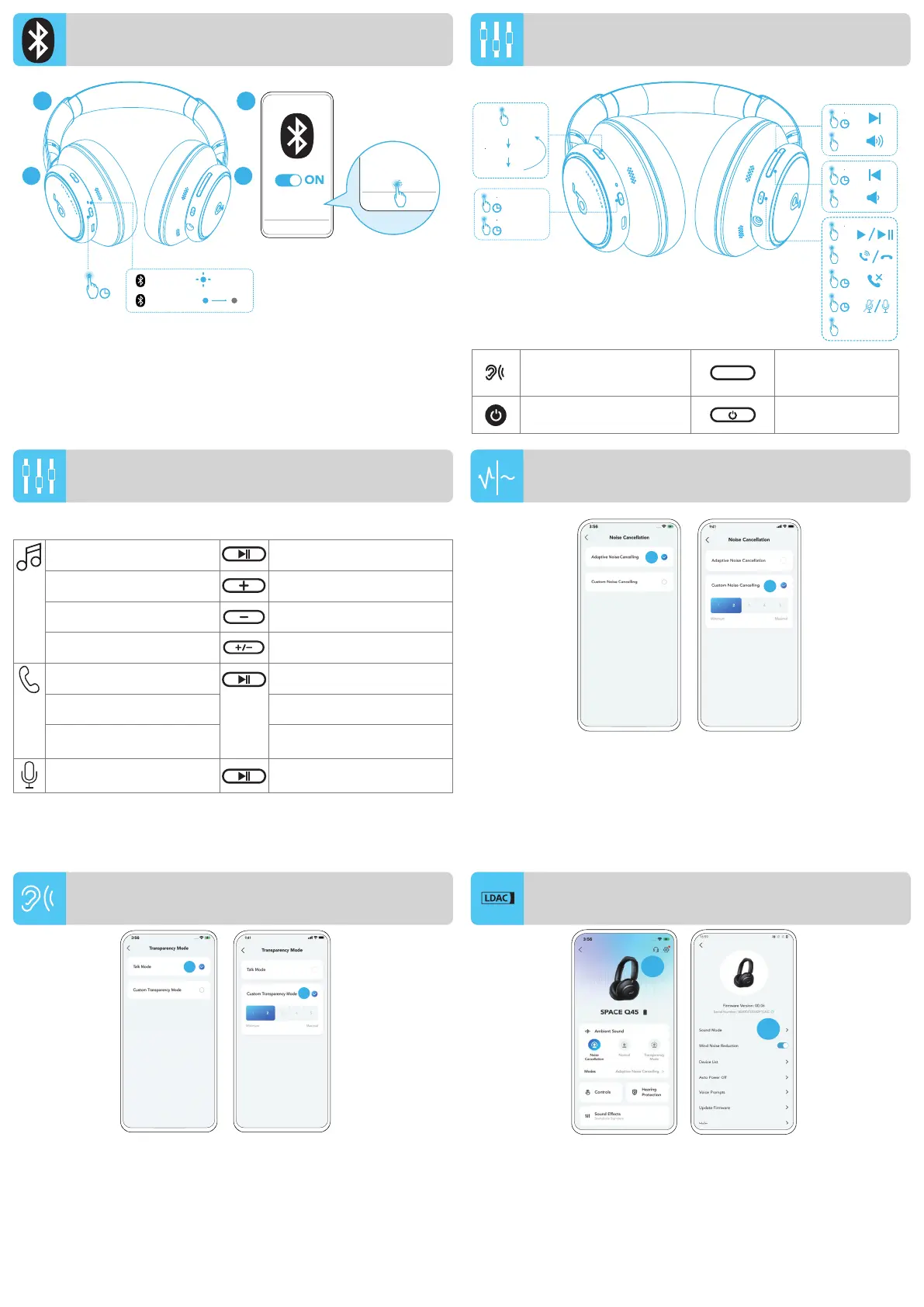
To manually enter Bluetooth pairing mode when the headphones
are off, press and hold the power button for 5 seconds until the
LED flashes blue.
BUTTON CONTROLS
BUTTON CONTROLS
Switch ambient
sound modes (ANC /
Transparency / Normal)
Press once
Power on / off
Press and hold for
2 seconds
Play / Pause Press once
Next track Press and hold for 2 seconds
Previous track Press and hold for 2 seconds
Volume up / down Press once
Answer / End a call Press once
Reject a call Press and hold for 2 seconds
Mute / Restore the
microphone
Press and hold for 2 seconds
Activate voice assistant
software
Press twice
To reduce ambient noise, switch to noise cancellation (default) via
NC button and customize in the soundcore app.
• Adaptive Noise Cancelling: Adjust the level of noise cancellation
automatically for various scenarios.
• Custom Noise Cancelling: Set the level of noise cancellation manually.
To stay aware of your surroundings while listening to music, switch
to transparency via NC button and customize in the soundcore app.
• Talk Mode: Voices stand out more clearly from other ambient sounds.
• Custom Transparency Mode: Set the level of transparency manually.
Pairing
Connected
3s
soundcore
Space Q45
soundcore
Space Q45
1 2
5s
L R
×1
×1
2s
×1
2s
2s
2s
2s
2s
×1
×2
×1
Voice
Assistant
ANC (Default)
Normal
ON
OFF
Transparency
1
2
1
2
MANUAL PAIRING
NOISE CANCELLATION
TRANSPARENCY
NC
• Use devices powered by Android 8.0 or later to experience LDAC
quality sound.
• LDAC provides higher quality sound, increases power
consumption, and reduces playtime.
• Enable LDAC in a low-interference environment to ensure a stable
Bluetooth connection.
1. Go to settings in the soundcore app. 2. Click on "Sound Mode".
2
1
LDAC




 To Next Page