
 Need help?
Do you have a question about the Soundcore Space A40 and is the answer not in the manual?
Download the soundcore app for enhanced features like sound modes, HearID Sound, and EQ tuning.
Select the best ear tips and perform a fit test in the soundcore app for optimal ANC performance.
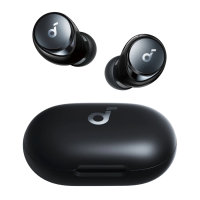
Remove insulation stickers from earbuds before first use and place them in the charging case.
Place earbuds in the charging case and close it to initiate charging.
Connect the charging case via USB-C or wireless charger. Fully charge before first use.
Earbuds automatically power on and enter pairing mode when the charging case is opened.
Connect to two devices simultaneously by wearing earbuds and pressing touchpad for 3 seconds.
Access app settings, select Dual Connections, then Connect New Device to manage connections.
Detailed controls for Play/Pause, Next Track, Calls, and Mode Switching in TWS mode.
Detailed controls for Play/Pause, Calls, and Mode Switching in Mono mode.
Select noise cancellation mode (Adaptive or Manual) in the soundcore app for optimal noise reduction.
Choose Transparency mode (Fully Transparent or Vocal Mode) in the soundcore app to stay aware of surroundings.
Use Android 8.0+ devices for LDAC sound quality. Offers higher quality but increases power consumption.
LDAC provides higher sound quality but reduces playtime due to increased power consumption.
Enable LDAC in low-interference areas for a stable Bluetooth connection.
Access Soundcore app settings, navigate to Sound Mode, and select Preferred audio quality.
Earbuds automatically power off after 30 minutes of inactivity. Duration is configurable in the soundcore app.
Reset earbuds to resolve pairing issues. Delete Bluetooth history and hold the case button for 10 seconds.
Guide to LED indicators: steady white, flashing white, flashing in sequence, and light off.
Update firmware via the soundcore app. Ensure earbuds are in the charging case and the case remains open during the update.
 General
| Quantity | 1 |
|---|---|
| Charging case | Yes |
| Cables included | USB Type-C |
| Control type | Touch |
| Product type | Headphones |
| Product color | White |
| Wearing style | In-ear |
| Control unit type | On-ear control unit |
| Recommended usage | Calls/Music |
| Signal-to-Noise Ratio (SNR) | 63 dB |
| International Protection (IP) code | IPX4 |
| Battery type | Built-in battery |
| Talk time (ANC on) | 5 h |
| Talk time (ANC off) | 6 h |
| Battery recharge time | 2 h |
| Input voltage (earpieces) | 4.4 V |
| Right earpiece battery capacity | 53 mAh |
| Continuous audio playback time (with ANC) | 8 h |
| Continuous audio playback time (without ANC) | 10 h |
| Continuous audio playback time (with charging case/with ANC) | 40 h |
| Continuous audio playback time (with charging case/without ANC) | 50 h |
| Wireless range | 10 m |
| Bluetooth version | 5.2 |
| Bluetooth profiles | A2DP, AAC, AVRCP, HFP, LDAC, SBC |
| Connectivity technology | True Wireless Stereo (TWS) |
| Microphone type | Built-in |
| Microphone frequency | 200 - 5000 Hz |
| Number of microphones | 6 |
| Microphone sensitivity | -38 dB |
| Operating temperature (T-T) | -10 - 60 °C |
| Package width | 108 mm |
| Package height | 50 mm |
| Package weight | 78.3 g |
 Weight and Dimensions
| Charging case weight | 48.4 g |
|---|---|
| Left earpiece weight | 4.9 g |
| Charging case dimensions (W x D x H) | 44 x 68 x 28 mm |


 To Next Page