EN 02
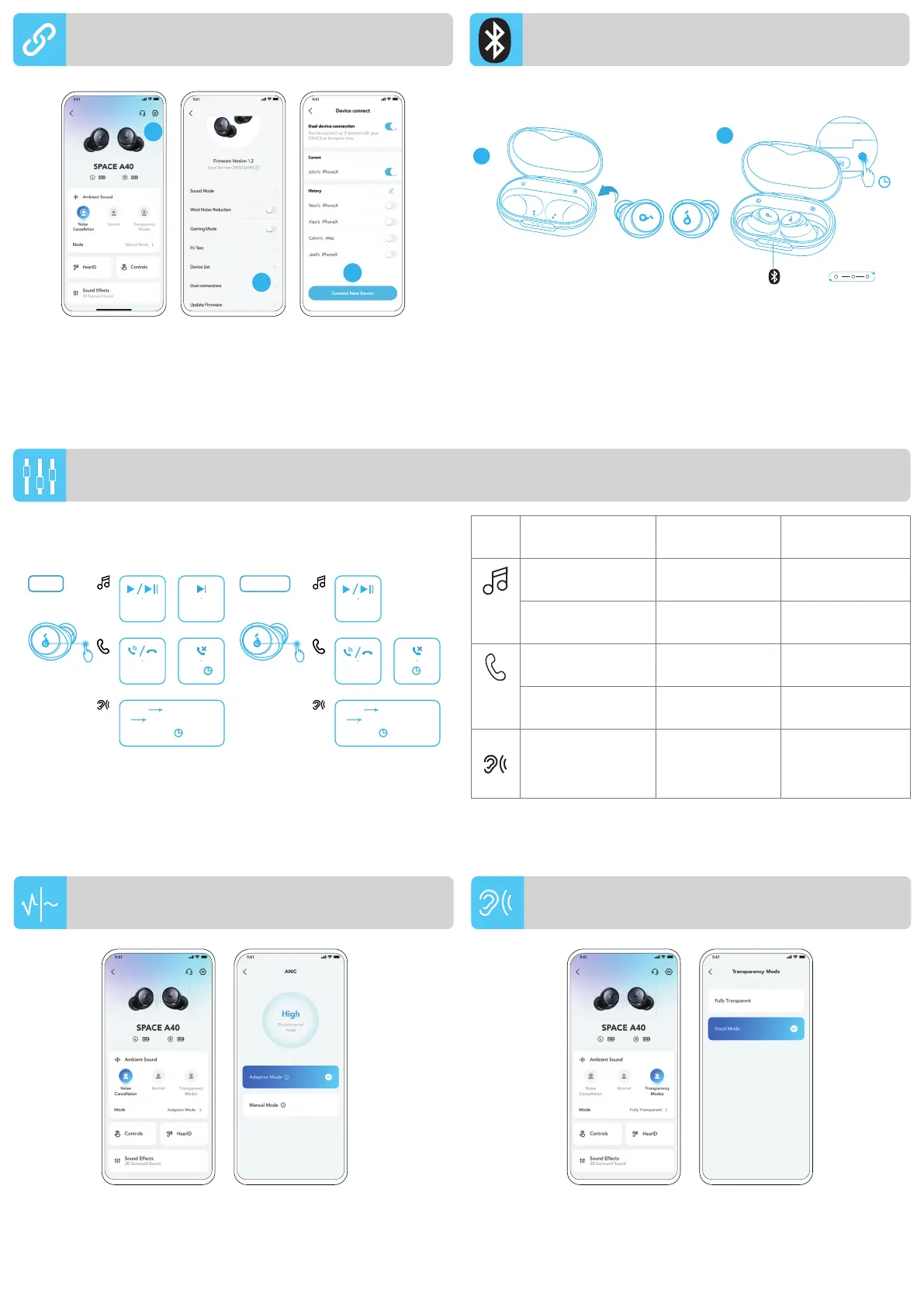
To manually enter Bluetooth pairing mode, place the earbuds in
the charging case and leave the case open, then press and hold the
button on the charging case for 3 seconds until the LED indicators
flash white in sequence continuously.
1
2
3s
PAIRING
You can also customize controls in the soundcore app.
MONOTWSTWS
ANC Transparency
Normal
×2
R
×2
L
×2
L/R
L/R
2s2s
ANC Transparency
Normal
2s2s
L/R
2s2s
×2
×2
2s2s 2s2s
To reduce unwanted ambient noise, select a noise cancellation mode in
the soundcore app.
• Adaptive Mode: Automatically switch to the most suitable noise
cancelling equalizer for different user scenarios.
• Manual Mode: Set the level of noise cancellation manually.
To stay aware of your surroundings while listening to music, select a
transparency mode in the soundcore app.
• Fully Transparent: Hear all ambient sounds.
• Vocal Mode: Voices stand out more clearly from other ambient
sounds.
MANUAL PAIRING
NOISE CANCELLATION
TRANSPARENCY
In the soundcore app, go to settings and select Dual Connections >
Connect New Device.
1
2
3
MULTIPOINT CONNECTION
TWS mode Mono mode
Play / Pause Tap twice (R) Tap twice
Next track Tap twice (L) /
Answer / End a call Tap twice (L/R) Tap twice
Reject a call
Tap and hold for 2
seconds (L/R)
Tap and hold for 2
seconds
Switch ambient
sound modes
(ANC / Transparency
/ Normal)
Tap and hold for 2
seconds (L/R)
Tap and hold for 2
seconds
CONTROLS



 To Next Page