EN 01
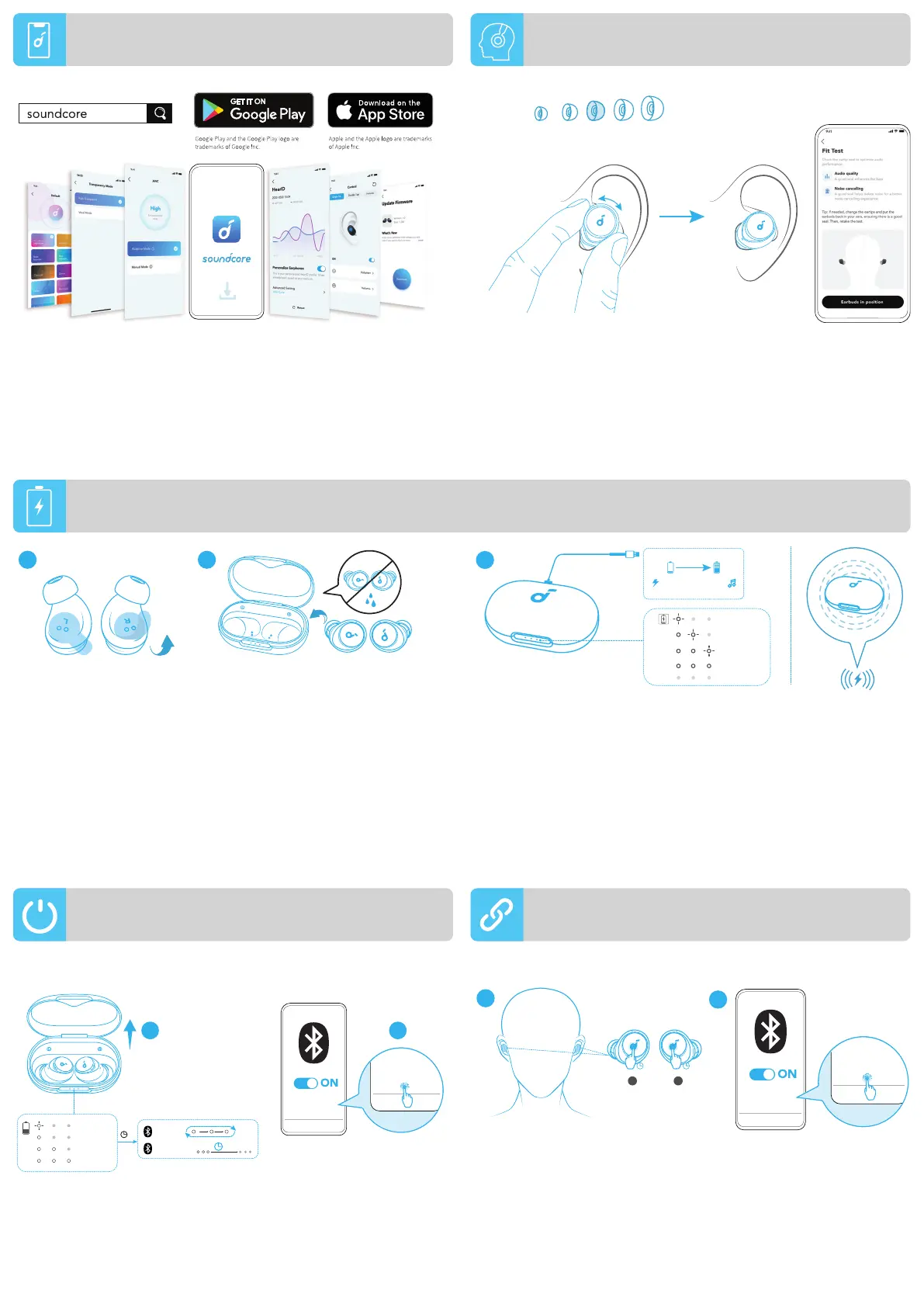
Download the soundcore app to enhance your experience (Ambient
Sound modes, adaptive noise control, HearID Sound, equalizer
tuning, custom controls, firmware update, and more).
If your earbuds cannot connect with the soundcore app, update it
to the latest version in your mobile app store.
Choose the Ear Tips that fit your ears best and take a fit test in the
soundcore app to ensure you get the best ANC performance.
XL
M
XS S L
1. Tear off the insulation sticker on the earbuds before first use.
2. Place the earbuds in the charging case and close it.
3. Connect the charging case to the power supply by using a certified
USB-C charging cable. Alternatively, position the charging case at the
center of your wireless charger for wireless charging.
• Fully charge both the earbuds and the charging case before the first
use. When they are fully charged, the LED indicators will turn off.
1 2
3
< 30%
30% - 70%
70% - 95%
96% - 99%
100%
10min=4hr
3hr
ON
1
soundcore
Space A40
soundcore
Space A40
2
3
s
Pairing
Connected
5% - 30%
<5%
30% - 70%
>70%
2s
The earbuds can connect with two devices at the same time so you can
switch between them effortlessly. Wear the earbuds, then press and hold
the touchpad on both earbuds for 3 seconds simultaneously. Select
"soundcore Space A40" from your device's Bluetooth list to connect.
soundcore
Space A40
soundcore
Space A40
1
2
L R
3s
3s
Open the charging case, the earbuds will automatically power on
and enter Bluetooth pairing mode.
Select "soundcore Space A40" from your device's Bluetooth list
when connecting for the first time.
WEARING
POWERING ON & PAIRING MULTIPOINT CONNECTION
APP
CHARGING



 To Next Page