EN 03
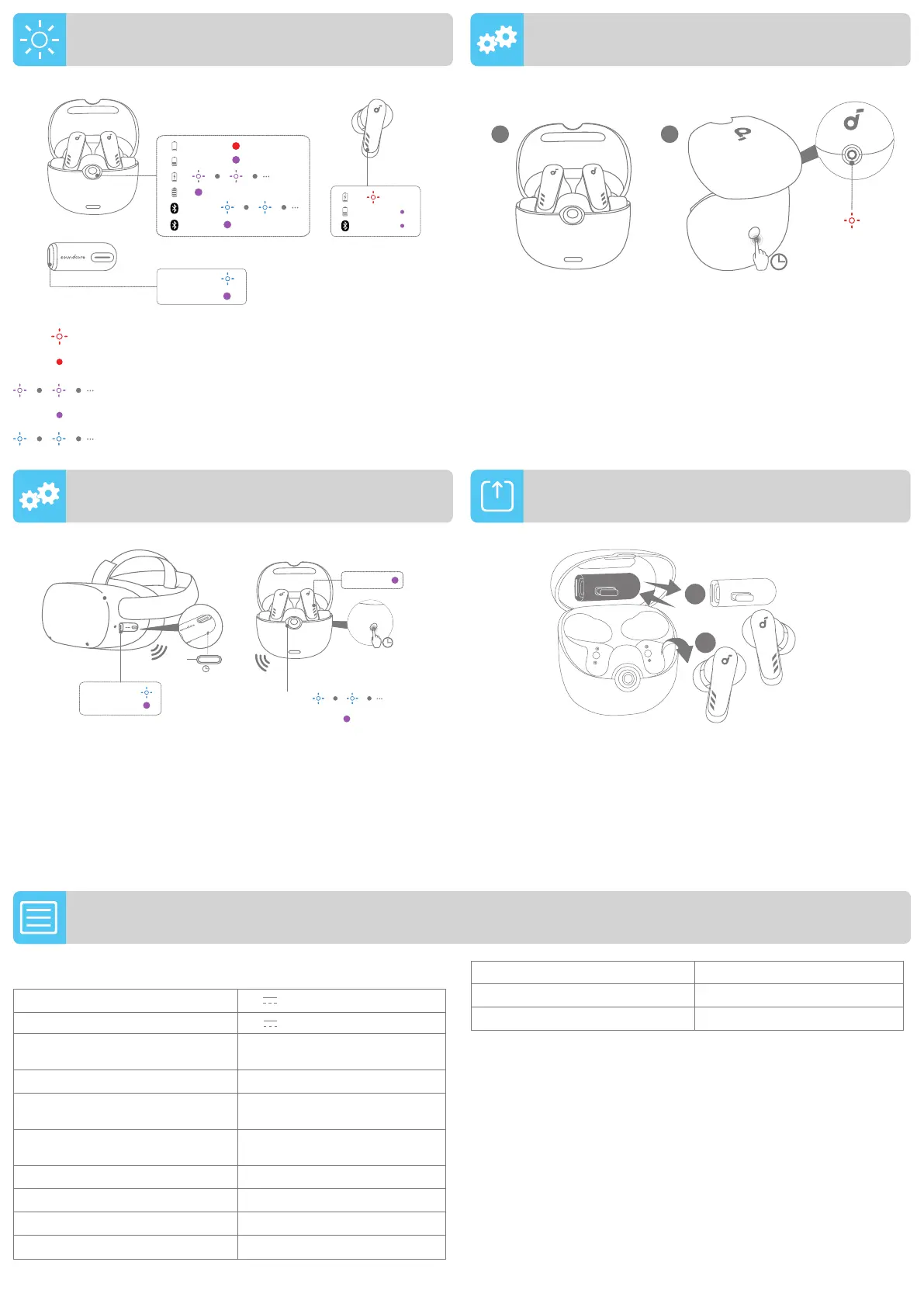
The dongle can be magnetically adhered to the inside of the lid of
the charging case.
You need to take out both earbuds first, then take out or store the
dongle.
DONGLE STORAGE
Reset if the earbuds have issues pairing with each other or with
other devices.
Return the earbuds in the charging case and leave the case open.
Press and hold the button on the back for 10 seconds until the
charging case LED indicator flashes red three times.
Reset if the dongle has issues pairing with the earbuds.
Plug the dongle into the USB-C port of your VR headset or gaming
console, then insert an object with a sharp tip for three seconds to
reset the dongle. Open the charging case, then press and hold the
button on the charging case for 3 seconds to pair with the dongle.
DONGLE RESET
LED LIGHT GUIDE EARBUDS RESET
<10%
>10%
PAIRING
CONNECTED
CONNECTED
>10%
×3
CONNECTED
CONNECTING
×3
10s
21
3s
3s
CONNECTED
CONNECTING
CONNECTED
PAIRING
CONNECTED
1
2
SPECS
Specifications are subject to change without notice.
Input
5 V 0.5 A
Rated output power 5 V
0.4 A(0.2A per port)
Battery capacity
63mAh x 2 (earbuds);
550mAh (charging case)
Charging time 2 hours
Playtime (connected via Bluetooth)
Up to 5.5 hours (Total 22 hours
with the charging case)
Playtime (connected via Dongle)
Up to 6 hours (Total 24 hours
with the charging case)
Driver unit 11mm dynamic driver
Frequency response 20Hz - 20kHz
Impedance 16 Ω
Waterproof level (Earbuds) IPX4
Bluetooth version 5.2
Bluetooth range 15m / 49ft
Dongle transmitter range 6m / 19.7ft
Flashing red
Steady red
Breathing purple
Steady purple
Breathing blue




 To Previous Page