DAB650SI / English Instruction Manual
7
Show RDS information
RDS (Radio Data System) is a service that allows FM stations to show additional information.
1. Tune to a RDS station.
2. Press INFO repeatedly to scroll through the following information (if available):
[Program Type]
[Radio text]
[Signal strength]
[Date/Time]
[Frequency]
[Stereo/Mono] – Audio mode. This option enables you to set the radio to receive FM
stations in Auto mode (Mono/Stereo) or in Mono only.
Factory Reset: This option will restore all settings to ' factor y original’. All clock, station
lists and stored preset stations will be cleared. After factor y reset the radio will
automatically re - scan the DAB band.
ADDITIONAL FEATURES
Aux in
Connect your auxiliary device to the 3.5mm AUX IN socket on the back of the unit. An auxiliary
device could be a MP3 player, a CD Walkman or a personal computer etc.
SLEEP function
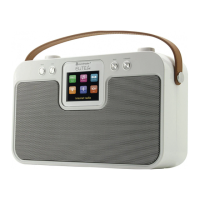
During DAB/ FM/ AUX mode, press SLEEP button repeatedly to chosen the sleep time.
The sequences is OFF > 15 > 30 > 45 > 60 > 75 > 90 mins.
After that press SELECT button to confirm the sleep time, the LCD display will indicate the
remaining sleep time. The radio player stops playing after the chosen time has elapsed.














 To Next Page