E-4
WALL MOUNT PREPARATION
To mount the unit on the wall
CAUTION:
• Be very careful to prevent the unit 2.1 kg (4.2 bs.) from falling when mounting on the wall.
• Before mounting, check the wall strength. (Do not put on the veneer plaster or whitewashed wall. The unit
may fall.) If unsure, consul a qualified service technician.
• Mounting screws are not supplied. Use appropriate ones.
• Check all wall mount screws for looseness.
• Select a good location. If not, accidents may occur or the unit may get damaged.
Driving screws: Installing the unit:
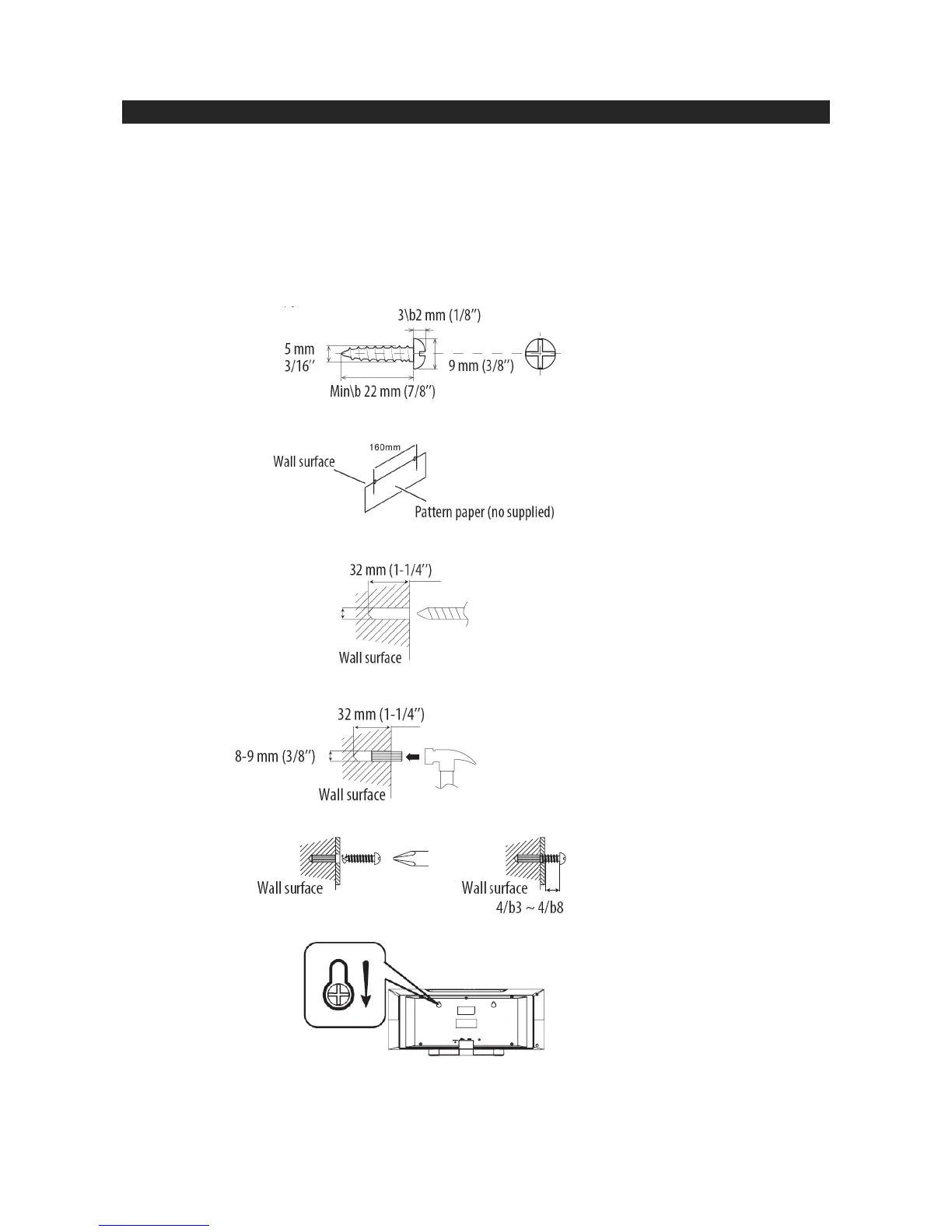
You may hang it on the wall. Use proper screws (not supplied). See below for size and type.
Installing the unit:
Fix the pattern paper to the wall in horizontal position as below.
Make a hole on the wall following the screw point marks on the pattern paper by using a drill.
Fix a wall mount plug into the hole using a hammer, until it is flush with the wall surface.
Fasten the screws to the wall as shown below. (Total screws: 2 ps).
Hang the unit onto the screws.















 To Next Page