ICD2020 / English Instruction Manual
22
CD Program
1. Set the unit in Stop mode
2. Press the “PROGRAM” button on the Remote Control. The display will show “T01 P01”
and “T01” flash.
3. Choose with “ ” or “ ” or 0 to 9 on the Remote Control, the track which should be
programmed and confirm the track by pressing the “PROGRAM” button on the Remote
Control. The display changes to “P02”.
4. To choose more tracks do step 3 again.
5. If all tracks are programmed press the “ ” button on the unit or Remote Control to start the
programmed playback.
Shuffle mode
Press the “RANDOM” button on the Remote Control. The display will show the Shuffle indicator.
Repeat one track
During playback press the “REPEAT” button on the Remote Control once to repeat playback of
the song you are listening to.
Repeat all tracks
During playback press the “REPEAT” button on the Remote Control twice to repeat all songs
from the CD. To cancel the Repeat mode press the “REPEAT” button on the Remote Control
until all symbols in the display disappear.
SLEEP
To set the sleep timer, press “SLEEP” on the unit or Remote Control. Choose from Sleep OFF,
15mins, 30mins, 45mins or 60mins.
Once you select a sleep period, the system returns to the “Now playing” screen.
If you go under Main Menu to Sleep press “MENU” on the unit or Remote Control to return to
the “Now playing” screen.
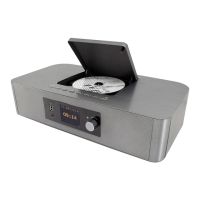
ALARM
There are two versatile wake-up alarms with snooze facility, and a
sleep function to turn the system off after a set period. Each alarm
can be set to start in a particular mode.
Press “ALARM” button on the unit or “ALARM1” or “ALARM2” on
the Remote Control or select Alarm under Main menu to set or
change an alarm.


 To Next Page