TVB-T2 First Time Installation
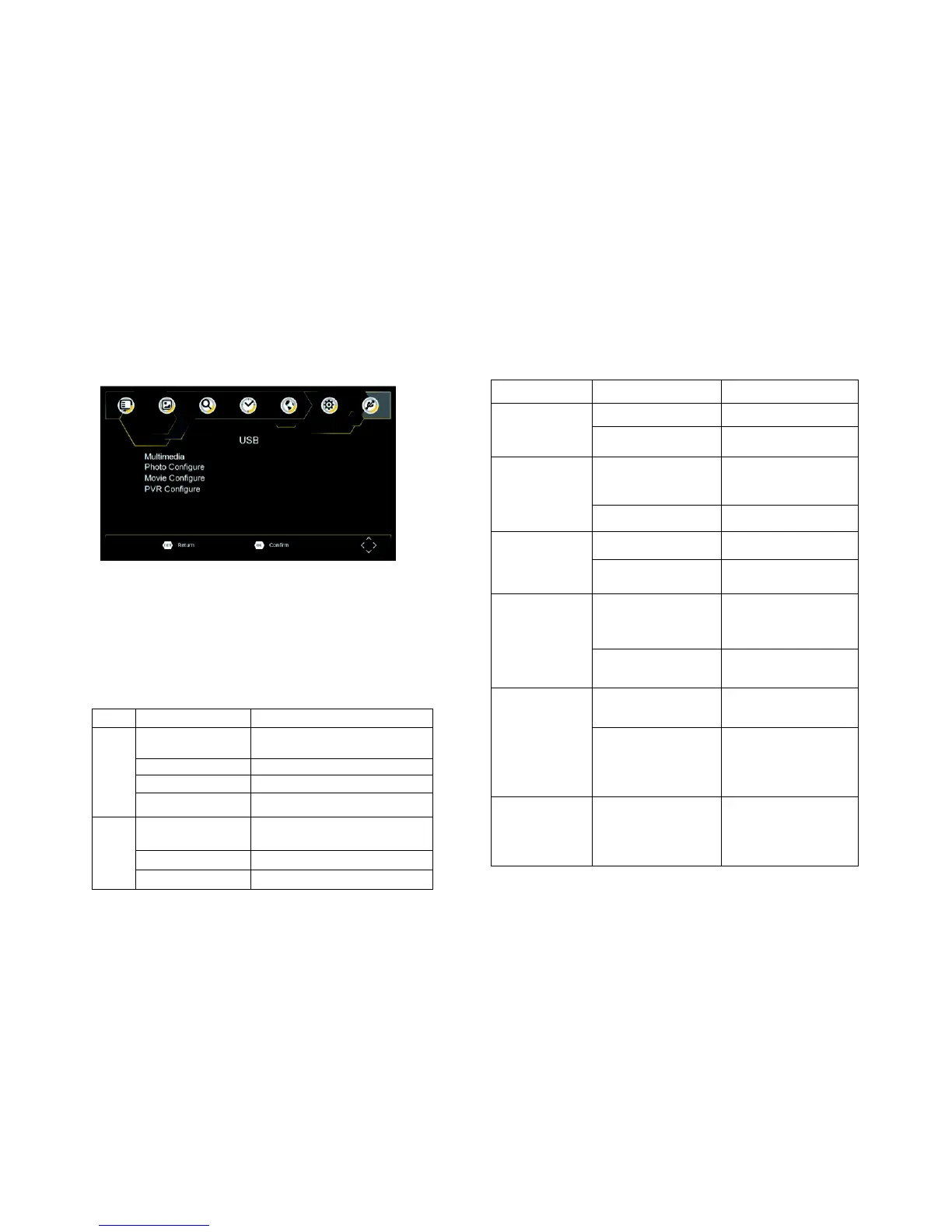
To access the Menu, press the SETUP button and select USB.
Multi-Media
Switch to USB mode and plug in USB to view files.
Photo Configure
Set the parameters for viewing photographs.
Movie Configure
Set the parameters for displaying movie subtitles.
PVR Configure
Set the parameters for record device.
The power
switch is not on
DVB-T cable
not
connected
Only sound,
no
image on
the
screen
No or incorrect
connection
with AV
cable
Make sure cables
are connected
correctly
The program is a
radio program
Press <TV/RADIO> key
to shift into TV mode
Remote
Control
is not
responding
Remote Control is
not facing or close
enough to the Set
Top Box
Adjust the position of
the Remote Control
and move closer to the
unit
The image
stopped
suddenly or
mosaic
QPSK,16QAM,64QAM,128QAM(T2),256QA
M(T2)
MPEG4 AVC/H.264 HP@L4
HEVC/H.265 HT@L4 MPEG2
MP@ML.HL
480i, 480p,576i, 576P, 720P, 1080i, 1080P,4:3
and 16:9



 To Next Page