EasyManua.ls Logo

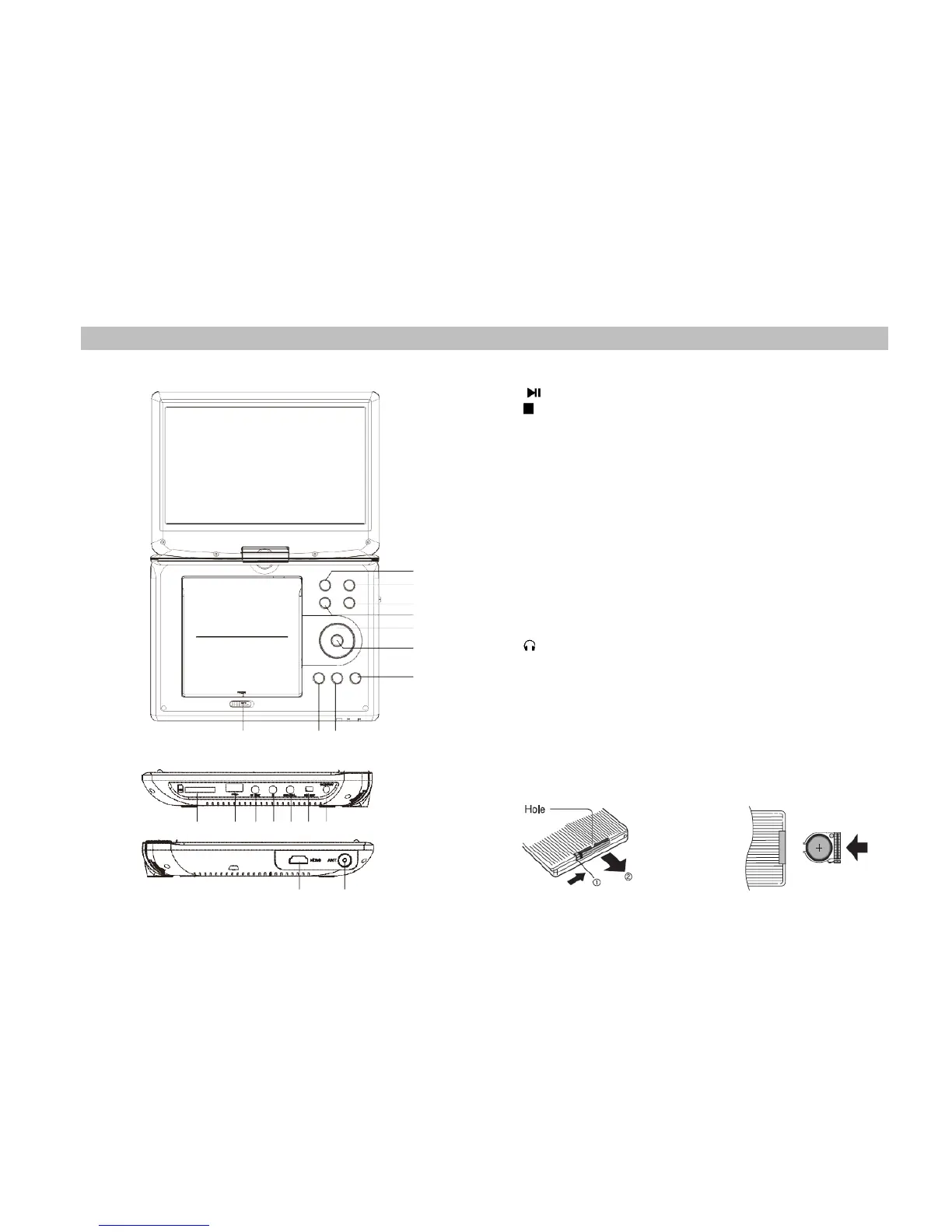
SOUNDMASTER PDB1960 - Identification of Controls; Main Unit

SOUNDMASTER PDB1960
18 pages
Print Icon
To Next Page IconTo Next Page
To Previous Page IconTo Previous Page
Loading...
1
IDENTIFICATION OF CONTROLS
Main Unit
6
3
5
4
7
8
10
9
1 2
1. PLAY / PAUSE
2. STOP
3. SOURCE
4. VOL-
5. VOL+
6. MENU
7. ▲ / ▼ / ◄ / ► (up/down/right/left)
Select an item in the menu. ENTER key confirms menu
selection. when playing, VCD, DVD, if available:
right: next track left: previous track up: fast forward down: fast
reverse
8. ENTER
9. OPEN
10. SETUP
11. SD/MMC
12. USB
13. AV OUT
14. Earphone Socket
15. COAXIAL
16. ON/OFF
17. DC IN 9-12V
18. ANTENNA
19. HDMI
Insert Battery
11 12 13 14 15 16 17
19 18
1. Open the Battery compartment
2. Insert battery (1 x CR2025 3V)
as shown in the picture.

Related product manuals