EasyManua.ls Logo

SOUNDMASTER UR620 - Location of Controls; Installation

SOUNDMASTER UR620
8 pages
Print Icon
To Next Page IconTo Next Page
To Previous Page IconTo Previous Page
Loading...
UR620 / English Instruction Manual
1
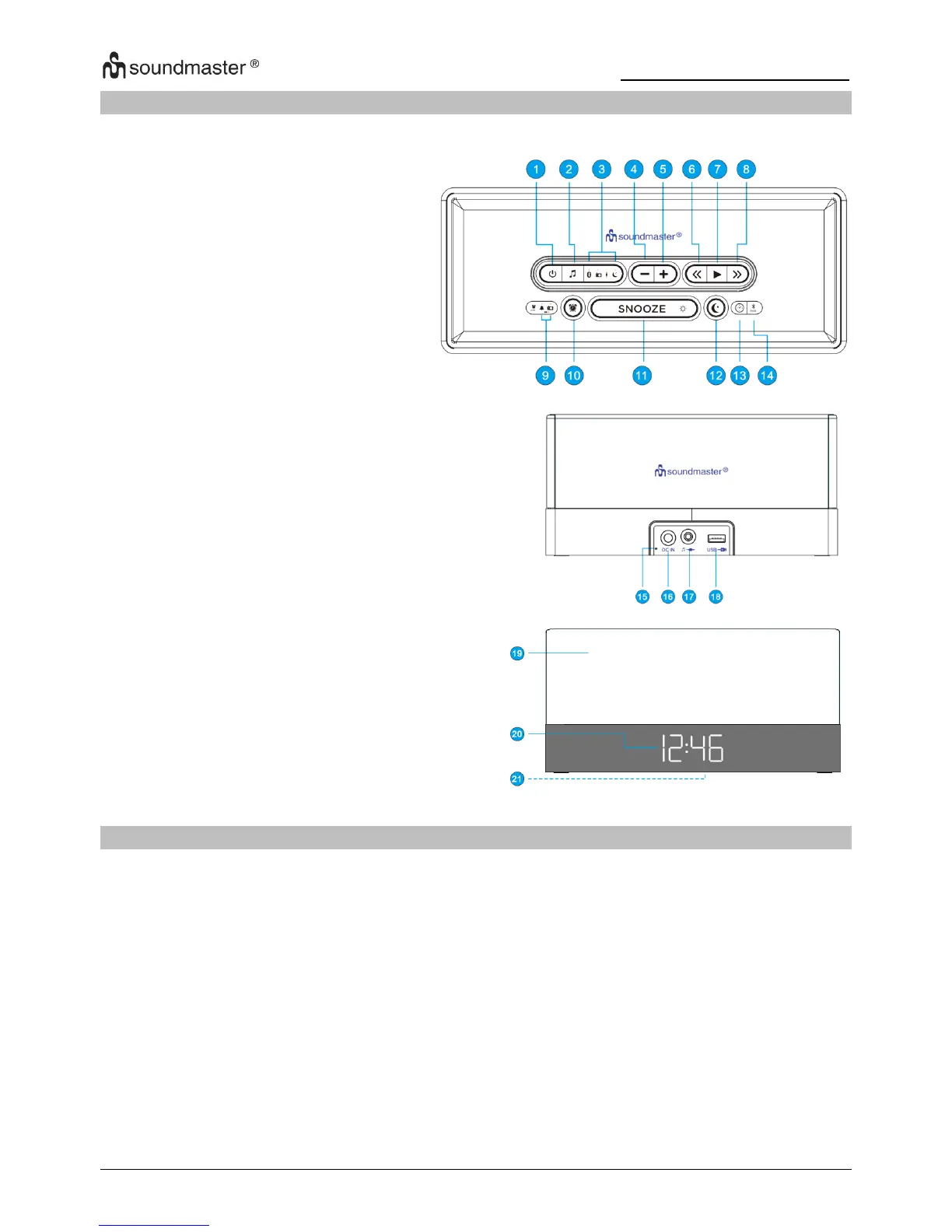
LOCATION OF CONTROLS
1
POWER ON / OFF
2
SOURCE
3
BLUETOOTH / FM RADIO /
AUX-IN / SLEEP LED (amber)
4
VOLUME -
5
VOLUME +
6
TUNE DOWN / HOUR
7
PLAY / RADIO PRESET
8
TUNE UP / MIN
9
ALARM BUZZER / ALARM
RADIO LED (amber)
LOW BATTERY LED (red)
10
ALARM
11
SNOOZE / BRIGHTNESS
12
SLEEP
13
TIME SET
14
BLUETOOTH PAIR
15
FM ANTENNA WIRE
16
DC IN JACK
17
LINE-IN JACK
18
USB CHARGING PORT
19
SPEAKERS
20
LED DISPLAY
21
BATTERY COMPARTMENT
(bottom of unit)
INSTALLATION
Use only the supplied AC/DC-adapter (AC In 100-240V AC, 50/60Hz / DC Out 5V 2.0A).
Do not connect the unit before checking the main voltage and before all other connections have
been made.
Insert the plug from the AC/DC-adapter to the DC jack (16) of the main unit. Then connect the
AC/DC-adapter to an AC outlet.
When you connect the unit at first time the display (20) will show “0:00” and start flashing.
To keep accurate time, this unit uses (2) “AAA batteries” (not included) for clock backup.
These batteries keep the clock operating in the event of a power interruption.


Related product manuals